
Content Pruning: Should You Delete Pages With No Impressions? (2026)

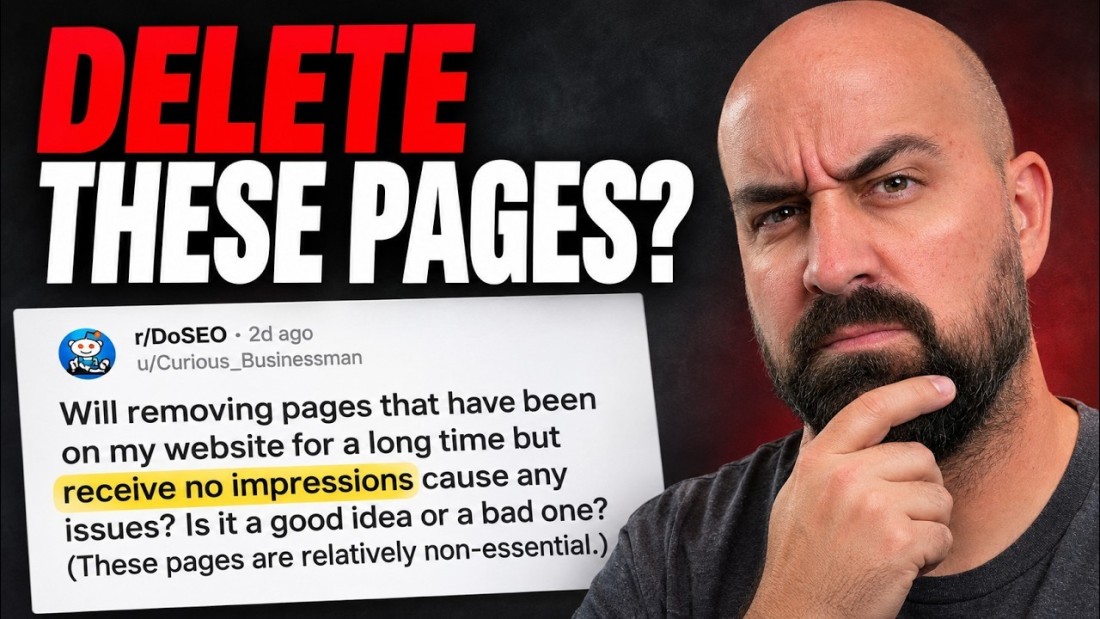
Content pruning means removing, merging or redirecting pages that no longer earn their place on your site. The question that starts most pruning projects is the one a site owner asked on Reddit this month: will deleting pages that have sat on the site for a long time with no impressions cause problems? In a November 2026 video, Tim The SEO Guru reads through the replies and marks which ones he agrees with. We went through the same thread, kept the advice that holds up, and checked the contested claims against Google's own documentation. The short version: zero impressions is a reason to look at a page, not a reason to delete it, and four checks decide what happens next.

The short answer
| What the page has | What to do | Status code |
|---|---|---|
| No impressions, no visits from any channel, no backlinks, no real purpose | Remove it and fix the internal links that pointed to it | 404 or 410 |
| No impressions, but backlinks or a clear replacement page | Redirect to the closest page on the same topic | 301 |
| No impressions, but visits from email, social or direct, or conversions | Keep it | 200 |
| No impressions because Google picked a different URL as canonical | Read the canonical URL's numbers before deciding anything | 200 |
| A topic you need, ranking badly | Improve or rewrite it | 200 |
Four checks before you delete anything
Nearly every reply in the thread says "usually fine, but check first". Put together, the replies give four checks, and the order matters because each one can take a page off the delete list.
1. Backlinks and internal links
The first reply sets the rule the rest repeat: if a page gets no traffic, no impressions and no links, and is no longer useful, removing it is usually fine, but look for backlinks and internal links before you do. A page nobody searches for can still be holding links from other sites, and those links are worth keeping pointed at something. Internal links matter for a different reason. Every link to a deleted page becomes a broken link on your own site, so list them and update them. If you have never mapped how your pages link to each other, our internal linking strategy guide covers how to do that.
2. Traffic and conversions from other channels
Search Console only reports Google Search. A reply from an SEO tool vendor's account makes the point that a page with zero search impressions can still get visits from email, social or direct traffic, so open GA4 before deleting. Look at sessions by landing page for the last 12 months, across all channels, and check whether the page appears in any conversion path. If you are also separating AI assistant visits from search visits, how to find AI traffic in Google Analytics shows where that channel sits in the same report.
3. The canonical URL Google chose
This is the least obvious tip in the thread, and the presenter singles it out as a good one.

Paste the URL into the URL Inspection tool in Search Console and read two fields. Google's help page defines "User-declared canonical" as the canonical your page states, and "Google-selected canonical" as "the page that Google selected as the canonical (authoritative) URL when it found similar pages on your site", adding that Google "might choose another URL that it considers a better canonical example". When the two differ, Google has folded your page into another one, and the search data sits under that other URL. The zero on your page then says nothing about demand for the topic. It says you have two pages Google treats as one, which is a consolidation job, not a deletion job. We cover that case in keyword cannibalization.
4. Where the redirect would go
Several replies say to 301 anything with backlinks to "the most relevant page". The presenter's addition is the part that gets skipped: backlinks alone do not justify a redirect, and the destination has to fit the content. Google's redirect documentation says a permanent redirect is used "as a signal that the redirect target should be canonical", which only makes sense when the target answers the same need. If no such page exists, Google's crawling documentation is direct: "If you removed the page and there's no replacement page on your site with similar content, return a 404 (not found) or 410 (gone)". Sending everything to the homepage is the pattern to avoid. Google's own post on 404s gives redirecting unknown URLs to the home page as an example that "can have negative effects on our understanding and indexing of your site".
The "triple zero" framework from the thread
One reply goes further than a checklist and sorts pages by where they rank.
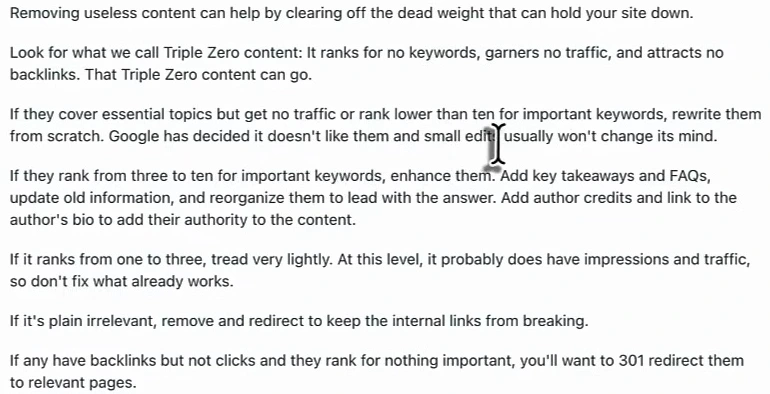
| Page status | The reply's advice | Our note |
|---|---|---|
| Triple zero: no keywords, no traffic, no backlinks | It can go | Run checks 2 and 3 first. "No traffic" should mean all channels. |
| Essential topic, no traffic or ranking below 10 | Rewrite from scratch | Too absolute. See below. |
| Ranking 3 to 10 | Enhance: update, lead with the answer, add takeaways, FAQs and an author | Reasonable. These are the pages closest to paying off. |
| Ranking 1 to 3 | Tread very lightly | Agreed. Fix facts, leave the structure. |
| Plainly irrelevant | Remove and redirect | Redirect only if a relevant target exists. |
| Backlinks, no clicks, ranks for nothing important | 301 to a relevant page | Same condition on the target. |
The presenter accepts most of this and pushes back on two points. First, ranking below position 10 does not prove that Google "has decided it doesn't like" a page. A page can sit at 14 because the top results have more links, because the search is dominated by big brands, or because the page is three weeks old. Check what outranks it before throwing the draft away. Second, FAQs and author bios are not fixes on their own. They help when they add something a reader needs. What moves a stuck page more reliably is first-hand material competitors do not have: your own numbers, photos, prices and process. That is the argument in our piece on commodity content.
Three claims in the thread that need a correction
One long reply reads well and contains three statements the presenter flags as off. Google's documentation backs him on each.
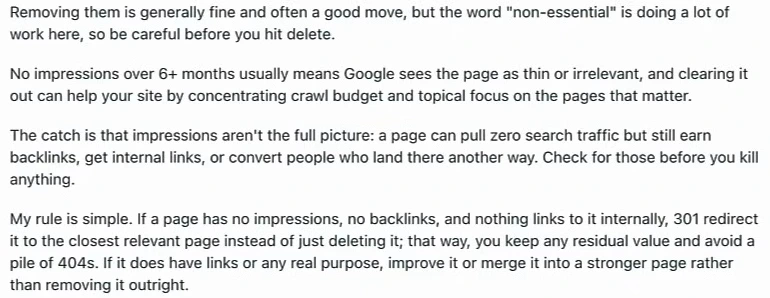
| Claim | What Google's documentation says |
|---|---|
| Six months with no impressions means Google sees the page as thin | Nothing in Google's documentation ties a time window without impressions to a quality verdict. Zero impressions can mean no demand, a different canonical, a page that is not indexed, or a search nobody types. |
| Deleting pages concentrates crawl budget | The crawl budget guide is written for "large sites (1 million+ unique pages)" and "medium or larger sites (10,000+ unique pages) with very rapidly changing content". It calls those numbers rough estimates. A 300-page business site is not short of crawl budget. |
| Redirect everything to avoid a pile of 404s | "If some URLs on your site 404, this fact alone does not hurt you or count against you in Google's search results" (Google Search Central blog, May 2011). The same post says Google treats 410 the same as 404. |
That 2011 post is old, and it is still the clearest statement Google has published on the subject: 404 errors are "a perfectly normal part of the web". The current status-code documentation describes no effect on the rest of the site.
One more line worth knowing comes from Google's page on helpful content. Among its warning signs is this question: "Are you adding a lot of new content or removing a lot of older content primarily because you believe it will help your search rankings overall by somehow making your site seem 'fresh'?" Google's answer in brackets is "No, it won't". Pruning to tidy up a site and stop sending visitors to dead ends is sensible. Pruning as a ranking tactic is not something Google says works.
What deleting can break
Two replies argue the other side, and both deserve space.
The first is about structure. Cut a large block of content and you change the internal linking and hierarchy of the site. The reply's advice is to remove and then bridge the gaps you created. The same commenter notices the word "relatively" in the original question. If the owner could not bring themselves to call the pages non-essential without a qualifier, the first job is to decide which they are. Some pages serve a small audience well: a returns policy for one product line, documentation for an old version, a page your sales team sends to prospects. The presenter agrees that page value is not binary.
The second is a cautionary story. A commenter describes a pet food shop that came to them after rankings fell. The owner had not mentioned that an entire set of pages for one animal had been deleted. Rankings and sales dropped, and the shop closed a year later. It is one person's account with no data attached, and we cannot verify it. It is still a useful picture of the failure mode: pages that looked like dead weight in a report were part of what made the site relevant for its market. Site moves fail the same way, which is why our website redesign SEO checklist starts with mapping every old URL.
That commenter also says impressions are useless and only clicks and sales count. The presenter's answer is the fair one: sales are the goal, but impressions show whether Google is surfacing a page at all.
A pruning workflow you can run in an afternoon
- Export. Search Console, Pages report, last 12 months (16 if you have it). Join it to a full crawl or your sitemap so that pages with zero impressions appear in the list. They are absent from the Search Console export by definition.
- Add three columns. Sessions from all channels in GA4, referring domains from a backlink tool, and internal links pointing in from your crawl.
- Inspect the zeros. For each zero-impression URL, read the Google-selected canonical. Where it differs, move the page to a "consolidate" list.
- Label every row. Keep, improve, merge, redirect or remove, using the table at the top.
- Act in small batches. Set the 301s, let true removals return 404 or 410, and update internal links and the sitemap the same day.
- Watch for four weeks. Check clicks and impressions for the section you touched, and the Page indexing report for the removed URLs, before starting the next batch.
If you want pruning to be part of a wider review, it slots into the technical pass in our SEO audit checklist.
Where the tools come in
The last third of the video is a tour of Arvow on the presenter's demo project, and one part of it applies here. The tedious step in pruning is the join: Search Console data in one tab, a crawl in another, backlinks in a third. Arvow connects to Search Console and to backlink data, and its MCP server lets you ask for that join from ChatGPT or Claude in plain language, for example "list pages with zero impressions in the last 12 months and show referring domains for each". We explain the setup in Google Search Console MCP. The video does not show a pruning run, so treat this as how you would do it, not as a demonstrated result. The decision on each page is still yours.
Want your Search Console, backlink and site data in one place before you prune? Arvow connects them and lets you query the lot from ChatGPT or Claude.
FAQ
Should you delete pages with no impressions?
Only after checking four things: backlinks and internal links, traffic and conversions from channels other than search, which URL Google chose as canonical, and whether a relevant redirect target exists. Pages that fail all four can be removed safely.
Is a 404 or a 301 better for a deleted page?
Use a 301 when another page on your site covers the same topic. Use a 404 or 410 when nothing does. Google treats 404 and 410 the same way, and says 404s on some URLs do not count against the rest of the site.
Does deleting old content improve rankings?
Google's helpful content guidance says removing older content to make a site seem fresh will not help. Pruning can make a site easier to use and maintain. It is not a documented ranking boost.
Does crawl budget matter for a small site?
Rarely. Google's crawl budget guide is aimed at sites with roughly a million pages, or tens of thousands that change daily. For a few hundred pages, Google can crawl everything, and deleting pages will not free up anything useful.

Generate, publish, syndicate and update articles automatically
The AI SEO Writer that Auto-Publishes to your Blog
- Cancel anytime
- Articles in 30 secs
- Plagiarism Free