
How to Find Your AI Traffic in Google Analytics (2026): The AI Assistant Channel, Step by Step


If people are arriving at your site from ChatGPT, Gemini or Copilot, Google Analytics now files those sessions under their own channel. Most site owners have never opened it. Once you do, you can see which pages AI assistants already send people to, and that tells you what to build more of.
In the video below, Tim from Tim The SEO Guru opens the AI Assistant channel on a live Google Analytics property, adds the landing-page dimension to see which pages the sessions land on, and then uses a free money-page architecture prompt to fix the structural gap that keeps most sites out of AI answers. This article walks through each step with the numbers from his screen, adds Google's own definition of the channel, and notes one thing in the demo you should check before you copy it.
The short version
- In Google Analytics, open Reports → Traffic acquisition. The Default Channel Group now includes an AI Assistant row.
- Type ai into the table search to isolate that row and read its engagement numbers against the site average.
- Add the secondary dimension Landing page + query string to see which pages AI assistants send people to.
- Study those pages, link to them from the rest of the site, and build the pages you are missing. Tim's tool for the last part is a prompt that outputs a full money-page architecture.
Step 1: Find the AI Assistant channel in Traffic acquisition
Tim starts in Google Analytics on a wellness clinic's property (the Search Console prompt on his Home screen names it as evercarewellness.com). The Reports snapshot for the last 90 days, July 9 to October 6, 2026, shows about 3.2K active users and 18K events. From there he clicks Reports → Traffic acquisition, which lists sessions by Session primary channel group (Default Channel Group).
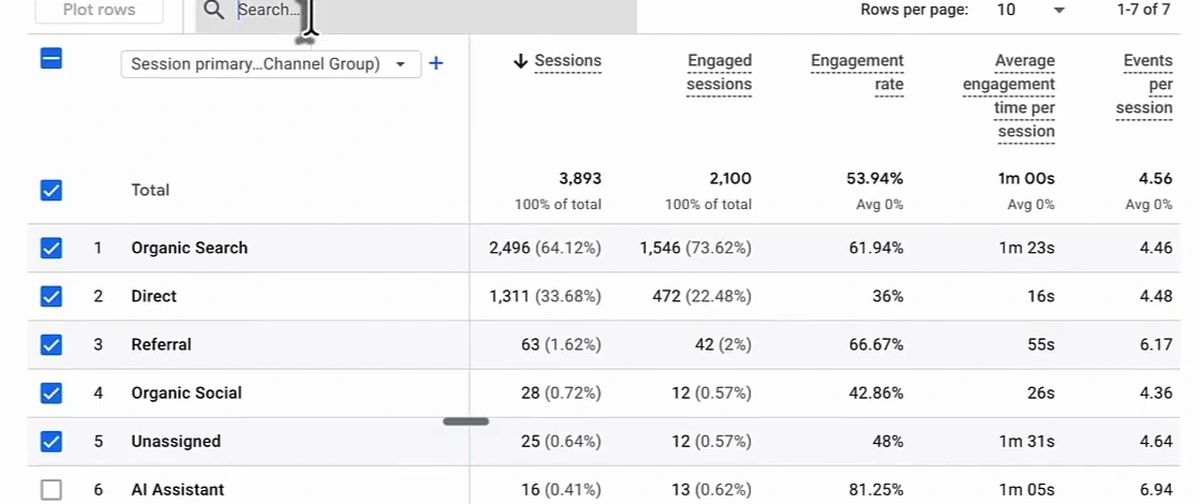
This is not a custom channel. Google's channel definitions page describes AI Assistant as a default channel: a session lands there when the medium is exactly ai-assistant, which Google sets automatically when the referrer matches its list of AI assistants. The examples Google names are ChatGPT, Gemini, Deepseek, Copilot and Grok. Two things the definition makes clear:
- Google's AI Overviews and AI Mode are not in this channel. Clicks from those come from Google Search and stay in Organic Search, so the AI Assistant row undercounts AI-driven visits by however much AI Overviews send you.
- Google doesn't publish the full referrer list. If you want to know whether Perplexity or Claude sessions are being classified here or still sitting in Referral, check the Session source / medium report for referrers like perplexity.ai and claude.ai.
No AI Assistant row at all means either no matching referrals in the date range, or no Google Analytics tag on the site. Tim's advice on the second: set it up first, because none of the rest works without it.
Step 2: Filter to the AI Assistant row and read the engagement numbers
Typing ai into the table search leaves one row:
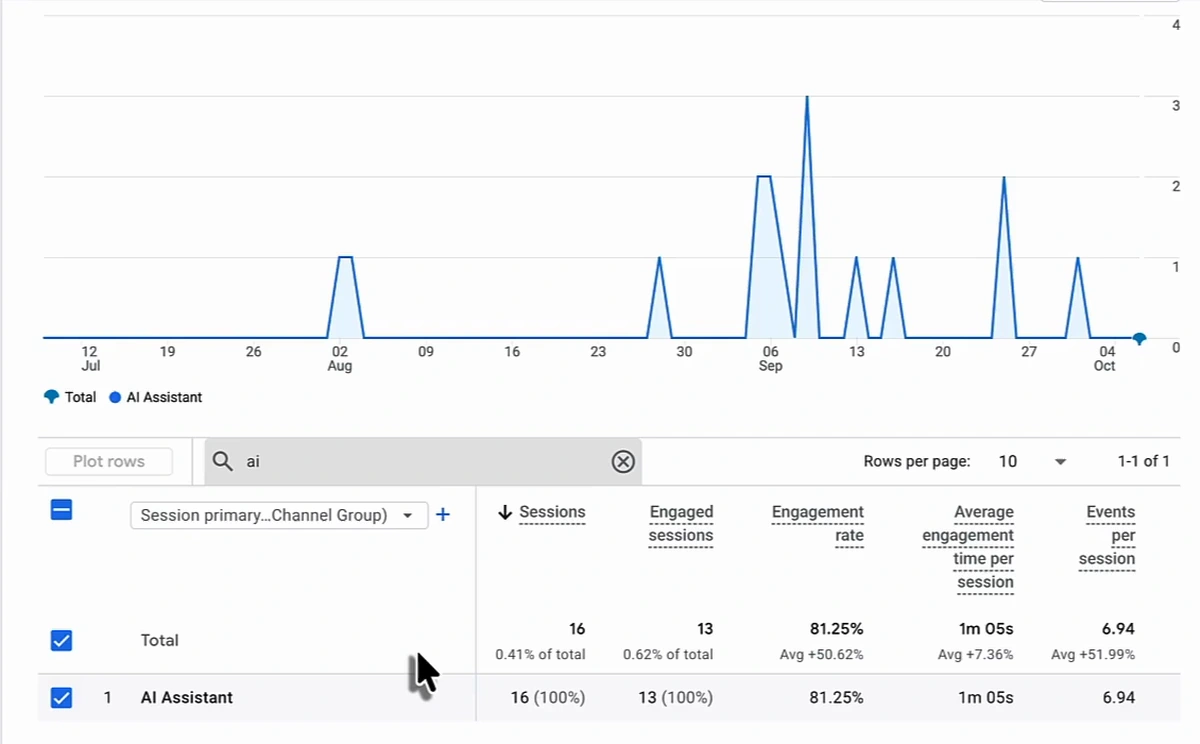
| Metric | AI Assistant channel | Site average, same 90 days |
|---|---|---|
| Sessions | 16 (0.41% of total) | 3,893 |
| Engaged sessions | 13 | 2,100 |
| Engagement rate | 81.25% | 53.94% |
| Average engagement time per session | 1m 05s | 1m 00s |
| Events per session | 6.94 | 4.56 |
Sixteen sessions in 90 days is not a traffic source. It is a signal. Read the comparison lines under each number: engagement rate is 50.62% above the property average and events per session 51.99% above it. People arriving from an assistant have a question half-answered already, and they do more on the page. That is the argument for finding out which pages they land on, which the default view hides.
Step 3: Add Landing page + query string to see which pages show up
Click the + next to the channel-group dimension, search for landing page, and pick Landing page + query string. The table now has one row per channel and page.
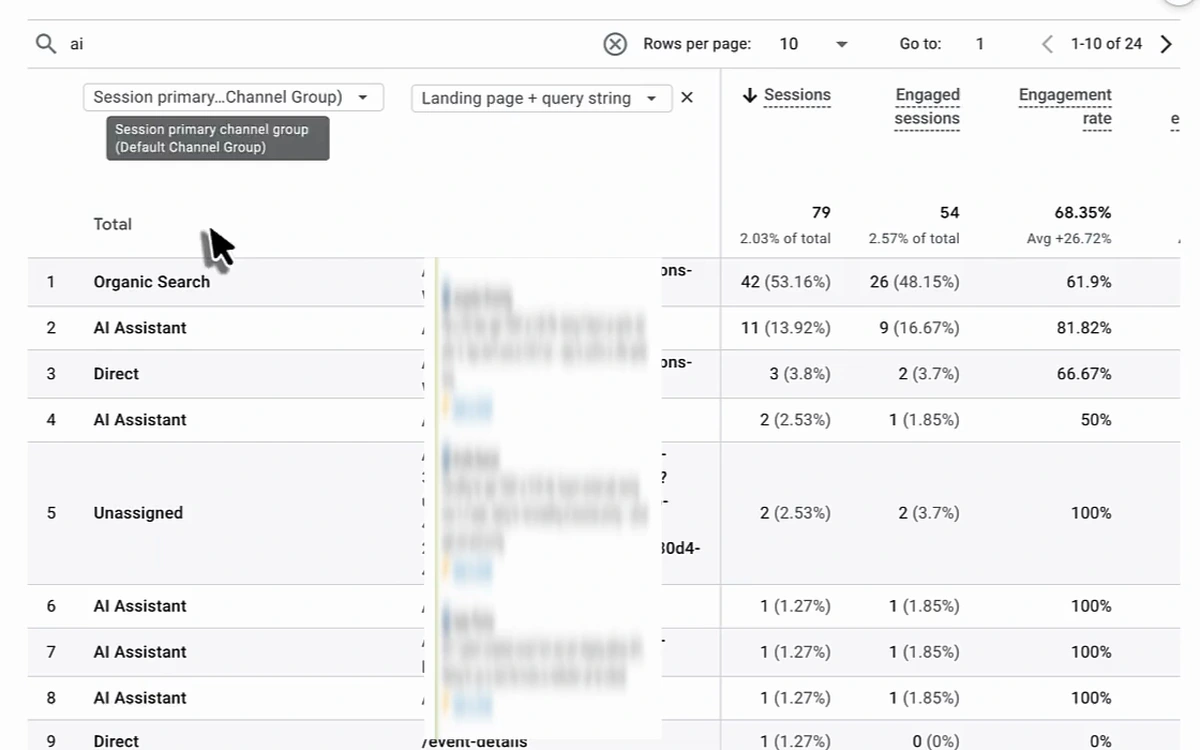
Two things to notice:
- The search box filters every column, not just the channel. With "ai" still typed in, an Organic Search row with 42 sessions appears, because its landing-page URL contains the letters "ai". Tim flags this on camera: read the channel column on the left and ignore the rows that don't say AI Assistant.
- AI traffic concentrates. Of the property's 16 AI Assistant sessions, 11 land on a single page, at an 81.82% engagement rate. The remaining five are spread across four pages with one or two sessions each. That one page is the one to study.
If you want to know why that page gets cited while the rest don't, run its topic as a prompt in the assistants yourself and open the sources the answer uses. Our guide to reading an AI visibility report covers how to do that systematically.
Step 4: Learn from the pages that work, and link to them
Tim's first two actions are not technical at all:
- Look at how the cited pages are structured and apply that structure to the pages that aren't showing up: headings, how directly the page answers a question, what it says about the service and the area.
- Link to the cited pages from the rest of the site, especially from blog articles, so visitors who land there follow links to the pages you want them on, and those pages benefit from the links.
The second point is cheap and most sites skip it. For which pages should link where, see our internal linking strategy guide.
Step 5: Fix the structure with the money-page architecture prompt
Tim's view is that the reason most sites have only a handful of pages in the AI Assistant report is that they have only a handful of pages worth citing: "most businesses do not have enough pages and are not structured architecturally." His fix is a prompt he calls the Money Page Architecture Framework, published free at arvow.com/prompts. You paste it into Claude, ChatGPT or any assistant and it runs a discovery interview before producing anything.
The interview is ten questions, asked one at a time: business basics, industry and model, geography, your five to ten primary offers, the conversion goal, the ideal customer, differentiation and proof, two to five competitors, the current website, and constraints. The prompt is told to wait for each answer and produce nothing until the interview is done.
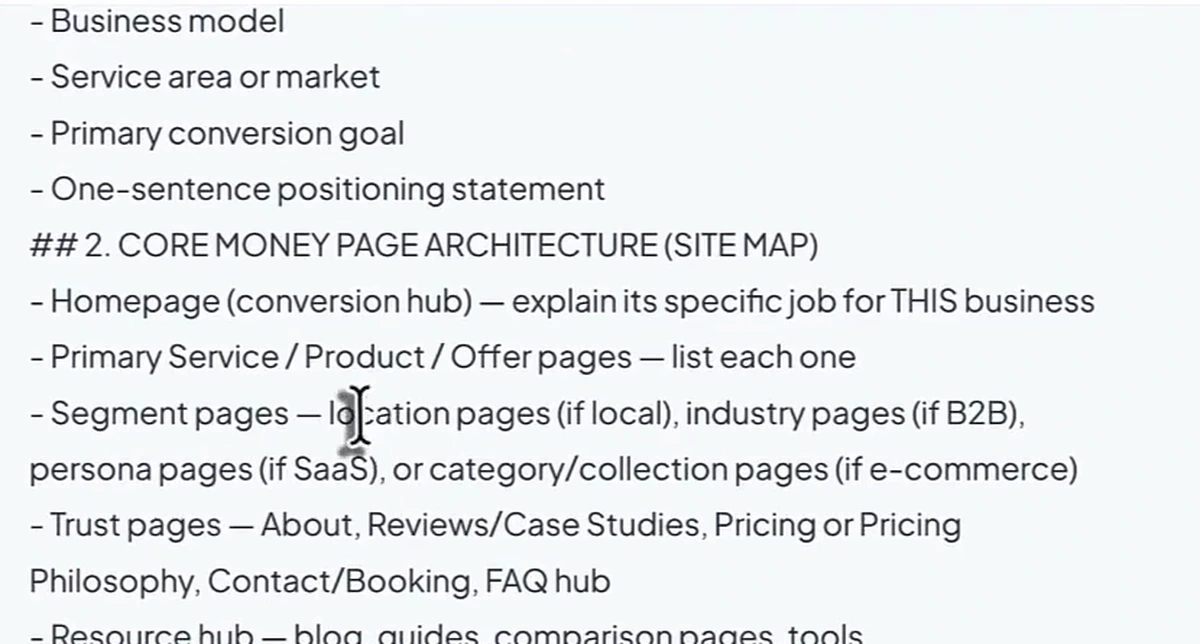
Then it outputs thirteen sections. The ones that matter for AI visibility:
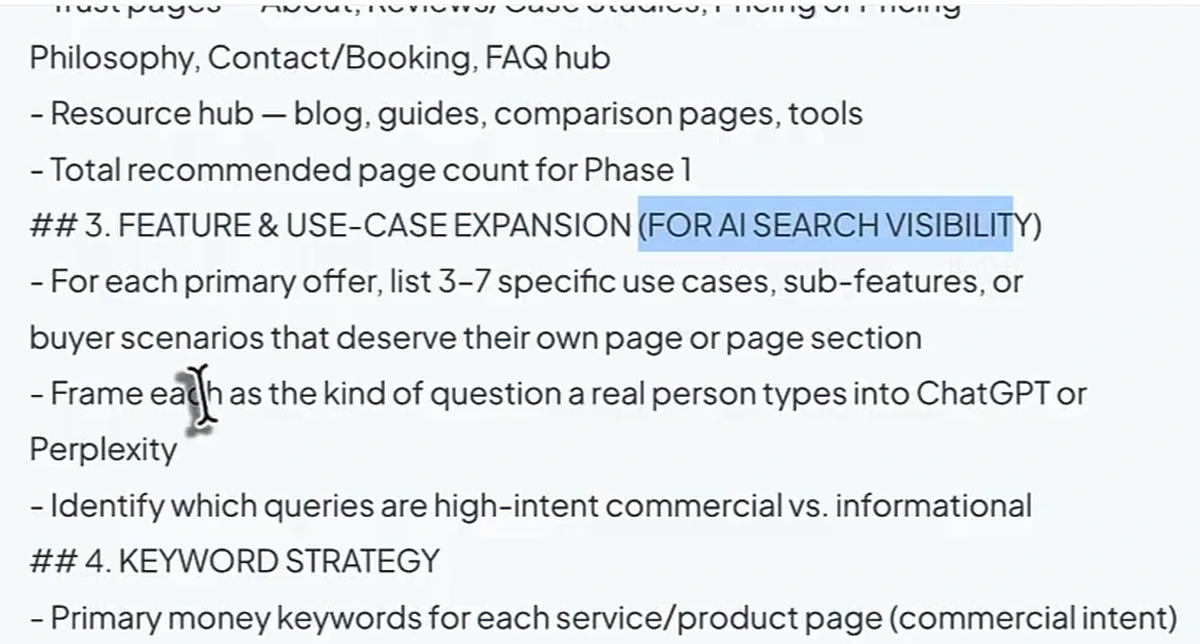
- Core money page architecture. A homepage as the conversion hub, one page per service, product or offer, and then segment pages: location pages if you're local, industry pages if you're B2B, persona pages if you're SaaS, category pages if you're e-commerce. Tim's example is a plumber in Miami: a sink repair page, then sink repair Miami, sink repair Coral Gables, and so on for each city served.
- Feature and use-case expansion. For each offer, three to seven use cases or buyer scenarios that deserve their own page or section, each framed as the question a real person types into ChatGPT or Perplexity, and sorted into high-intent commercial versus informational.
- Keyword strategy. Primary money keywords per service page, supporting long-tail and "near me" variations, informational keywords for the blog, comparison keywords ("X vs Y", "best [thing] for [audience]", "[thing] alternatives"), a branded versus unbranded split, and the tools to validate the list: Ahrefs, Semrush, Google Search Console, AlsoAsked, Keyword Insights.
- Internal linking blueprint. Blogs to money pages, segment pages to offer pages, comparison pages to money pages, anchor text guidance, hub-and-spoke clusters.
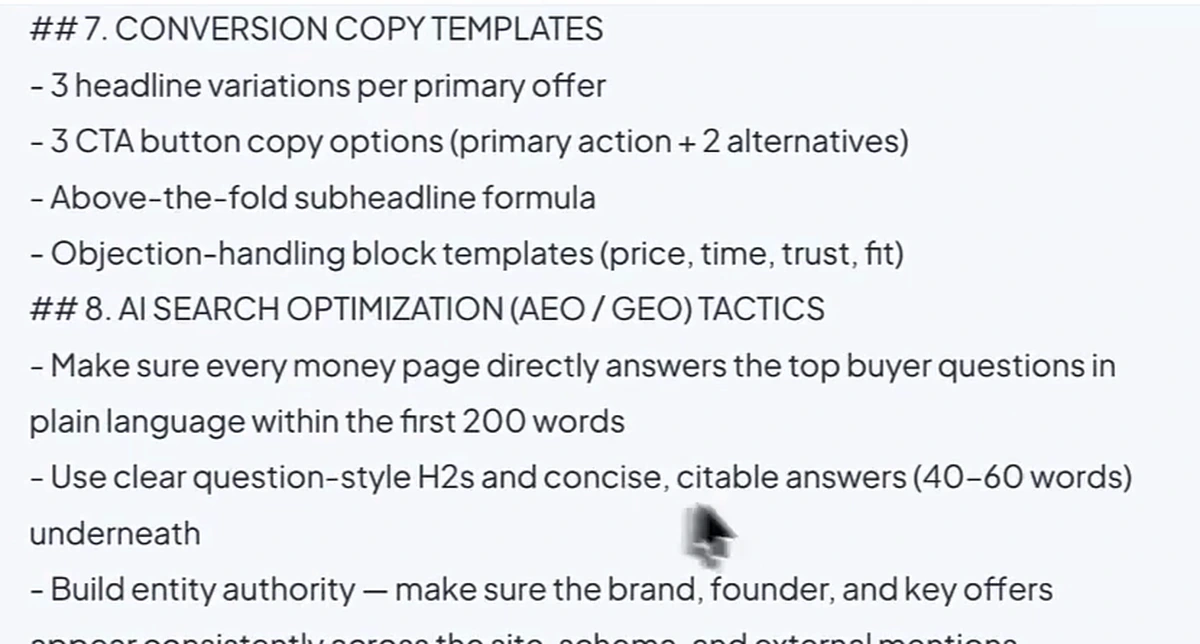
Section 8 is the one to read twice. Its AI search optimisation tactics are concrete: answer the top buyer questions in plain language within the first 200 words of every money page; use question-style H2s with concise, citable answers of 40 to 60 words underneath; keep the brand, founder and key offers consistent across the site, schema and external mentions; add comparison tables and structured data because LLMs prefer extractable, structured information.
The remaining sections cover a reusable page content framework, copy templates, schema, a competitive analysis framework, a blog-to-money-page support plan (three to five blog topics per money page, each linking to its parent), and a four-phase roadmap from foundation pages to optimisation. If you're weighing separate microsites against location pages, this prompt plans the location-page version; our microsites versus landing pages piece covers that choice.
Step 6: Execute the blog support strategy, and check what the tool generates
The prompt gives you the page list and the blog topics. Tim's execution layer for the blog half is Arvow's AutoBlog: enter the long-tail keywords from the keyword strategy, generate bottom-of-the-funnel articles for each money page, and publish to the connected site on a schedule. He also tours the rest of the toolset in a demo project, and his habit with the LLM brand monitor is worth copying: for any prompt where visibility is low, write an article for it.
One frame from that demo deserves a careful look before you copy the workflow. The example article he opens is "Sink Repair in Miami, Florida", and the Miami page describes the company as having served the Dallas–Fort Worth Metroplex for 80 years, since 1945, lists Texas licence numbers, a Dallas-area phone number and a "Best in DFW 2025" award.
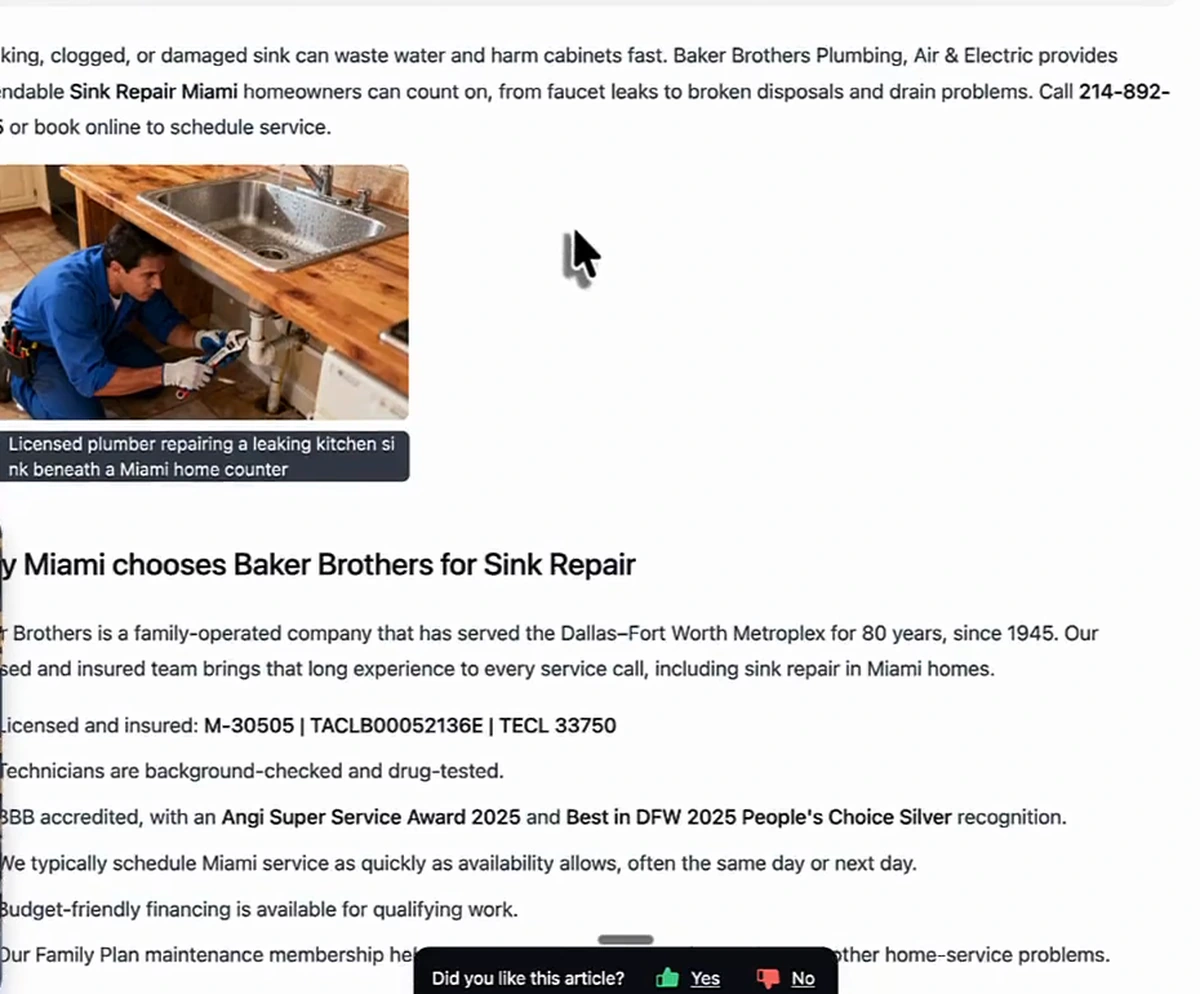
That is not a hallucination. It is a template whose variable half (city, service) filled correctly and whose fixed half (history, licences, awards) was written for a different business. The demo is a sandbox and nothing was published, but the lesson transfers to any location-page build: audit the fixed facts in your template as carefully as the variables. A page naming the wrong city is exactly what an assistant declines to cite, and a licence number from another state is a complaint waiting to happen. Fill the empty Focus Keyword field too, or the on-page checks run against nothing.
Measuring whether it worked
Tim closes with a guarantee that the structure will get you "showing up a lot more". The video shows no before-and-after on this property, so treat it as his claim, not a result. What he does give you is the measurement loop: the AI Assistant channel with the landing-page dimension is the scoreboard. Note today's numbers, build the missing pages, link to the cited ones, and re-open the same report in 90 days. For the prompts rather than the clicks, a visibility tracker across the assistants shows whether you're named at all, which Analytics can't see. For getting into the sources assistants already cite, start with how to increase AI visibility.
Plan the pages with the free Money Page Architecture prompt, then let Arvow write and publish the supporting articles. Get the prompt.
FAQ
How do I see AI traffic in Google Analytics?
Open Reports → Traffic acquisition. The Default Channel Group includes an AI Assistant row for sessions whose referrer matches Google's list of AI assistants (ChatGPT, Gemini, Copilot, Deepseek and Grok are the named examples). Type "ai" in the table search to isolate it, then add the Landing page + query string dimension to see which pages those sessions land on.
Does the AI Assistant channel include Google AI Overviews?
No. Google's definition excludes AI Overviews and AI Mode; clicks from those are counted as Organic Search. The AI Assistant channel covers third-party assistants that send a referrer Google recognises.
Why do Organic Search rows appear when I filter for "ai"?
The table search matches every column, including the landing-page URL, so any page with "ai" in its path shows up. Read the channel column and ignore the rest.
Why is AI traffic so small?
On the property in the video it was 16 sessions in 90 days, 0.41% of the total, but at an 81% engagement rate against a 54% site average, and mostly on one page. Use the report to find that page and build more like it.
What is the money page architecture prompt?
A free prompt on arvow.com that interviews you in ten questions and outputs a site map, a use-case expansion framed as AI-search questions, a keyword strategy, an internal linking blueprint, AI search optimisation tactics, schema, a blog support plan and a phased roadmap.

Generate, publish, syndicate and update articles automatically
The AI SEO Writer that Auto-Publishes to your Blog
- Cancel anytime
- Articles in 30 secs
- Plagiarism Free