
Google Traffic Dropped? Why Sites Lose Google's Trust and a 7-Day Recovery Plan (2026)

A Google traffic drop on a site that was doing well is one of the most common questions we get now, and the pattern behind it has changed. It used to be a penalty or a technical break. Increasingly it is a site that automated its content with AI, kept publishing more of the same after the first dip, and watched the dip become a cliff. The video below is a Nex Gen AI walkthrough of why that happens and a six-step recovery process, ending in a seven-day action plan. This article lays the process out step by step, with the reasoning behind each one and where a tool helps.
Can Google lose faith in a site that was performing?
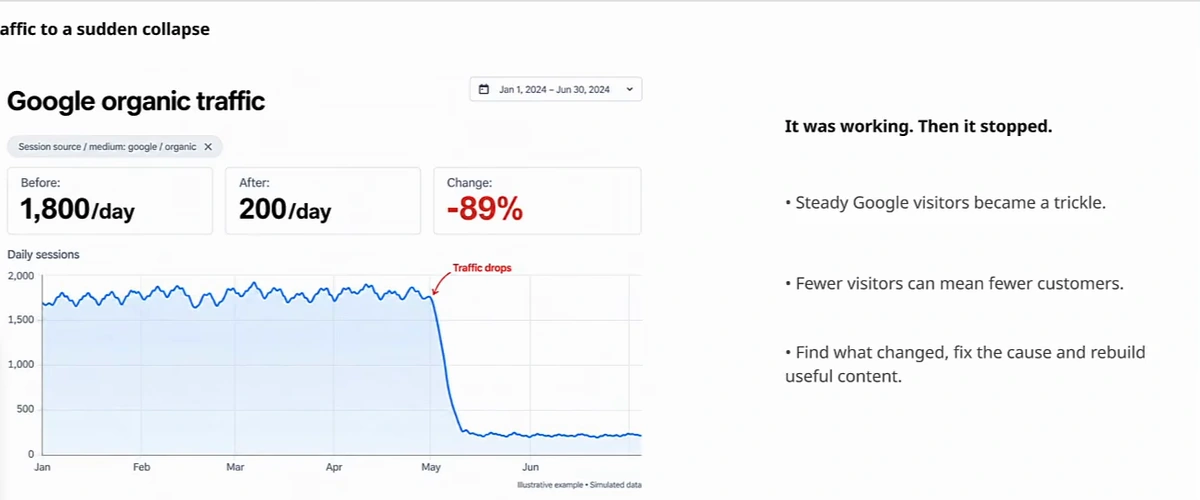
Yes, and the presenter's short answer is that it happens all the time. The opening slide shows the shape: 1,800 sessions a day for months, then 200 a day, an 89% drop. That chart is labelled as a simulated illustration, so treat it as the pattern rather than a case study; the pattern is what matters. A decline can follow ranking changes, technical problems or weaker demand, and the slide is careful to list all three. But the case the video is really about is the fourth cause — low-value content — because it has a trap the others do not: if thin content is part of the problem, publishing more of it makes the problem worse, and "more of the same" is exactly what an automated content pipeline does when nobody intervenes.
Why it matters is not subtle. Fewer Google visitors means fewer potential customers — the bookings, purchases and enquiries dry up — and if you diagnose the wrong cause you spend weeks fixing something that was never broken. So the process starts with diagnosis, not with writing.
Step 1: Diagnose before you assume it is the content
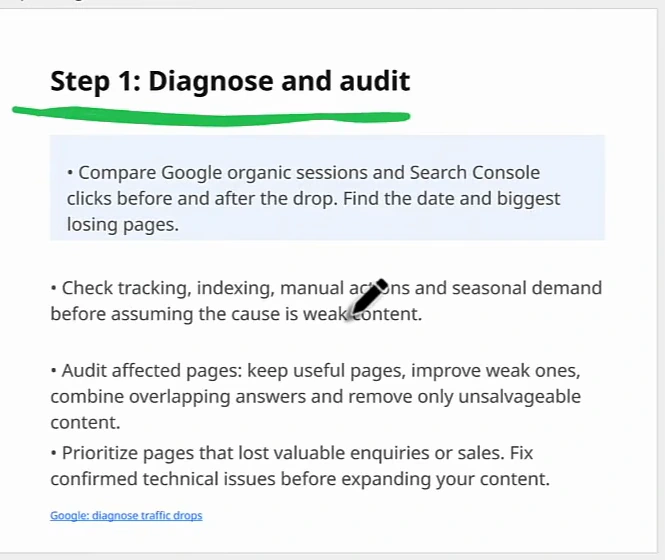
Open Google Analytics and Search Console side by side and compare organic sessions and clicks before and after the drop. Find the date it started and the pages that lost the most. Then, before assuming weak content, rule out the causes that look identical on a chart: broken tracking, de-indexed pages, a manual action, or seasonal demand that fell on its own. The presenter's view is that it is probably the content, but the check costs an hour and a wrong diagnosis costs months; if a manual action or a spam update is the cause, our note on the Google spam update is the place to start instead.
Once the technical causes are cleared, audit the affected pages with four verbs: keep the useful ones, improve the weak ones, combine the ones that answer the same question, and remove only what is unsalvageable. Prioritise the pages that used to bring enquiries or sales, not the ones with the biggest traffic number. And fix any confirmed technical issue before you write a single new page. If you want the technical pass done for you, our technical SEO audit service covers it; the content audit is the part that has to be yours.
Step 2: Give the AI real evidence before it drafts
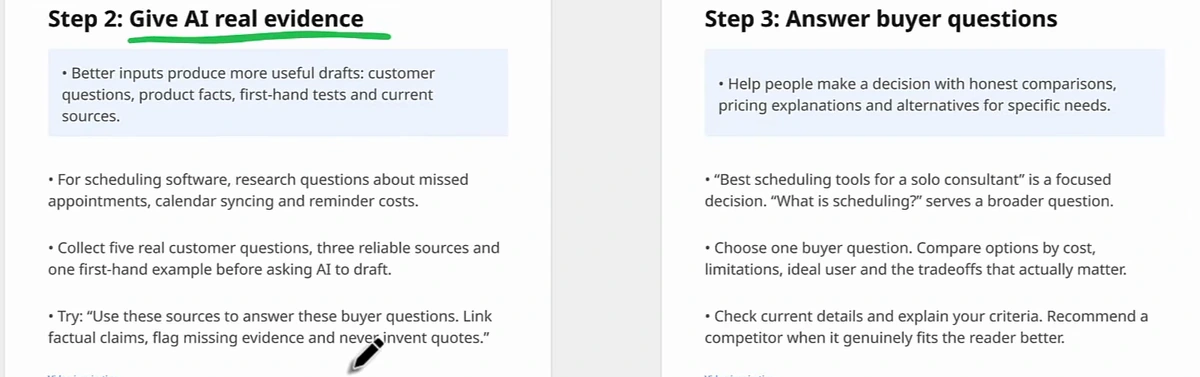
The video is not anti-AI; the presenter uses it for every article. The failure it describes is automation with no human input at either end. The fix on the input side is a rule you can write on a sticky note: before asking AI to draft anything, collect five real customer questions, three reliable sources and one first-hand example. For a scheduling-software company that means the questions customers actually ask about missed appointments, calendar syncing and reminder costs — not "what is scheduling software". The prompt the slide suggests is equally specific: use these sources to answer these buyer questions, link every factual claim, flag missing evidence, and never invent quotes.
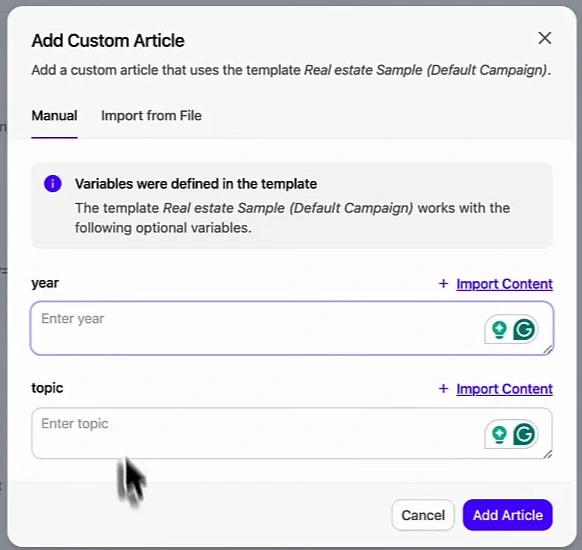
Where a tool helps is in making that evidence the default rather than the exception. The demo shows Arvow's template articles: you define a structure and a generation prompt once, declare variables — the real-estate example uses year and topic — and each article is generated with your data filled in, so a piece about first-time buyers falling 30% in 2026 is built from your number, not a generic one. The presenter's reason is blunt: Google and the AI engines do not reward commodity articles, and a template plus your own variables is the fastest way to stop producing them. Brand assets (calls to action, sitemap, images, videos) and a knowledge base of your facts are attached to the project, so every generated article is pulled from evidence you checked rather than from the model's general knowledge.
Step 3: Answer one buyer question, honestly
The pages that recover fastest are bottom-of-funnel ones that help someone decide. The slide contrasts two titles: "best scheduling tools for a solo consultant" is a focused decision; "what is scheduling?" serves a broader, weaker question. Pick one buyer question per page, compare the options by cost, limitations, ideal user and trade-offs, check that the details are current, explain your criteria — and recommend a competitor when it genuinely fits the reader better. That last line is the tell of a trustworthy page, and it is the one most AI pipelines never produce. The demo keys this into Arvow as an SEO article with the buyer question as the title and "scheduling tools" as the keyword, then lets the brand assets and knowledge base fill in the specifics.
The same question should live in more than one place: a blog post that answers it, a service page that answers it with a next step, and a social post that points at both. When someone asks that question in ChatGPT, Claude or Google's AI Overviews, the probability that you are the cited answer rises with every place you answered it. The presenter tracks this by adding the customer questions as prompts in Arvow's LLM brand monitor and rewriting pages whose visibility stays low; our guide to getting mentioned in AI search covers the measurement side.
Step 4: Show original proof
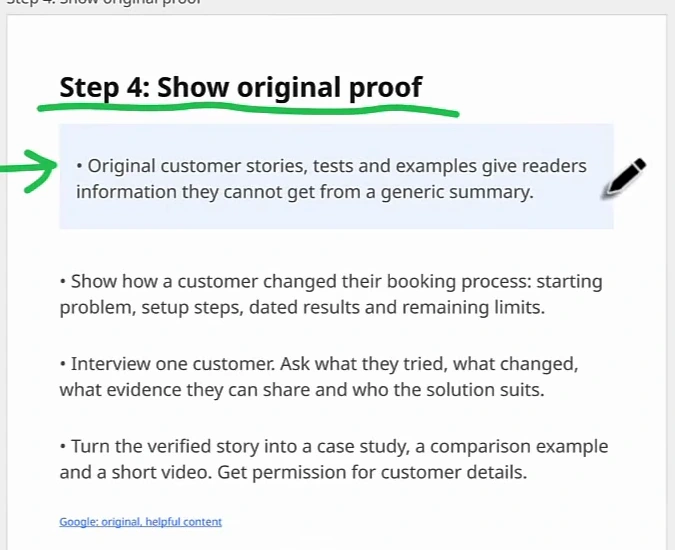
Original customer stories, tests and examples give readers information they cannot get from a generic summary — which is another way of saying they give Google a reason to prefer your page over the thousand rewrites of the same topic. The slide's recipe is concrete: show how one customer changed their booking process, with the starting problem, the setup steps, dated results and the limits that remain. Interview one customer; ask what they tried, what changed, what evidence they can share and who the solution suits. Then turn that one verified story into a case study, a comparison example and a short video, with permission for the details. Reviews are proof too — the presenter points out you can turn them into content — and Google reviews are usually the fastest source of dated, first-hand statements a business already owns.
Step 5: Review before publishing
Everything above can be automated, and the presenter automates most of it — but still reviews every article before it goes live, briefly. The slide's reasoning is that a fluent draft can contain wrong facts, weak advice or empty filler, and fluency hides all three. The checks are specific: replace a line like "this tool saves hours" with a documented test (the task, the conditions, the measured result); verify facts, source links, prices, screenshots and instructions; confirm the page delivers what its title promises; and ask someone unfamiliar with the page to use it, then fix the point where they got stuck. Five minutes per page is enough. Zero minutes is how the drop happened.
Step 6: Measure recovery, and be patient about it
Recovery is slow, and the slide says so plainly: improving site quality is sustained work, search systems may need months to reassess a site, and recovery is not guaranteed. What you can control is the record. Note what changed and when. Track impressions, clicks and qualified leads for the pages you improved, not just sessions. Compare like periods and allow for seasonality, and keep improving useful content instead of chasing daily fluctuations. As you delete or rewrite underperforming pages and re-release them on the rules above, the presenter's experience is a slow climb back toward where you were — the same timescale we describe in how long it takes to rank first on Google.
The seven-day action plan
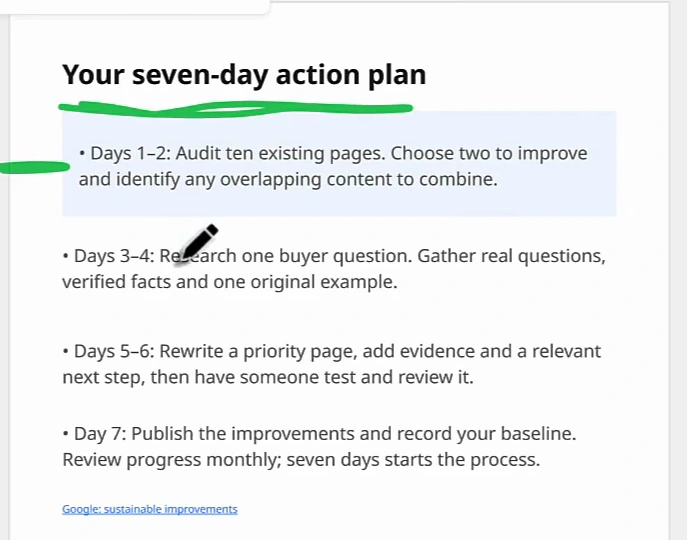
- Days 1–2 — audit. Pull ten existing pages, sorted by lowest performance. Choose two to improve and mark any overlapping pages to combine.
- Days 3–4 — research one buyer question. Gather the real questions, the verified facts and one original example (a customer story, a test, a number of your own).
- Days 5–6 — rewrite a priority page. Add the evidence and a relevant next step, then have someone test and review it.
- Day 7 — publish and record the baseline. Note the date and the page's current impressions, clicks and leads, then review monthly.
Seven days does not fix a traffic drop; it starts the process and gives you a page and a baseline to learn from. Repeat it — find the underperforming content, rewrite it from real questions and real evidence, publish, measure — and the trajectory changes. Tools still belong in that loop, and AI still makes it faster; the presenter's closing point is that the drop comes from throwing it out there and letting it ride, and the recovery comes from using it in smart ways with a person at both ends. Our own numbers on what evidence-based AI content does over time are in the AI SEO case study.
Arvow's template articles, brand assets and knowledge base make evidence the default input for every AI article, and its LLM brand monitor tracks whether the buyer questions you answered are the ones AI engines cite you for. Start with what AI SEO actually is.

Generate, publish, syndicate and update articles automatically
The AI SEO Writer that Auto-Publishes to your Blog
- Cancel anytime
- Articles in 30 secs
- Plagiarism Free