
Google Search Console Regex: How to Find Question and Buyer-Intent Queries (2026)

Google Search Console regex filters let you pull one kind of search out of thousands of queries with a single pattern. Two patterns do most of the work: one that isolates questions, and one that isolates searches with buying intent. Tim The SEO Guru runs both on a med spa's Search Console property in a November 2026 video, then hands the results to ChatGPT to turn into page edits. This guide gives you the two patterns, the rules Google's regex engine follows, the mistakes we spotted on screen, and a tightened version of each pattern you can paste in today.
The two patterns, ready to copy
| Goal | Pattern from the video | Tightened version |
|---|---|---|
| Question queries | ^(who|what|where|when|why|how|was|did|do|is|are|does|if)\s | ^(who|what|where|when|why|how|which|can|should|will|was|did|do|is|are|does|if)\s |
| Buyer-intent queries | (buy|order|price|pricing|cost|hire|best|cheap|near me|company|agency|services) | \b(buy|order|prices?|pricing|costs?|hire|best|cheap(est)?|near me|company|agency|services?)\b |
The left column is exactly what the video shows. The right column is ours, and the sections below explain each change.
How to add a regex filter in Search Console
- Open Performance and pick a date range. The video uses 3 months on Search type: Web.
- Click Add filter and choose Query.
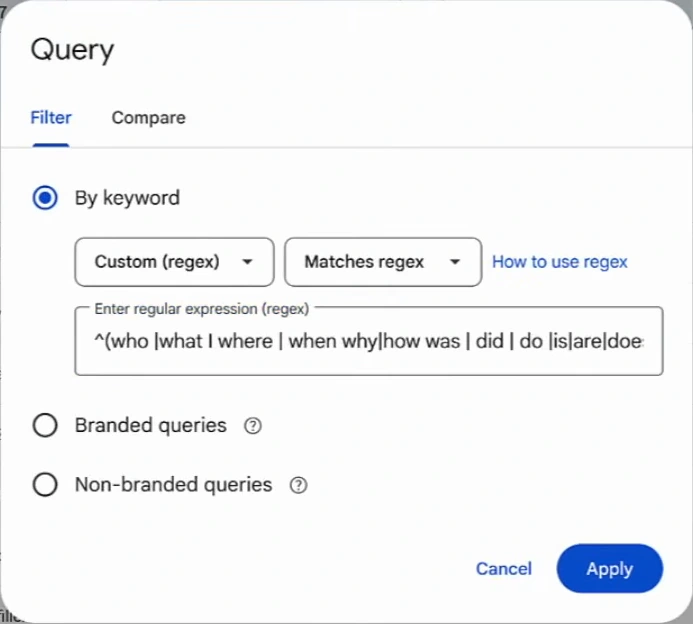
- Under "By keyword", change the first dropdown from "Queries containing" to Custom (regex). Leave the second on Matches regex.
- Paste the pattern and click Apply.
- Scroll to the Top queries table and sort by impressions, then by clicks.
The rules Google's regex follows
Four rules from Google's help page decide what your pattern matches. We checked each one on 16 November 2026.
| Rule | What it means for you |
|---|---|
| Search Console uses RE2 syntax | Alternation, groups, anchors and character classes work. Lookaheads and backreferences are not part of RE2 |
| Default matching is a partial match | The pattern can match anywhere in the query unless you anchor it with ^ (start) or $ (end) |
| Matching is not case-sensitive by default | No need to add capitalised variants. Prefix (?-i) if you want case to matter |
| "Doesn't match regex" is available | Flip the second dropdown to exclude a set of queries instead of selecting it |
Google also warns that filtering by query can change the report totals, because anonymised queries are left out and long tables are truncated. A filtered view is a sample of your demand, not a census. Use it to find patterns, not to report totals. The full rule set is in Google's advanced filtering help page.
Pattern 1: question queries
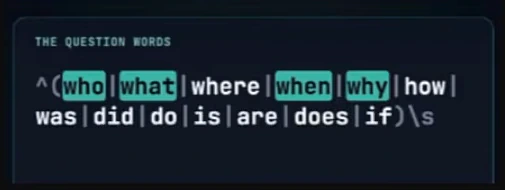
Read it left to right. The caret anchors the match to the start of the query. The brackets hold thirteen opening words separated by pipes, which mean "or". The \s at the end demands a space after the word, so "is botox safe" matches and "israel" does not.
Here is what it returned on the med spa's property over three months. Unfiltered, the property showed 1.48K clicks, 189K impressions, a 0.8% click-through rate and an average position of 14.4.
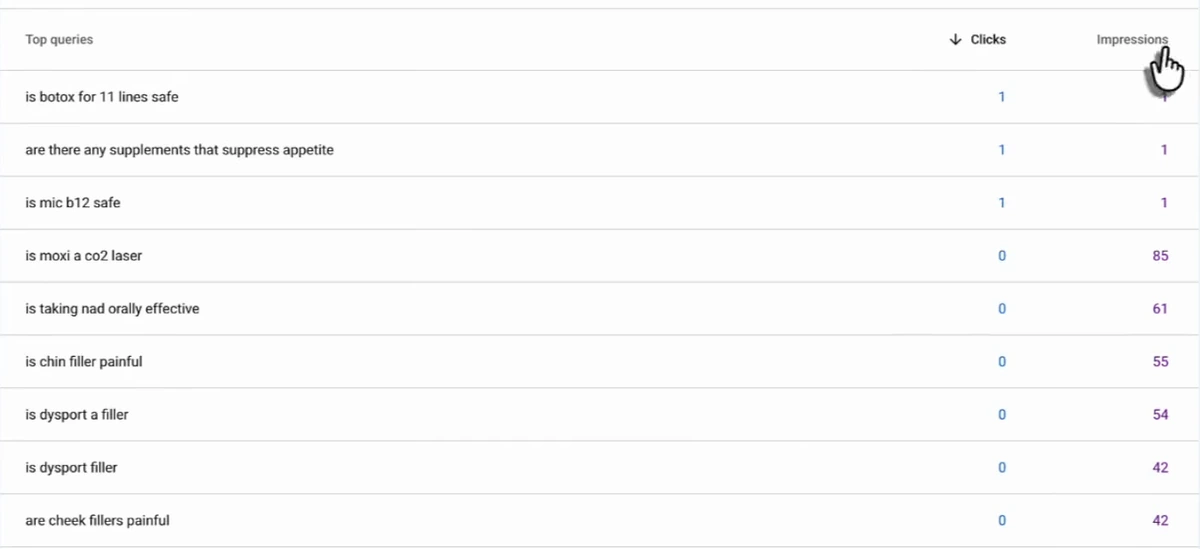
Three queries have one click each. The rows below them are the finding: "is moxi a co2 laser" with 85 impressions and no clicks, "is taking nad orally effective" with 61, "is chin filler painful" with 55, "is dysport a filler" with 54. People are asking, Google is showing the site, and nobody clicks. Each of those is either a missing page or a page that does not answer the question in its title and first paragraph.
Two things to fix before you trust the list
Spaces are characters. When the presenter reopens the filter, the pattern in the box is not the one on the card. It reads ^(who |what I where | when why|how was | did | do |is|are|doe…, with spaces around some pipes, a capital I where a pipe should be, and two pipes missing. In regex a space is a literal space, so "who " followed by \s needs two spaces to match. Every row visible in the results starts with "is" or "are", the two alternatives that survived intact. We cannot see the whole table, so treat that as our reading of the frame. The practical point holds either way: paste the pattern from a plain-text file, and if your results only show one or two question words, check for stray spaces.
The list of question words is short. It has no "can", "should", "which" or "will". For a service business those carry real intent ("can you get botox while pregnant", "which filler lasts longest"). Our version adds them.
Pattern 2: buyer-intent queries
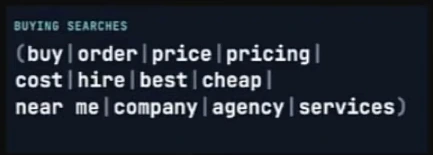
This one has no anchor, on purpose. Buying words can sit anywhere in a query: "botox near me", "cheapest botox prices near me", "co2 laser cost".
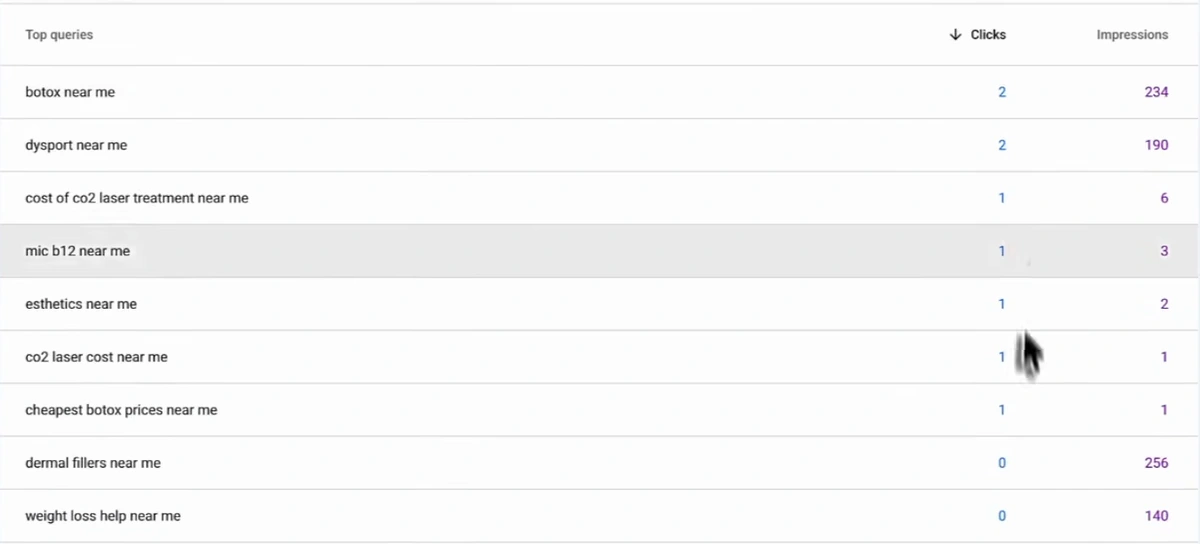
"Botox near me" has 234 impressions and 2 clicks. "Dermal fillers near me" has 256 impressions and none. For a local clinic these are the searches closest to a booking, and the property is visible for them without winning the click.
The flaw ChatGPT caught and the video skipped
Because matching is partial, "order" also matches inside "disorder", and "cost" inside "costco". The presenter does not mention this. ChatGPT does, in a note under its results table that is never read aloud: "The filter also catches incidental matches, such as 'order' inside 'disorder', so these aren't all buying-intent searches."
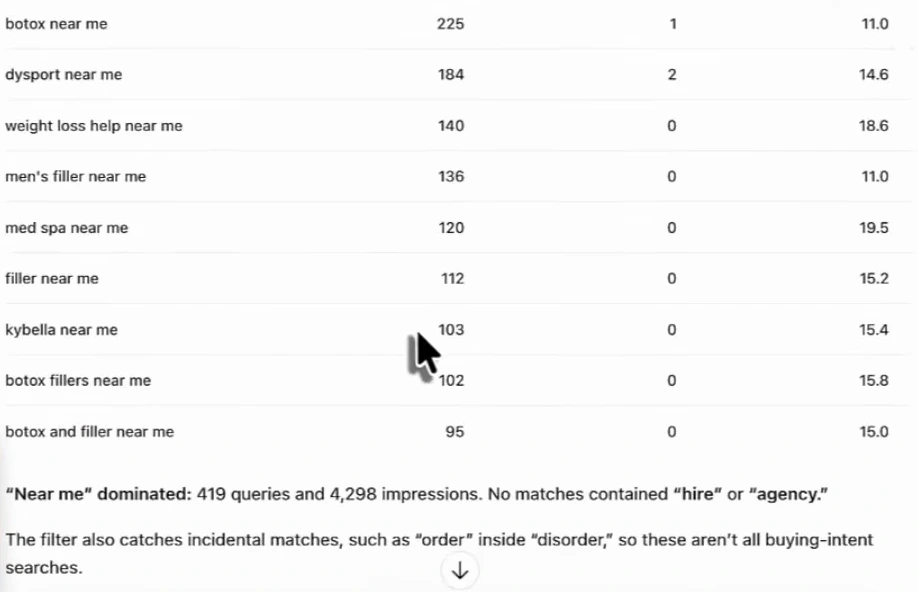
The fix is a word boundary. RE2 supports \b, which matches the edge of a word. Wrapping the group in \b(…)\b stops "order" from firing on "disorder". The cost is that "cost" no longer matches "costs", which is why our version writes costs?, prices? and services?.
The same note has a second lesson: "No matches contained 'hire' or 'agency'." Those words came from a generic list. Nobody hires a med spa. On this property, "near me" produced 419 queries and 4,298 impressions on its own. Edit the list to fit how your customers talk. A clinic might swap "hire", "company" and "agency" for "appointment", "consultation" and "book". A B2B firm keeps them. We go deeper on choosing these words in buying intent keywords.
What to do with the filtered queries
A list of queries is not a plan. In the video, ChatGPT is connected to the site's Search Console data through Arvow's MCP server, and the presenter asks it what to do with the buying queries. The answer is a table worth copying as a format.
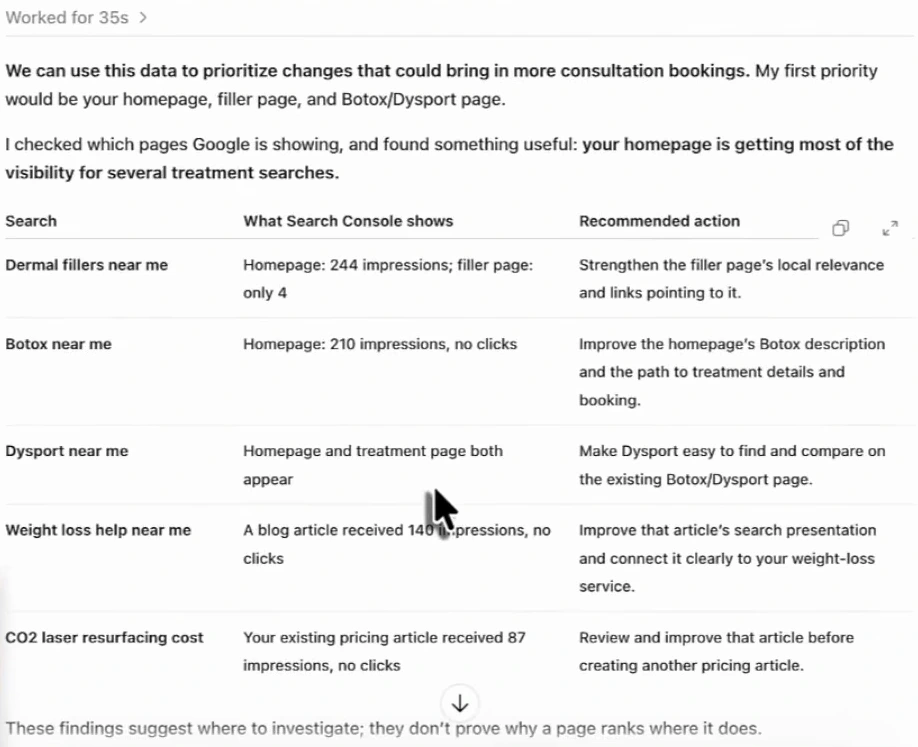
The useful move here is adding the page dimension. For "dermal fillers near me" the homepage received 244 impressions and the dedicated filler page 4. Google is ranking the wrong page. You cannot see that from the query table alone. In Search Console, click a query, then open the Pages tab to see which URLs earned its impressions.
From there, each row falls into one of four actions.
| What you see | Likely action |
|---|---|
| Impressions land on the homepage, not the service page | Strengthen the service page and link to it from the homepage with descriptive anchor text |
| Two of your pages share the query | Decide which one should own it. See keyword cannibalization |
| An existing article gets impressions and no clicks | Rewrite its title and opening before writing anything new |
| A question gets impressions and no page answers it | Write the page, or add the question and a direct answer to the closest existing one |
ChatGPT ends its table with a sentence the video does not dwell on: "These findings suggest where to investigate; they don't prove why a page ranks where it does." That is the right weight to give any of this. Its advice on the CO2 laser pricing query is the same idea in practice: improve the article you have before creating another one.
If you would like an assistant to run these filters for you, our Google Search Console MCP guide covers the connection, and how to find low competition keywords covers what to write once you have the list.
Connect Search Console once and ask for question and buyer-intent queries in plain English from ChatGPT or Claude. See the Arvow MCP.
Three more filters worth saving
- Non-branded only. The Query dialog now has Branded queries and Non-branded queries options under the regex box. Google says the split is made by an AI-assisted system, not regex, that it is available on top-level properties with enough query volume, and that some queries may be misclassified. Google announced it on 20 November 2025 and opened it to all eligible sites on 11 March 2026. If your property does not have it, use "Doesn't match regex" with your brand's spellings, as in Google's own example
willow tree|wilow tree|willowtree. - Long queries.
^(\S+\s){6,}returns queries of seven or more words. These read like the prompts people type into AI assistants, and they are a good source of section headings. - Comparisons.
\b(vs|versus|or|alternative|compare)\bsurfaces people choosing between two options, one of which may be you.
The last two are ours, not from the video.
Where Search Console stops
Search Console only reports Google Search. The same questions are being asked in ChatGPT, Claude, Gemini and Perplexity, and none of that shows up in the Performance report. The video closes on Arvow's brand monitor for the same med spa: 16 prompts tracked, 22% visibility, sentiment +36.
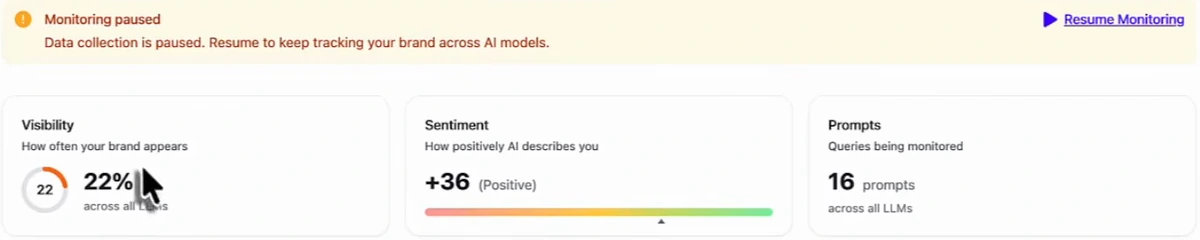
The two sources feed each other. Your question queries are a ready list of prompts to track, and the prompts where you score zero tell you which questions need a better page. How to find AI search prompts walks through building that list.
FAQ
Does Google Search Console support regex?
Yes. In the Performance report, add a Query or Page filter and choose Custom (regex). You can select "Matches regex" or "Doesn't match regex". Search Console uses RE2 syntax.
What is the regex for question keywords in Search Console?
^(who|what|where|when|why|how|which|can|should|will|was|did|do|is|are|does|if)\s returns queries that start with a question word followed by a space.
Is Search Console regex case-sensitive?
No. Google's help page says default regex matching is not case-sensitive. Add (?-i) at the start of the pattern if you need case-sensitive matching.
Why does my regex filter return unrelated queries?
Matching is partial by default, so a word can match inside a longer word. Anchor the pattern with ^ or $, or wrap the words in \b word boundaries.
Why are the totals lower after I apply a query filter?
Google omits anonymised queries from filtered views and truncates long tables, so filtered totals can be lower than the unfiltered report.
Generate, publish, syndicate and update articles automatically
The AI SEO Writer that Auto-Publishes to your Blog
- Cancel anytime
- Articles in 30 secs
- Plagiarism Free