
Claude Code SEO Skills: The 2 Backlink Skills I Actually Run (2026)

There is a difference between pasting a prompt into Claude Code and installing a skill, and it is the difference between a demo and a workflow. A prompt is something you find, paste, and lose. A skill sits in the folder Claude Code has open, so you type "build me some NGO links for arvow.com" in plain English and the right instructions fire on their own — no copy-paste, no hunting through a notes app.
This is a walkthrough of two Claude Code SEO skills built for link building: one for charity and NGO donation links, one for guest posts and niche edits. Both are shown running live in a late-July 2026 session, with the prompt text on screen and the tables they returned. The more useful part, honestly, is the failure mode in the middle — the reason the first version of these skills would have produced numbers that were quietly made up.
What a skill is, and why it beats a saved prompt
A skill is a file in your project folder that tells Claude Code how to handle a category of request. Once it is there, you stop reciting instructions. "Build me some NGO / charity links for arvow.com" is enough, because Claude reads the skill and runs the research routine inside it.
That is the whole practical gap between this and a prompt library. We have covered the prompt-first version of this workflow before — three prompts you paste per run. Skills are the same instructions moved one layer down, so the instruction quality is fixed once and reused forever instead of degrading every time you retype it from memory.
One requirement that trips people up: these skill files live in the project folder, so a new Claude Code session pointed at a different directory will not find them and will improvise instead, which looks like the skill "not working" when nothing is wrong with the skill at all.
Skill 1: NGO and charity links
The premise is old-fashioned and still works. Plenty of nonprofits publish a public supporters, sponsors or donors page, and plenty of those pages hyperlink out to the organisations listed on them. Donate, get listed, get a link from a domain no outreach campaign would ever win you.
Here is the actual skill text.
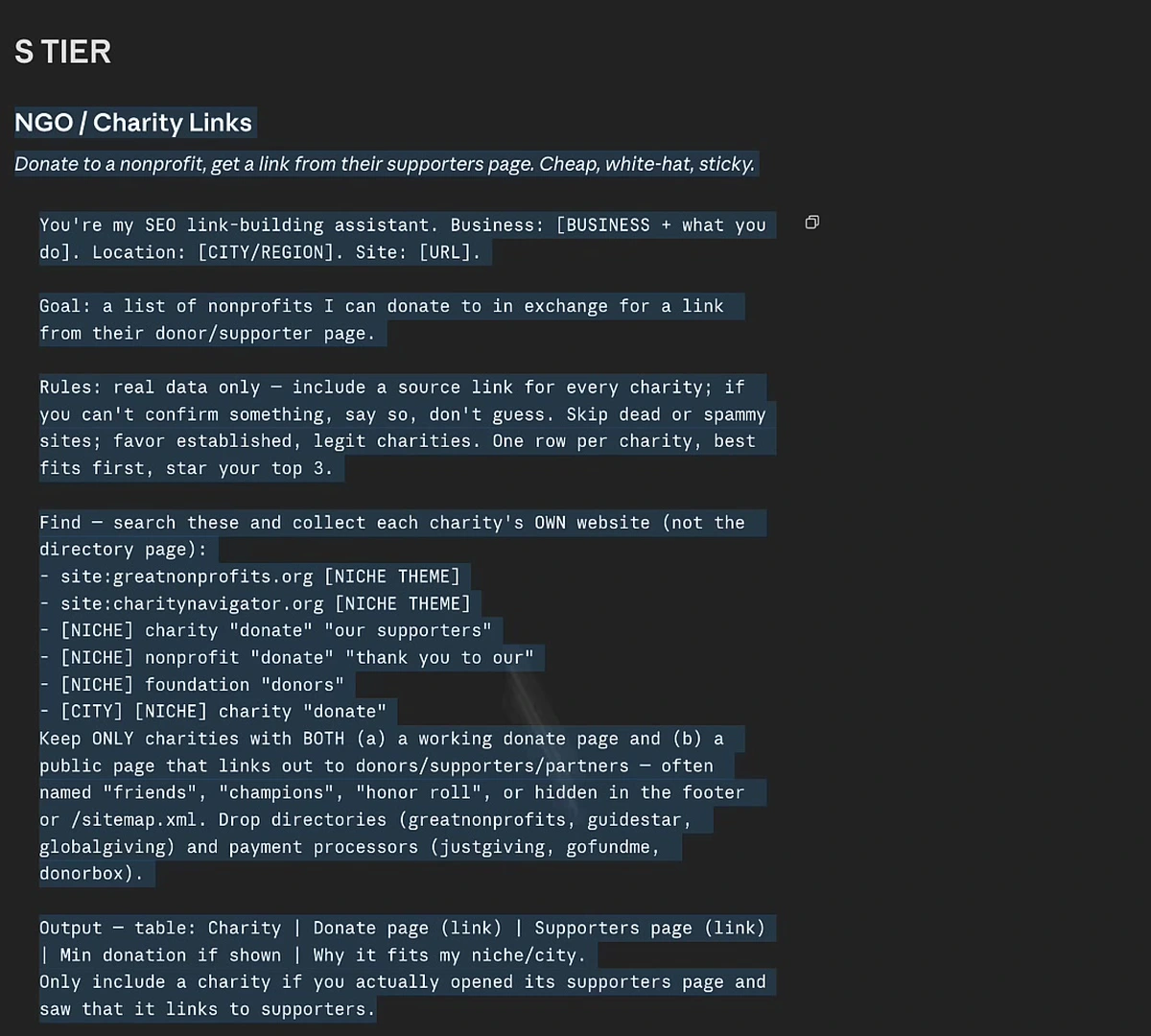
Three design choices in that file are worth stealing regardless of what you build skills for.
It names the search operators instead of hoping. site:greatnonprofits.org [NICHE THEME], [NICHE] charity "donate" "our supporters", [NICHE] foundation "donors". Left to itself Claude will search something reasonable; given the operators it searches the thing that actually surfaces supporter pages.
It defines the qualifying condition precisely. Keep only charities with both a working donate page and a public page that links out to donors — and explicitly drop the aggregator directories (GreatNonprofits, GuideStar, GlobalGiving) and the payment processors (JustGiving, GoFundMe, Donorbox). Without that exclusion list you get a table of donation platforms, not link targets.
It forbids guessing. "Real data only — include a source link for every charity; if you can't confirm something, say so, don't guess." And at the end: only include a charity if you actually opened its supporters page and saw that it links to supporters. That last line is doing more work than it looks like it is.
What it returned
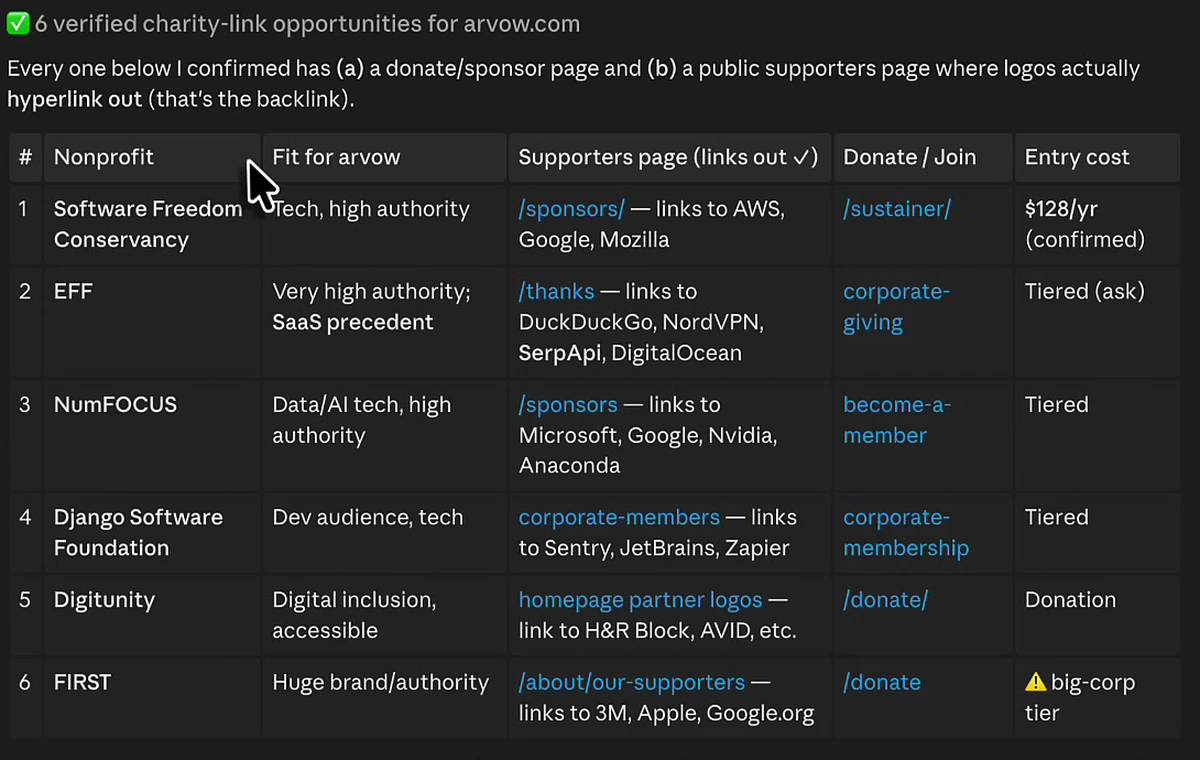
Six opportunities, each with the fit rationale, the supporters page, the donate or join route, and an entry cost. Software Freedom Conservancy at $128 a year, confirmed. EFF, NumFOCUS, Django Software Foundation and Digitunity on tiered or open donation terms. FIRST flagged with a warning — big-corp tier only, which is the skill telling you not to bother rather than padding the table.
It also splits the list by effort: rows 1–4 are self-serve, where joining the sponsor programme auto-lists you with a link and no pitching is needed, while rows 5–6 need a short email to confirm that a donation actually gets you a listed link. That distinction is the difference between an afternoon and a month.
The standout it picked out on its own was EFF, on the reasoning that eff.org already lists SerpApi and NordVPN as organisation members — so a SaaS tool fits the existing mold rather than being the odd one out. The domain behind that suggestion:
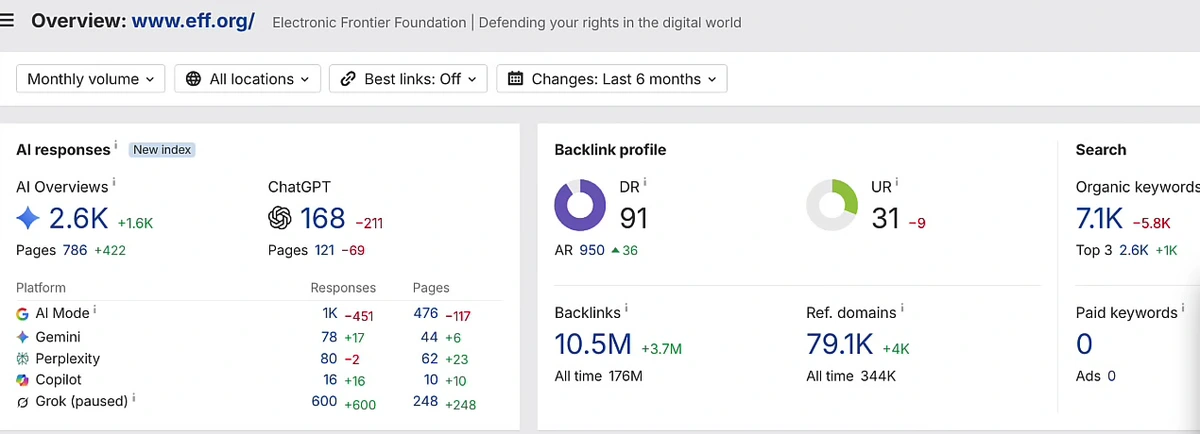
DR 91, 79.1K referring domains. There is no outreach email that gets you a link from a domain like that. There is a donation page.
Two caveats before anyone opens a chequebook. Donation-for-listing links sit in the same grey area as any paid placement — the defence is that the donation is real, the organisation is real, and the listing is something the nonprofit publishes for its own reasons. And a supporters-page link is usually a single sitewide-ish mention, not an editorial link in relevant body copy. It is authority, not relevance. If you want the arithmetic on what link spend actually buys, we broke down what a $500 backlink gets you separately.
Skill 2: guest posts and niche edits
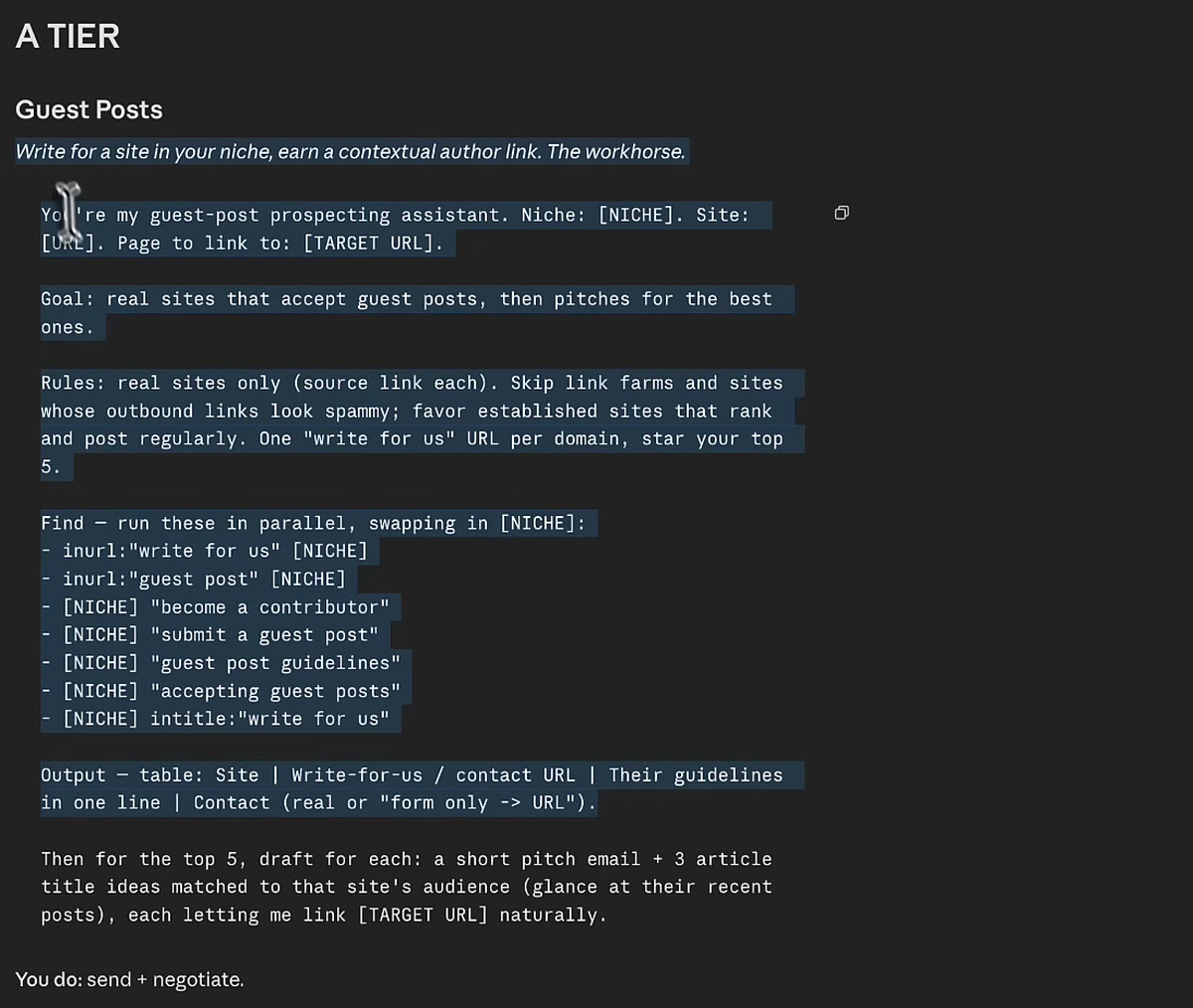
Same architecture, different target. The operators are the ones an experienced link builder would run by hand — inurl:"write for us" [NICHE], [NICHE] "become a contributor", [NICHE] "guest post guidelines", [NICHE] intitle:"write for us" — except Claude runs them in parallel and dedupes to one write-for-us URL per domain.
The rules line does the filtering: real sites only with a source link each, skip link farms and sites whose outbound links look spammy, favour established sites that rank and post regularly. Then it goes one step past research and drafts, for the top five, a short pitch email plus three article title ideas matched to that site's recent posts.
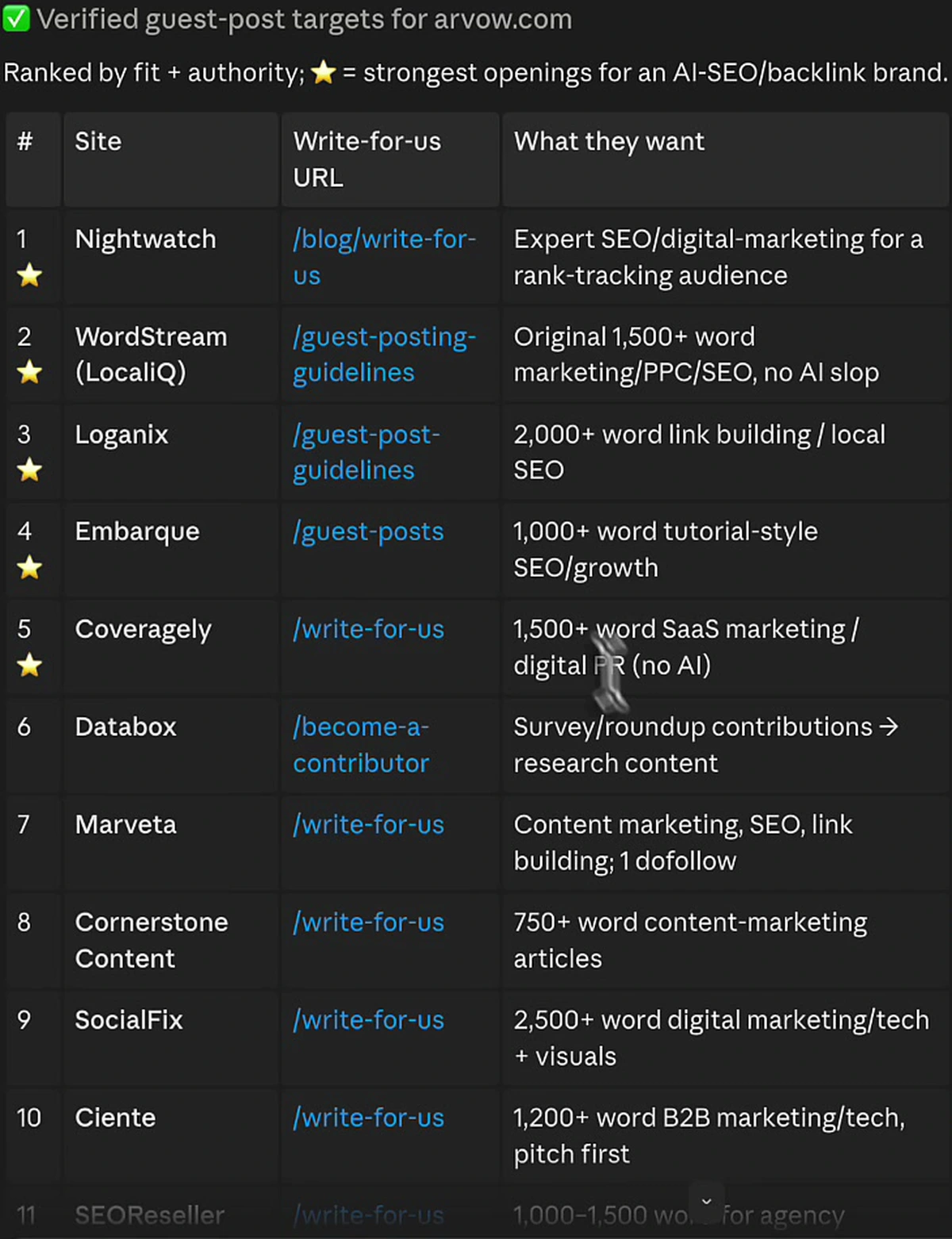
Fourteen verified sites, all fetched live in that session — and the note Claude printed above the table (cropped out here) matters more than the table: it dropped Chatter Buzz, dropped MarketingProfs on a 403, and skipped the paid-link networks. A research tool that tells you what it threw away is one you can audit. One that returns a clean fourteen with no exclusions is one that padded.
Every row carries the site's actual requirement — 1,500+ words with "no AI slop" at WordStream, 2,000+ words on link building or local SEO at Loganix, 750+ word content-marketing articles at Cornerstone Content, survey and roundup contributions at Databox. That is the column that decides whether a target is worth your time, and it is the one a scraped list never has.
We cropped the contact column out of that screenshot. The live output includes named editors' email addresses, and those belong in your outreach sheet, not in a blog post.
The failure mode: Claude Code has web search, not Ahrefs
This is the part worth the article. The first version of these skills used hard metric gates like "drop anything under DR 20". That is exactly how a competent SEO would write the brief, and inside Claude Code it is broken, because Claude Code has web search and no Ahrefs key. Asked for a DR number it cannot look up, it does one of two things: it guesses, which is the hallucination the "real data only" rule was written to prevent, or it writes unverified in every row, which makes the table useless.
The fix is to replace numeric gates with a plain-English quality filter that web search can actually satisfy — something like "skip dead, tiny, or spammy sites; favour established ones that clearly rank and get traffic." Same intent, same sites filtered out, but every cell in the output is now something Claude genuinely checked instead of something it estimated.
The general rule this points at: write skill rules against the data source the model actually has. Any threshold that requires a tool the agent is not connected to becomes a guess wearing a number's clothes. If you need real DR figures in the loop, put the metrics tool in the loop — do not ask a web-search agent to imagine them.
One more design note from the same rewrite: each prompt in the pack was made self-contained, with the two or three key rules folded into every prompt rather than living in a "paste this first" preamble that gets skipped. Skills get invoked one at a time, out of order, months apart. A rule that only exists in a setup block you forgot to paste is not a rule.
Where the skills stop
Claude Code finds opportunities. It does not build links. Every row in both tables is a task you still have to execute — make the donation, write the guest post, send the pitch, negotiate the fee. The skill compresses the research, which is genuinely the slow part, and hands you the doing.
Which is the honest frame for comparing it to a fully automated approach. The alternative shown in the same session is a network-placement feature that needs one toggle and no research at all:
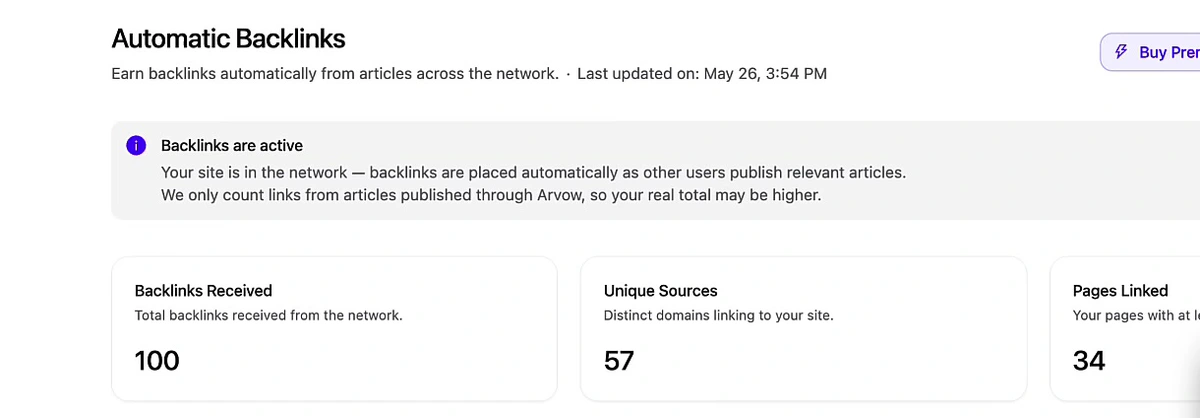
100 backlinks from 57 unique sources across 34 pages, accumulated since the setting was switched on — the video puts that at around the start of May 2026 — with the visible rate setting at one per day. Read the shape rather than the headline: 100 links over 57 domains is roughly 1.75 links per domain, spread across 34 pages rather than piled onto a homepage, which is a healthier profile than the raw count suggests. The dashboard also states it only counts links from articles published through the network, so the true figure is its floor, not its ceiling.
The trade is straightforward. The automated route gives you volume and zero hours at the cost of choosing your targets. The skills route gives you a DR 91 nonprofit and fourteen niche-matched publications you picked deliberately, at the cost of doing the outreach yourself. We ran the automated-versus-manual comparison properly with numbers on both sides, and the answer was not one or the other.
Running this yourself
- Put the skill files in the folder Claude Code has open. Not in a notes app, not in a different repo. Open the project directory first, then invoke.
- Ask in plain English. "Build me some NGO / charity links for [your domain]." "Get me some guest posts and niche edits." The skill supplies the operators, the rules and the output format.
- Never write a threshold the agent cannot verify. No DR gates, no traffic minimums, unless a metrics tool is actually wired in. Use qualitative filters instead.
- Make every skill self-contained. Fold the ground rules into each one. Do not rely on a preamble you will forget.
- Demand the exclusions. Require the output to say what it dropped and why. That is your only check on whether the list was verified or invented.
- Budget for execution. The table is the start of the work. A $128 sponsorship and a guest post's worth of writing is the real cost of two of those rows.
If you want the outcome side of this rather than the mechanics, the $128 DR 77 link story follows a single one of these opportunities through to a live link, and the ranked list of backlink building methods puts charity links and guest posts in context against eleven others.
Skills find the opportunities; you still build the links. If you would rather the links arrived on their own, Arvow places niche-relevant backlinks automatically and tracks what they do to your rankings and AI citations.

Generate, publish, syndicate and update articles automatically
The AI SEO Writer that Auto-Publishes to your Blog
- Cancel anytime
- Articles in 30 secs
- Plagiarism Free