
SEO Microsites in 2026: What They Cost and What Beats Them


Microsites are one of those local SEO tactics that sound clever until you price them. Build a separate site on an exact-match domain, aim it at one service in one city, link it back to the main site, repeat. It works often enough that people keep recommending it — and it quietly costs more, in money and in rankings, than the alternative almost nobody bothers to set up properly. This walkthrough follows a local SEO video from the Nex Gen AI channel that builds the microsite case on camera, then abandons it for a location landing page structure on one domain, and it stops at the two places where what is on the screen is more informative than what is being said.
What an SEO microsite actually is
A microsite is a small standalone site, separate from your main website, built around one narrow target. In the structure the video pulls up, the main company site (brand.com) keeps the usual Home / About Us / Products-Services / Contact Us tree. The microsite sits beside it on its own domain (campaignbrand.com), and everything inside it exists to convert one intent: a campaign landing page and a block of interactive content at the top, feeding a specific FAQ section and a lead form with a single primary CTA underneath. One optional link connects it back to the main site.
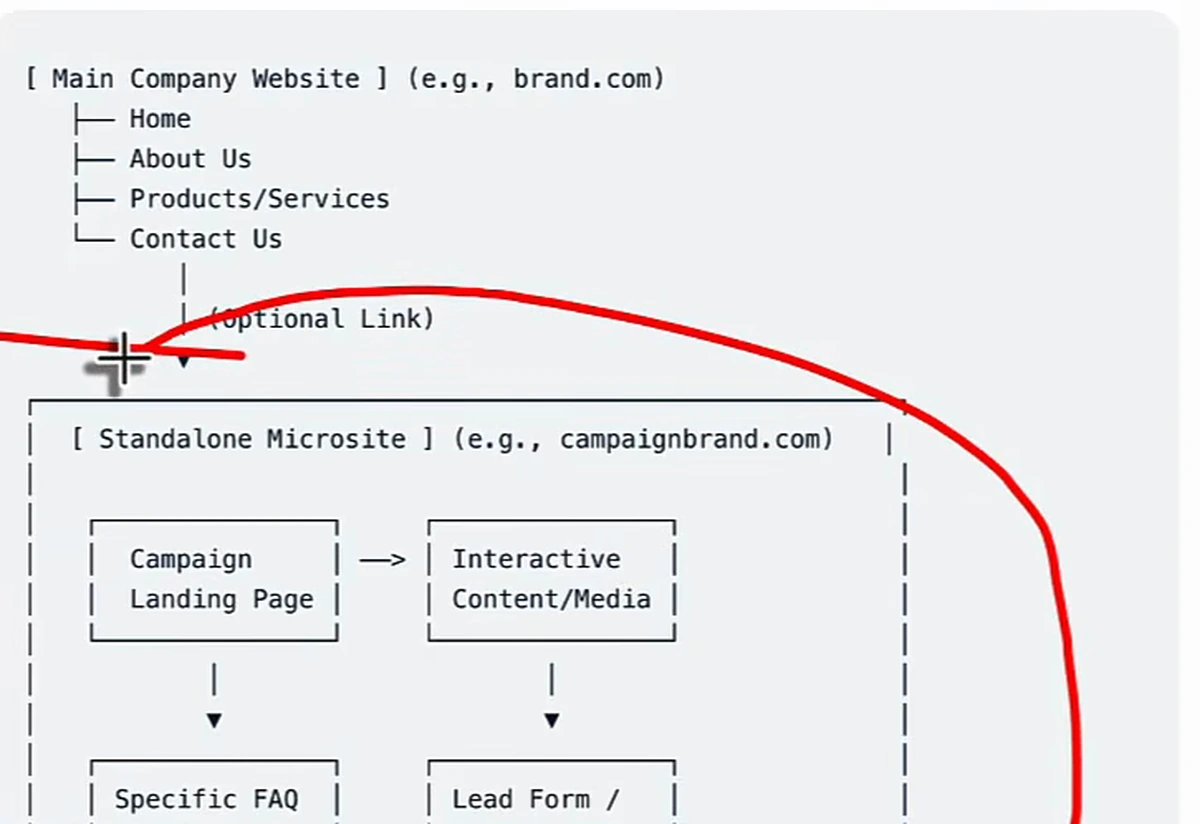
For local SEO the target is rarely a campaign — it is a service-and-city combination. Drain cleaning Miami. Emergency plumber Miami. You buy the matching domain, build the site around that phrase, and hope the exact-match URL gives you a shortcut. The traffic then has to be handed back to the main site to be worth anything.
The keywords come before the domain, not after
Whichever structure you end up building, the first move is the same and it is the one people skip: get the actual queries out of Google Search Console rather than guessing them. The video makes the point with a sample report for a Miami plumber — impressions, clicks, CTR and average position by query.
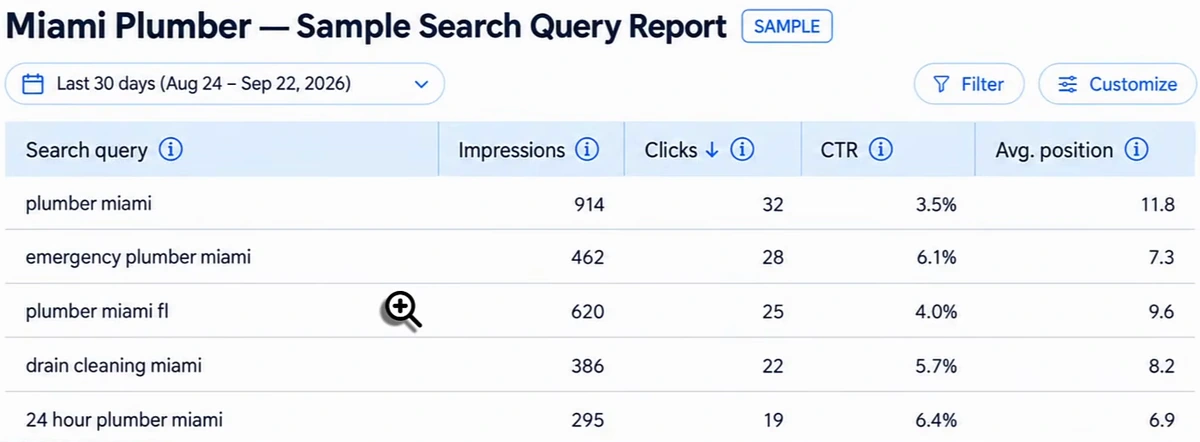
Two things fall out of a report like that. First, every row is a service plus a location, which is the unit you are going to build pages around. Second — and this is the presenter's actual argument — people search differently from how you describe your own work. The plumber thinking in terms of sink repair and clog removal finds drain cleaning miami sitting there with 386 impressions and an average position of 8.2. You would not have written that page from imagination. The mechanics of pulling these out properly are in our guide to local SEO keyword research.
What an exact-match microsite domain really costs
This is the first place where the screen tells a different story from the narration. The video takes drain cleaning miami from that report, searches GoDaddy for draincleaningmiami, and describes the result as available to purchase. What the page actually shows is draincleaningmiami.com tagged PREMIUM DOMAIN and VERIFIED DOMAIN, with an estimated value of $1,421 and a line that says, in plain words, that the domain is for sale by the current owner.
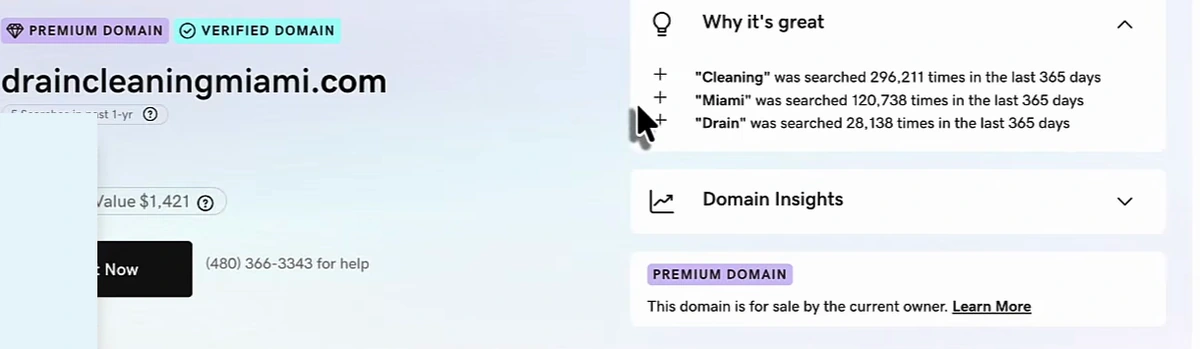
That is the microsite maths nobody puts in the pitch. The good exact-match local domains are largely gone, and the ones that are left are held by domain investors precisely because the phrase has volume — GoDaddy's own panel is selling the domain on search demand for "cleaning", "Miami" and "drain". So the real cost of one microsite is a four-figure domain, plus hosting, plus a build, plus the content, plus the technical maintenance of a second property. Multiply that by the eight or ten service-and-city combinations in your query report and the strategy stops being a strategy.
And you have not solved the hard part. A brand new domain with no history has to earn authority from zero before it ranks for anything, and everything it does earn is stranded on a site that is not your business.
The alternative: location landing pages on one domain
The structure the video actually recommends keeps everything on the main site. You give up the exact-match URL and get the match everywhere else — in the slug, in the H1, in the body — while the pages inherit the authority your domain already has.
| Layer | Example | Job |
|---|---|---|
| Service page | /drain-cleaning | The canonical page for the service itself. Everything below points here. |
| Location landing page | /drain-cleaning-miami | Targets the service-and-city query. H1 and slug carry the phrase; body carries the company, the problem and the fix. |
| Nearby-city variants | /drain-cleaning-coral-gables, /drain-cleaning-naples | Same target shape, different city, genuinely different content. |
| Supporting blog posts | "Emergency plumbing in Miami: what to do first" | Catches informational search, links into the landing page and the service page. |
The traffic lands wherever it lands — a blog post, a landing page, the service page — and every route ends at the same booking or consultation. That is the whole point of building it on one domain: three ways to be found, one place to convert, and no authority leaking to a property you will abandon in a year.
Scaling to nearby cities without writing duplicate content
Here is the failure mode the video is blunt about, because it is the reason location pages got a bad reputation in the first place. The old version of this tactic was to write one page, clone it twenty times, and change the city in the H1. Those pages do not get indexed. Google flags the duplication and the whole set sinks.
The fix is that each city page has to be genuinely different content aimed at the same target shape. Not a find-and-replace — a new page about that service in that city, with the local detail that makes it worth reading. That is more writing than most local businesses will ever do by hand, which is the real reason the microsite pitch keeps finding buyers: it feels like less work than producing thirty honest pages.
Linking the layers so they stop competing
The structure only pays off if the internal links are deliberate. In the video's version the blog post links to the location landing page, the landing page links to the service page, and the service page links back out to both — a small closed network around one service, repeated per city. Every page in it has a distinct job and a distinct target query, which is what keeps them from cannibalising each other. If you want the general rules for this, see our guide to internal linking strategy; if the local pages you already have are fighting, how to fix local SEO covers the diagnosis.
The presenter's closing warning is worth repeating because it is the argument against running both structures at once: if you build microsites and location pages for the same service-and-city terms, you are competing with yourself. Pick one.
Producing the pages at scale
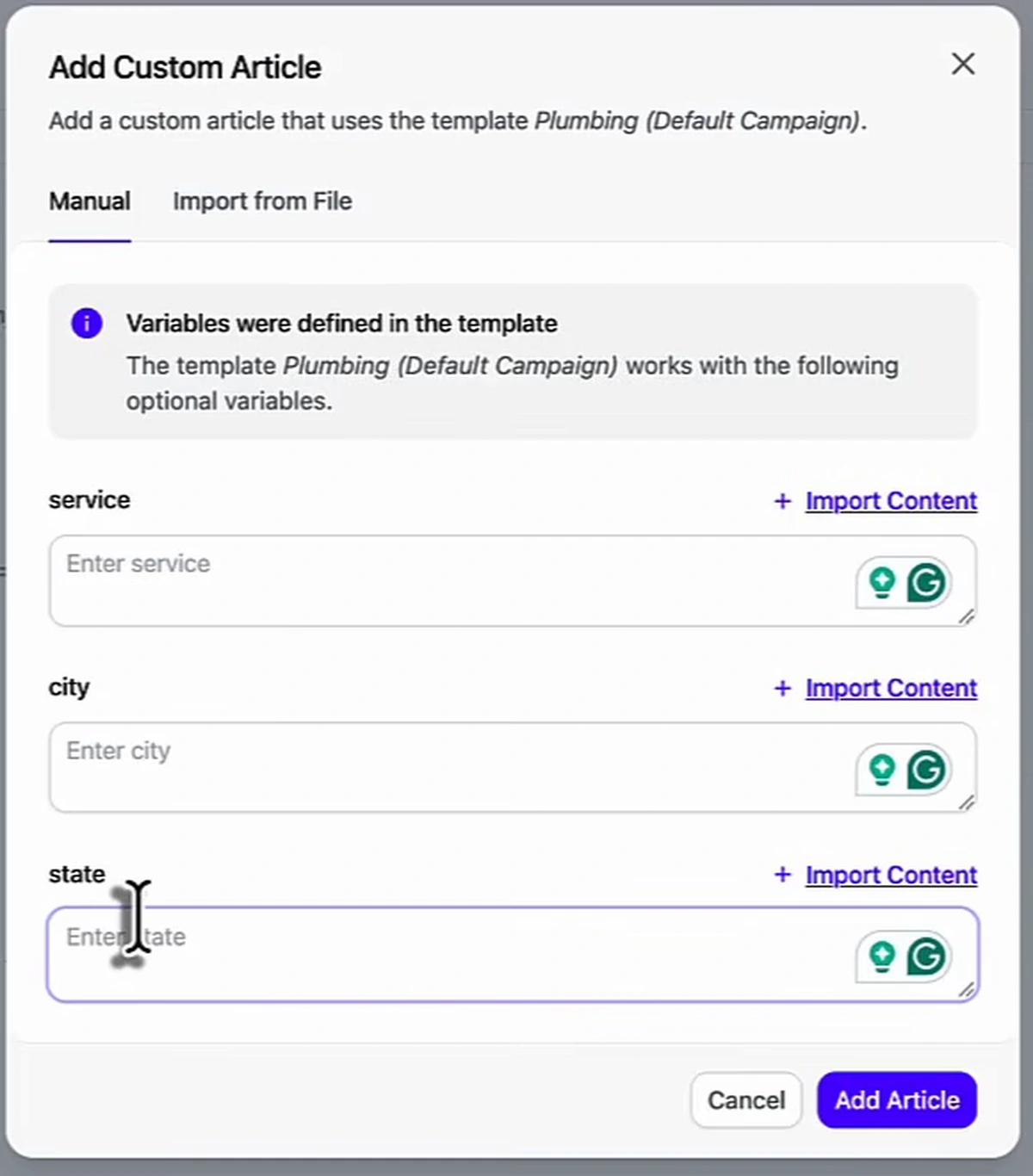
The production method shown is a reusable template with variables, which is how you get thirty different pages instead of thirty copies. The template in the video is built in Arvow and declares three variables — service, city and state — written in the outline as {{ service }} in {{ city }}, {{ state }}. Around them sits a fixed generation prompt holding the brand's standing facts, and a markdown outline that tells the model what each section must do.
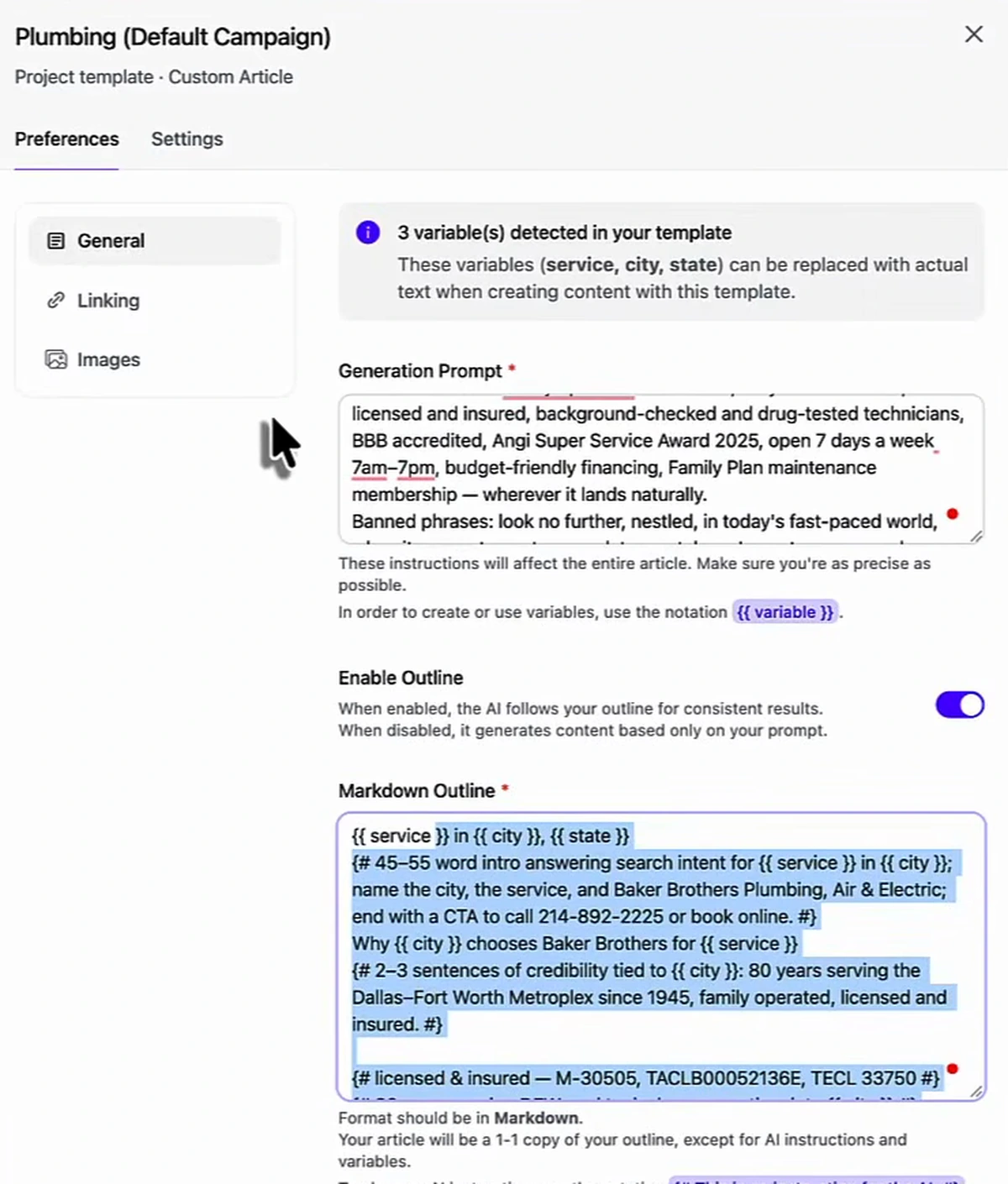
Generating a city page is then a three-field form: pick the template, type the service, the city and the state, and the page is written against the outline rather than copied from a sibling.
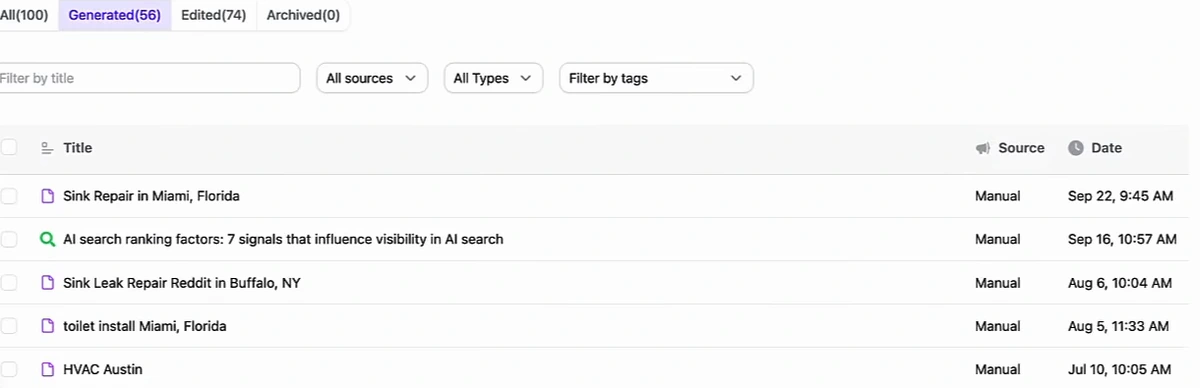
The output is a list of pages in exactly the shape the query report asked for — Sink Repair in Miami, Florida, toilet install Miami, Florida, HVAC Austin. The presenter's own account also shows what happens when a variable gets filled carelessly: one row reads Sink Leak Repair Reddit in Buffalo, NY, a service field that picked up a stray word and shipped it into a title. The template does not check your inputs.
What a generated location page contains — and two things to check
The generated page for Sink Repair in Miami, Florida opens with an auto-generated table of contents, an intro that puts the exact phrase in the first two sentences, an image with descriptive alt text, and a filled meta description. That covers most of what the video claims the tool handles for you.
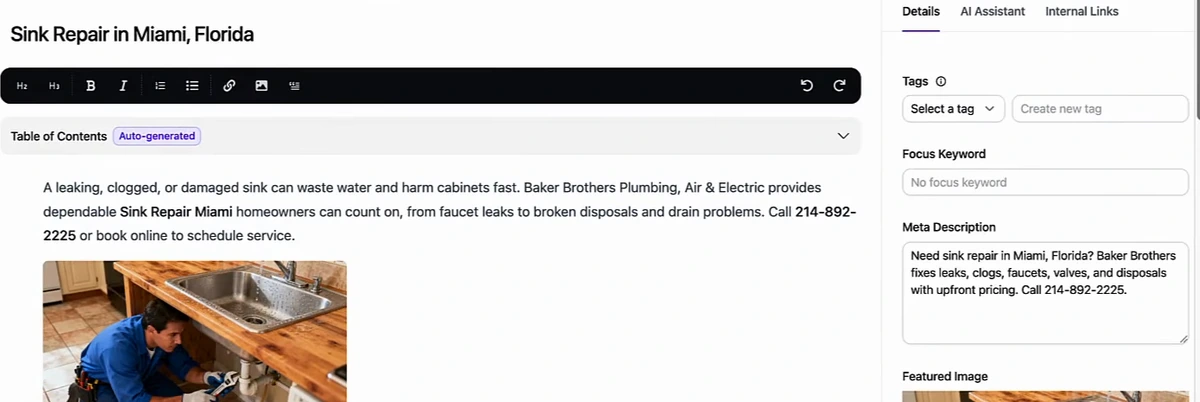
Check one: the focus keyword is not set for you. The narration says the generator handles the H1s, H2s, alt text and meta descriptions — the technical SEO, in other words. The screen agrees about the meta description and the alt text, and it shows the Focus Keyword field reading "No focus keyword". On a strategy whose entire premise is one target query per page, that is the one field you cannot leave blank. Set it per page as you publish.
Check two: audit the half of the template that does not change. The outline in this demo tells the model to write two or three sentences of credibility "tied to {{ city }}" and then hands it a fixed fact: eighty years serving the Dallas–Fort Worth Metroplex since 1945. The variable does its job and the city becomes Miami. The credibility block does not, so the finished Miami page carries a Dallas service history, Texas licence numbers and a "Best in DFW 2025" award.
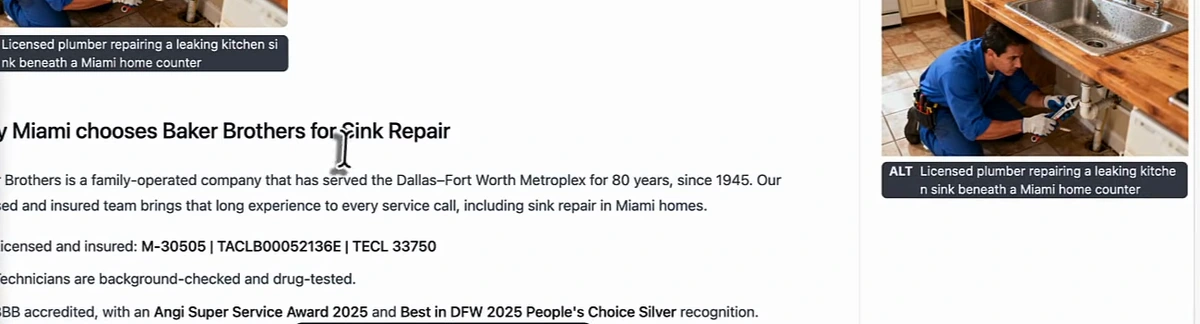
This is the template-hygiene rule in one line: the variables are the easy half. Anything hard-coded into a generation prompt — service areas, years in business, licence numbers, awards, phone numbers — gets stamped onto every city page whether it is true there or not. Before you scale a template to thirty suburbs, read the fixed part as if you were the customer in city number thirty.
When a microsite still makes sense
The honest answer is: rarely, and not for the reason it is usually sold. A separate domain is defensible when the thing on it is genuinely separate from the brand — a time-boxed campaign, a distinct product with its own audience, an acquisition you are keeping at arm's length. That is the original microsite use case, and it is the one drawn in the diagram at the top of this page.
For a local service business chasing drain cleaning Miami, the trade is bad on every axis: a four-figure domain instead of a free URL, zero authority instead of inherited authority, a second site to maintain, and traffic that has to be handed back to you through a link. The location landing page loses only the exact-match domain — which has not been the ranking lever it was a decade ago — and wins everything else.
What to build first
- Export your query report. Search Console, last three months, sorted by impressions. Highlight every row that is a service plus a place.
- Map each row to one page. One service page per service, one landing page per service-and-city pair. Write down the target query beside each URL and make sure no two match.
- Build the primary city first. Get one landing page genuinely good before you scale the pattern — it becomes the template for the rest.
- Template the fixed half carefully. Put only facts that are true everywhere into the standing prompt. Anything city-specific becomes a variable.
- Generate the nearby cities, then read them. Set the focus keyword on each one and check that the credibility block still makes sense in that city.
- Add the blog layer and wire the links. Blog to landing page, landing page to service page, service page back out. Then leave it alone long enough to rank.
If your current local pages are already in place and simply not ranking against the competition, the diagnostic pass is a different job — how to outrank local competitors walks through it.
Arvow runs the production half of this strategy: reusable templates with service, city and state variables, generated location pages with metadata and alt text, and the local SEO automation that keeps Google Business Profile posts and review replies moving while the pages build authority.

Generate, publish, syndicate and update articles automatically
The AI SEO Writer that Auto-Publishes to your Blog
- Cancel anytime
- Articles in 30 secs
- Plagiarism Free