
Google Business Profile Management Software for Agencies (2026)


Ranking a local business on Google Maps is a solvable problem. Ranking twenty of them, every month, without hiring a person whose entire job is copy-pasting review replies — that is the part nobody warns you about when you start a local SEO agency.
The work that moves the Maps pack is not hard. It is just relentless. Every client needs their reviews answered. Every client needs their profile posting something every few days. Multiply that by your client list and you have invented a job that scales linearly with revenue, which is the one thing an agency cannot afford.
That upkeep is what Google Business Profile management software is for. This walkthrough shows how the recurring work gets configured once per client and then runs on its own — including the part most tools get wrong, the approval layer that stops you publishing something embarrassing on a client's behalf. One disclosure up front: the tool being demonstrated is Arvow, which is our own product. This is a walkthrough of what it does, not a comparison against other tools, and it covers reviews and posts — not rank tracking, citations or client reporting.
What it automates, all of which is shown on screen below:
- Connecting multiple client listings to one workspace, so the work happens in one place instead of one Google login per client.
- Reply rules by star rating — five-star replies can publish automatically while one-star replies wait for a human.
- AI review replies with control over tone, language, length and how long the reply waits before it posts.
- Google Business Profile posts as Update, Event or Offer, with generated images.
- Scheduling a month of posts ahead, so the listing keeps looking active without anyone touching it.
- Review-first drafts or full automation, chosen per automation — the difference between safe client work and a bad afternoon.
What Google Business Profile management software has to automate
Strip local SEO down to what has to happen again next week and you are left with two things:
- Replying to every review, in a way that adds context rather than saying "thanks."
- Publishing Google Business Profile posts often enough that the listing reads as active.
Everything else in local SEO is closer to a project than a chore. Categories get set once. Citations get built once. The profile mistakes that make a listing invisible get fixed once. But reviews arrive forever, and a profile that stopped posting in March looks abandoned by June.
That asymmetry is why agency margins die in the maintenance layer. The setup work is billable and finite. The upkeep is neither.
Why review replies are worth automating properly
There is a lazy version of review automation — a canned "Thank you for your feedback!" fired at every rating — and it is worse than not replying, because it burns the one piece of review content you fully control.
A review reply is the only text on the listing that you write. The customer decides what the review says. You decide what the reply says. That means the reply is where the service, the location and the business name can be stated plainly: thank you for having us out to the property in Lisbon for the emergency call-out reads very differently to Google — and to a language model — than thanks!
The language-model point is the one that has changed recently. When an assistant summarises a local business, it ingests the review text and the owner's response underneath it. The reply is not a courtesy any more; it is indexable copy attached to a high-authority page you don't own. We went deeper into the ranking side of this in why more reviews won't rank you higher.
So the goal is not "reply to everything fast." It is "reply to everything fast, in the client's voice, with the right context, without a human reading every one" — and that requires the automation to be configurable rather than canned.
Route by star rating, not by client
The first configuration decision is the one that makes the whole thing safe: not every rating deserves the same treatment.
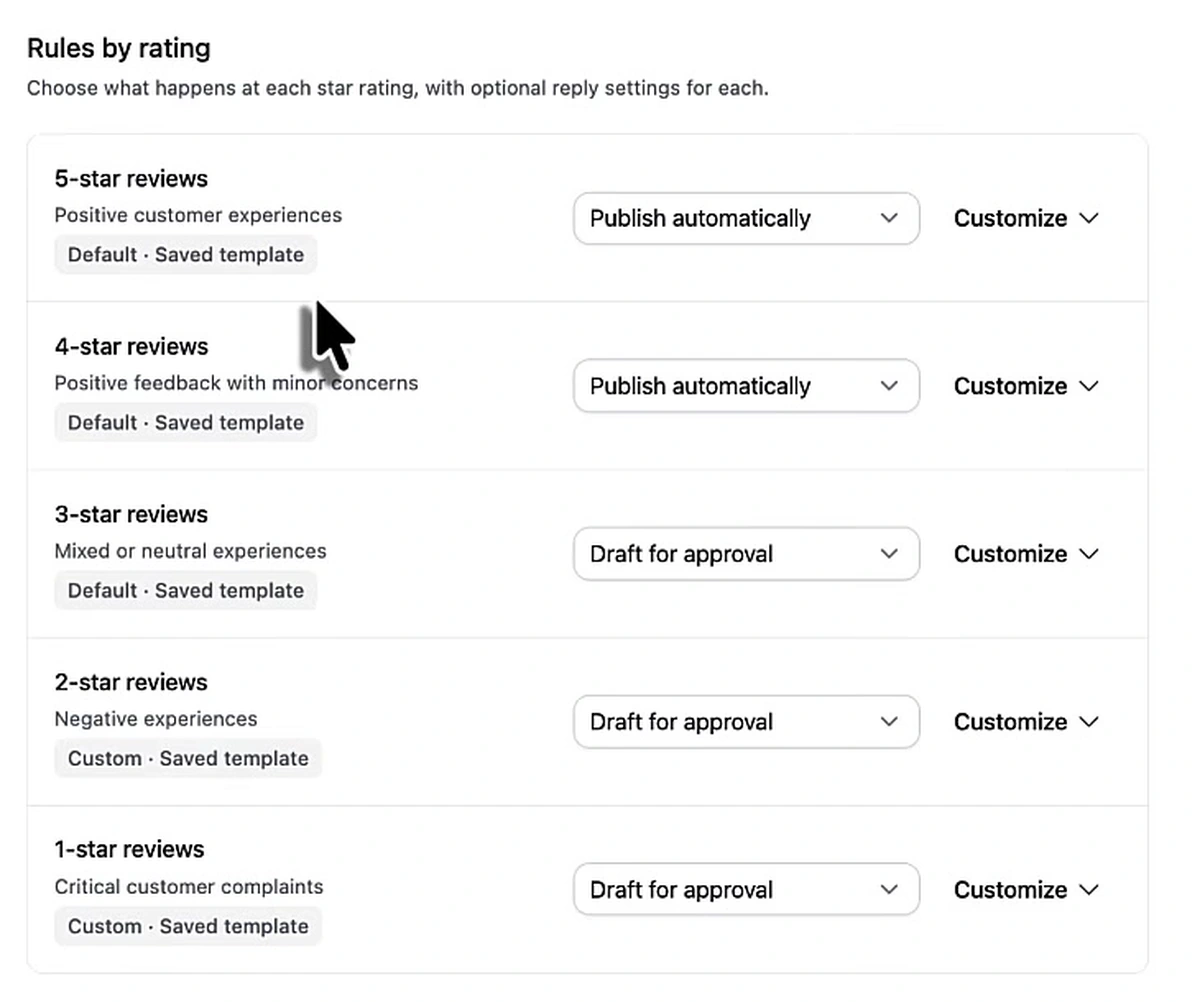
Five- and four-star reviews are set to publish automatically. Three-, two- and one-star reviews are set to draft for approval. Each rating carries its own saved template, and the two negative tiers use a custom one rather than the default.
This is the split that matters for agency work. Roughly the reviews that could damage a client relationship are exactly the reviews a person should see before they go live, and they are a small minority of the volume. You are not approving every reply — you are approving the handful that carry risk, which is a few minutes a week rather than a few hours.
It also means the failure mode of the automation is bounded. If the AI writes something tone-deaf about a one-star complaint, it writes it into a draft, not onto your client's public profile.
The settings that decide whether a reply is worth publishing
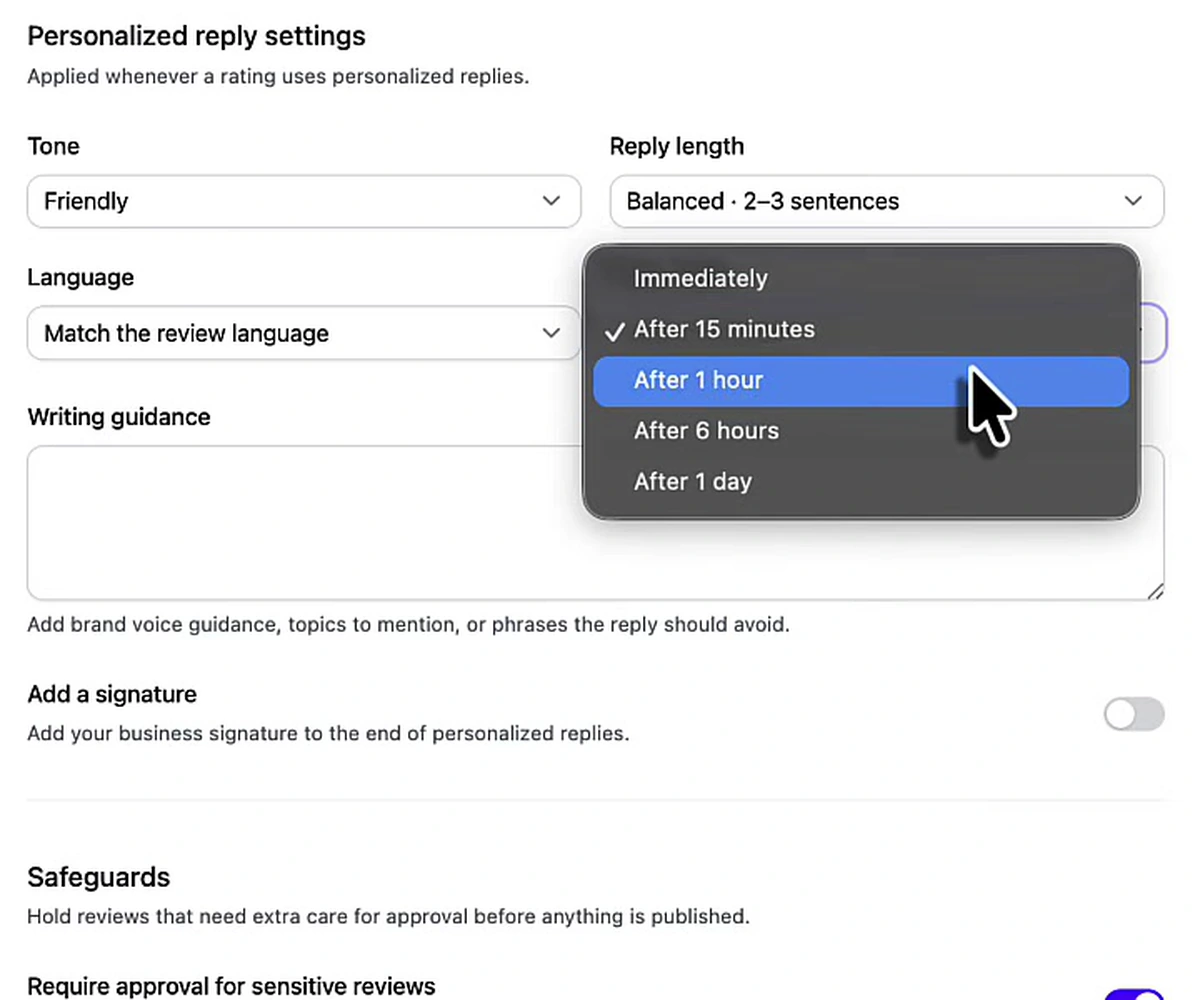
Four of these change the output enough to be worth setting deliberately:
- Tone and length. Set here to friendly and "balanced · 2–3 sentences." Long enough to name the service and the location, short enough not to read as filler.
- Language. "Match the review language" — which matters more than it sounds if your client serves a city where reviews arrive in two languages. Answering a Portuguese review in English is a visible tell that nobody is home.
- Writing guidance. A free-text box for brand voice, topics to mention, and phrases to avoid. This is where the SEO context goes: the service names, the service area, the things the client does not want promised in writing.
- Reply delay. Immediately, after 15 minutes, after 1 hour, after 6 hours, or after 1 day.
The delay is the setting people skip and shouldn't. A reply that lands nine seconds after the review reads like a bot, because it is one. Fifteen minutes to an hour reads like a business that checks its notifications. It costs nothing and it is the difference between automation that is invisible and automation that is obvious.
Underneath sits a safeguards block — hold reviews that need extra care for approval before anything is published, with a toggle for sensitive reviews. That is the backstop for the case your star-rating rules didn't anticipate: a five-star review whose text mentions something legal, medical or otherwise not worth improvising on.
Google Business Profile posts, generated and scheduled
The second recurring job is posting. A Google Business Profile that publishes nothing is a profile that looks dormant, and posting every few days is the cheapest freshness signal available to a local business — it is one of the steps in the process we use to rank in the Maps pack.
It is also the single most tedious thing on an agency's task list, because a GBP post is small, low-stakes, and due again on Thursday.
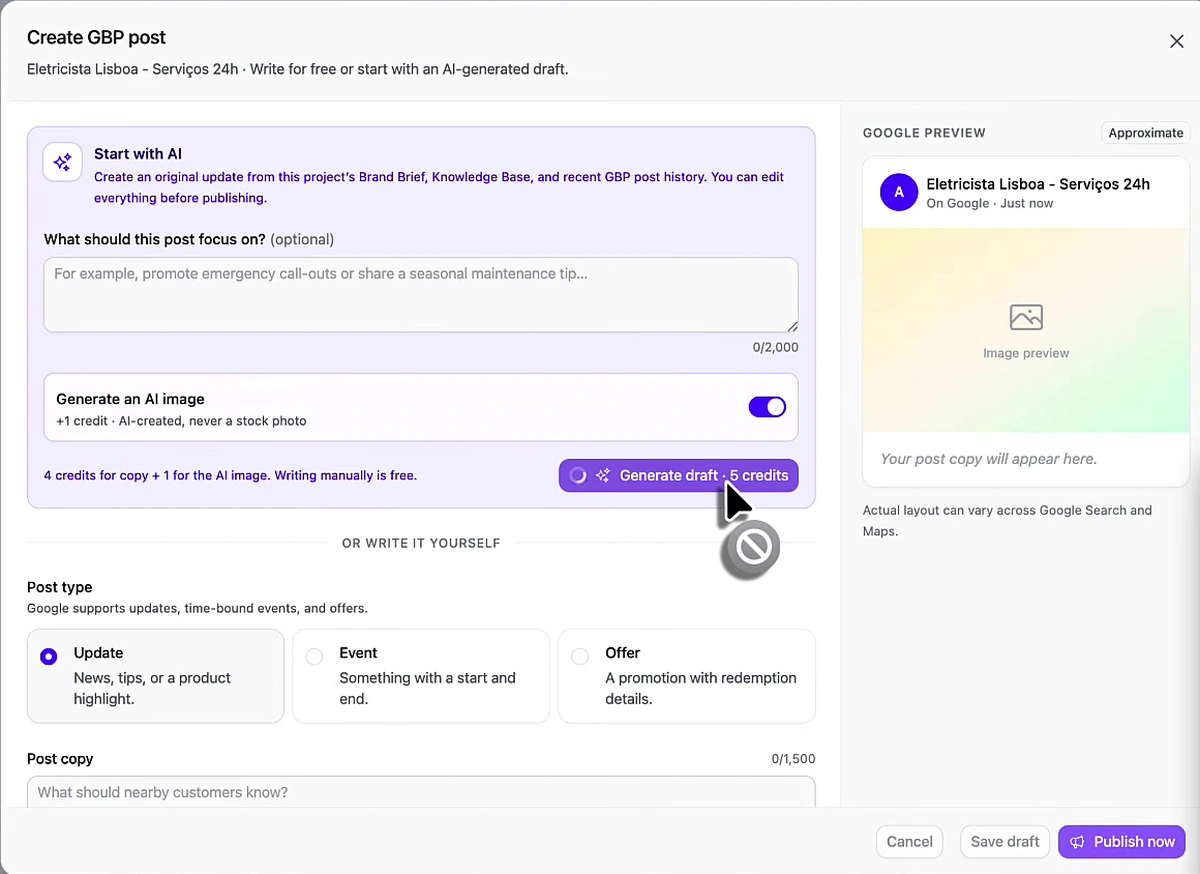
Two details in that screen are worth pulling out. First, the AI draft is built from the project's Brand Brief, Knowledge Base and recent GBP post history — the last one being what stops a month of posts from saying the same thing four times. Second, Google supports three post types and they are all here: Update (news, tips, a product highlight), Event (something with a start and end), and Offer (a promotion with redemption details).
Generating costs credits — four for the copy plus one for an AI image, per the panel — and writing a post yourself is free. Worth knowing before you point an automation at forty locations.
The approval switch that makes this safe for client work
Doing this one post at a time is still manual work, just faster manual work. The automation is where the month disappears.
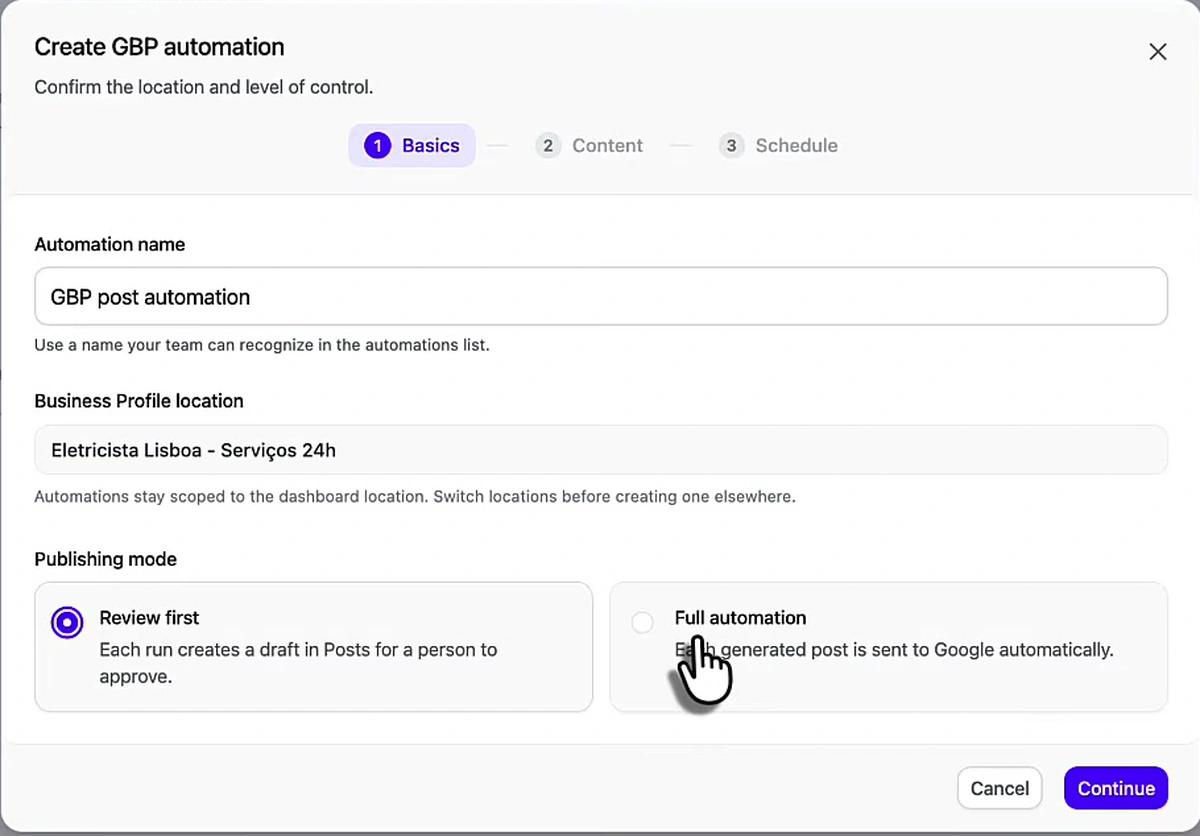
Three things to note here, in order of how much they matter to an agency:
Publishing mode. "Review first" means each run creates a draft in Posts for a person to approve. "Full automation" means each generated post goes to Google automatically. For a client you just onboarded, run review-first for a few weeks until you trust the output, then switch. For a client you have run for two years, full automation and a monthly spot-check is probably right. The point is that this is a per-client decision, not a per-tool one.
Automations are scoped to one location. The modal says it directly: automations stay scoped to the dashboard location, and you switch locations before creating one elsewhere. So a twenty-client agency sets up twenty automations. That is honest, and it is still twenty setup tasks instead of twenty recurring ones — but budget an afternoon for onboarding rather than expecting a global switch.
The wizard is Basics → Content → Schedule. The schedule step is what turns "post every few days" from a calendar reminder into something that has already happened.
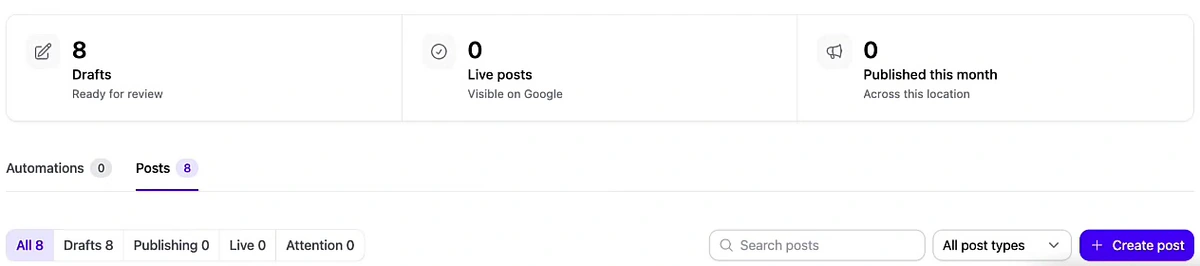
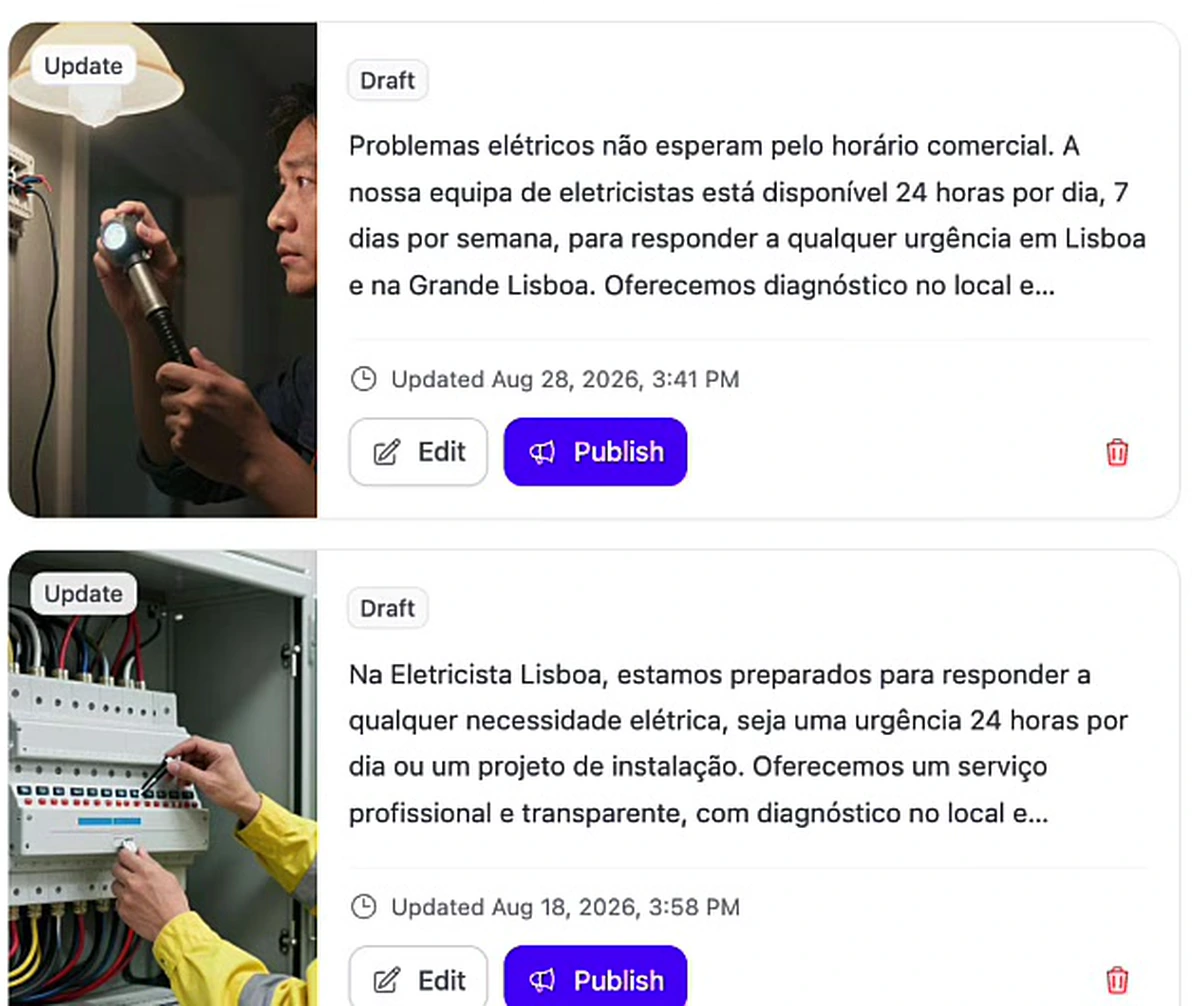
That queue is what review-first mode looks like in practice: a month of posts already written, sitting behind one approval pass instead of eight separate sit-downs with a blank composer.
What this actually changes about running the agency
The honest framing is not "AI does your local SEO." It is that the two jobs which scale linearly with your client count stop doing that, and everything else stays exactly as hard as it was.
Practically, the order we would run it in for a new client:
- Fix the profile first. Automation on a badly categorised, half-filled listing just makes a badly categorised listing post more often. That work comes first, and it is covered in the Google Business Profile SEO guide.
- Set the rating rules before the voice settings. Decide what auto-publishes and what waits for a human. That is the risk decision; tone is a preference.
- Write the guidance box properly, once. Service names, service area, things not to promise. This is the highest-leverage text you will write for that client all month.
- Run posts in review-first mode for a cycle. Approve a month of drafts, see what the model gets wrong about the business, feed that back into the brand brief, then decide whether to go full automation.
- Repeat per location. There is no global switch. Setup is per client; upkeep is not.
What you get back is the part of the week that used to be spent on work that was important, repetitive, and completely unbillable.
What this walkthrough does not cover. It shows no pricing, and it is not a comparison — no competing tool is evaluated here. It also stays inside the two jobs demonstrated on screen: review replies and Google Business Profile posts. Rank tracking, citation building and client reporting are outside what this walkthrough shows, so treat the scope above as the scope of the demo rather than a full feature inventory.
If you manage listings for more than one client, the local SEO automation overview is the place to start. The two halves are also documented on their own pages: Google review automation for the reply side, and GBP posts automation for the posting side.
FAQ
What does Google Business Profile management software actually do?
At minimum it connects to your clients' Google Business Profiles and takes over the two jobs that never stop: answering reviews and publishing posts. In the walkthrough above that means reply rules set per star rating, AI-written replies with control over tone, language, length and delay, and Update, Event or Offer posts generated with images and scheduled a month ahead — with an approval step in front of anything that goes out under a client's name.
Is this a comparison of GBP management tools?
No. This is a walkthrough of Arvow, which is our own product. It names no competitors, shows no pricing, and makes no claim to be an independent review. If you want a vendor comparison, the white label local SEO services roundup evaluates multiple providers.
Can you manage multiple Google Business Profiles from one dashboard?
Yes — profiles are connected per location and you switch between them from the same account. The thing to know is that automations are scoped to a location, so each client needs its own review-reply rules and its own posting automation. The configuration is per client; the ongoing work is not.
Is it safe to auto-reply to Google reviews for a client?
It is safe for the ratings where the downside is small, which is why the rating split matters. Auto-publishing four- and five-star replies is low risk. Auto-publishing a reply to a one-star complaint is not, and should be held as a draft for a person. A safeguards setting that holds sensitive reviews for approval regardless of rating is the sensible backstop.
Do review replies affect AI search results?
They are part of what a model reads when it summarises a business, because the reply sits directly under the review on the profile. That makes replies one of the few pieces of text on a listing you fully control, which is a reason to write them with context rather than a stock thank-you.
How often should a Google Business Profile post?
Often enough that the profile never reads as dormant — every few days is the usual target, which is roughly the eight-posts-a-month cadence shown above. Consistency matters more than volume, which is exactly why scheduling beats remembering.
Should new clients start on full automation?
No. Run review-first mode for a cycle so you can see what the model assumes about the business, correct the brand brief, and only then switch. The cost of review-first is one approval pass a month; the cost of getting it wrong in public is a client conversation.
Does automating replies mean the same text on every review?
Only if you choose saved templates for every rating. The alternative is personalized replies generated per review with tone, length, language and written guidance applied — which is the setting worth paying for, since a visibly templated reply gives the game away.

Generate, publish, syndicate and update articles automatically
The AI SEO Writer that Auto-Publishes to your Blog
- Cancel anytime
- Articles in 30 secs
- Plagiarism Free