
How to Rank #1 on Google Maps in 2026: The Local SEO Process


Local SEO is, for all practical purposes, Google Maps SEO. Search dentist NYC and the biggest thing staring back is the map pack — most people never scroll past it. They want a business they can call today, and the pack is a search engine inside the search engine, with its own rules.
I have spent years reverse-engineering those rules for my own projects and for clients. This is the process I use to rank a business in the Maps pack — any business, any city: what you feed the listing, in what order, and why.
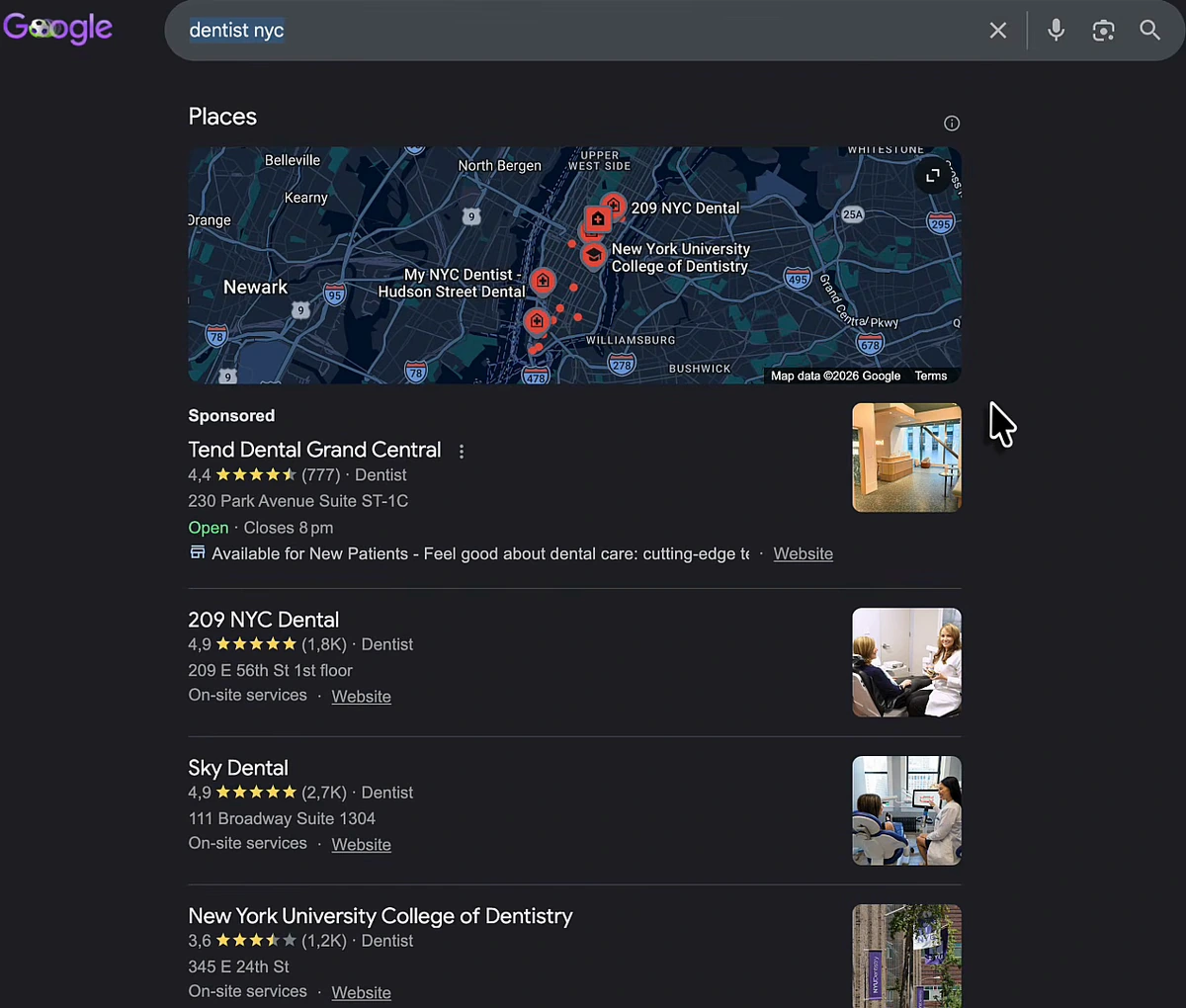
Google routes every local search to the Maps pack
Search any "service + city" query and the Places box sits above the organic results. If the intent is local, Google pushes you into Maps.
This even holds in AI Mode. I ran the same query through Google's AI Mode on camera, and the answer was assembled almost entirely from Maps listings — hours, neighbourhood, services, all lifted from profiles and their reviews.
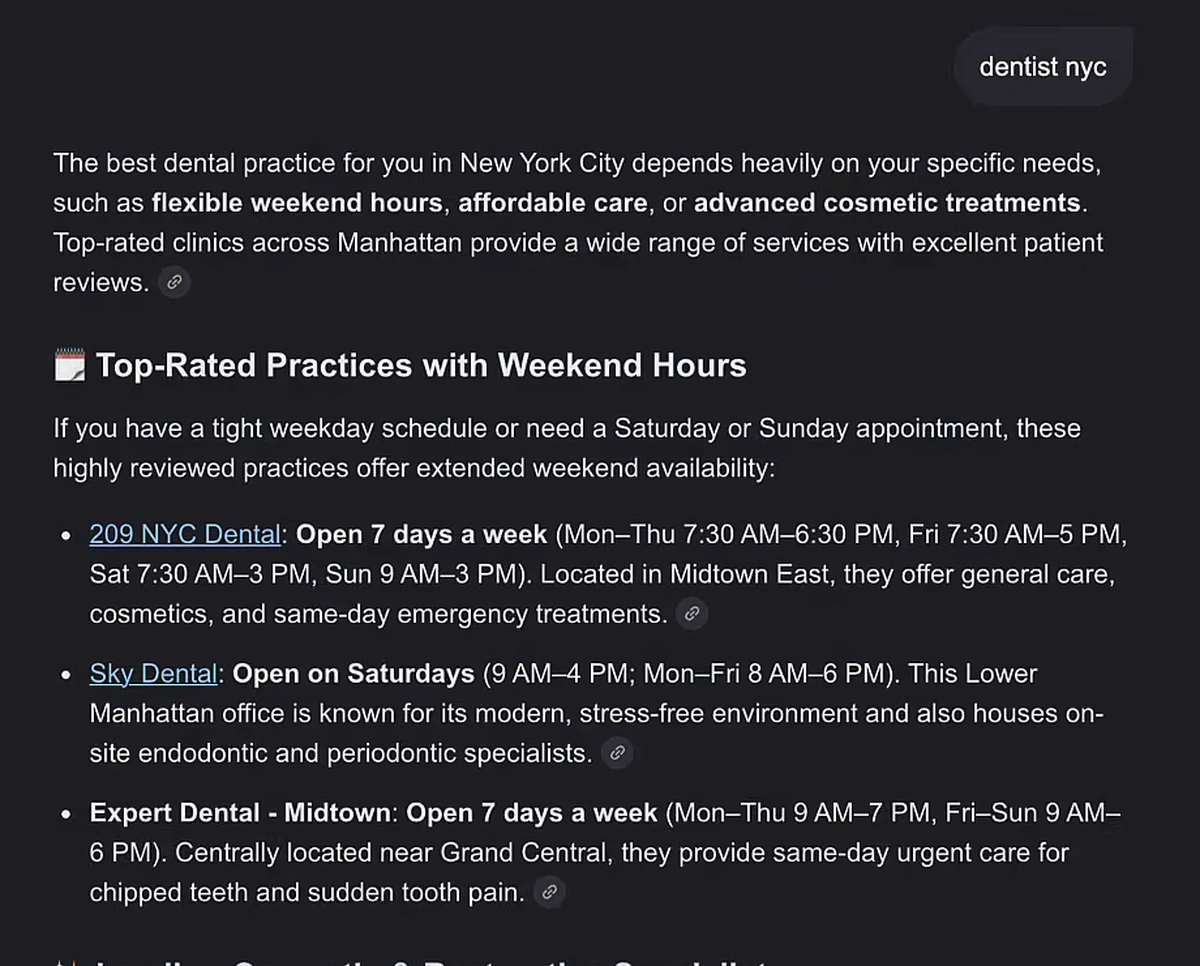
That matters because everything below pays twice: once in the classic pack, and once in whatever AI surface reads the same data. LLMs crawl listings, reviews and replies the same way Google does — the same reason we built an LLM visibility tracker for the AI side of search.
The mental model: your listing is a living entity
Google treats a Business Profile as a living entity. Rankings in the pack are not decided by one factor — reviews alone do not explain why one dentist outranks another with more of them. Proximity plays a part, classic search rankings play a part, and review velocity, photos, posts and replies all add up.
My mental model: if ranking first takes 100 points, reviews give you a few, posts a few more, the description, categories and website each add their share. Even a full scorecard can lose to proximity — but every point you leave on the table is one a competitor picks up. The whole process is: feed the entity, on every surface Google gives you, more consistently than the businesses above you.
Build the review engine first
Reviews are the loudest signal, and most businesses run them wrong in two ways: they collect generic praise, and they never reply properly.
Instruct customers on what to write
"Thanks, five stars" is almost worthless. A review that ranks — and sells — mentions the service, the outcome and the location: have the customer name the procedure, the pain point it solved, and the city. "He did my rhinoplasty and I went home the same day in Plano, Texas" is data Google can match to a future search. You are not writing it for them; you are showing them what a useful review looks like.
Reviews surface directly in the pack
Google pulls a quote from your reviews into the pack itself, and that one line is often what decides which of three 4.9-star clinics gets the click.
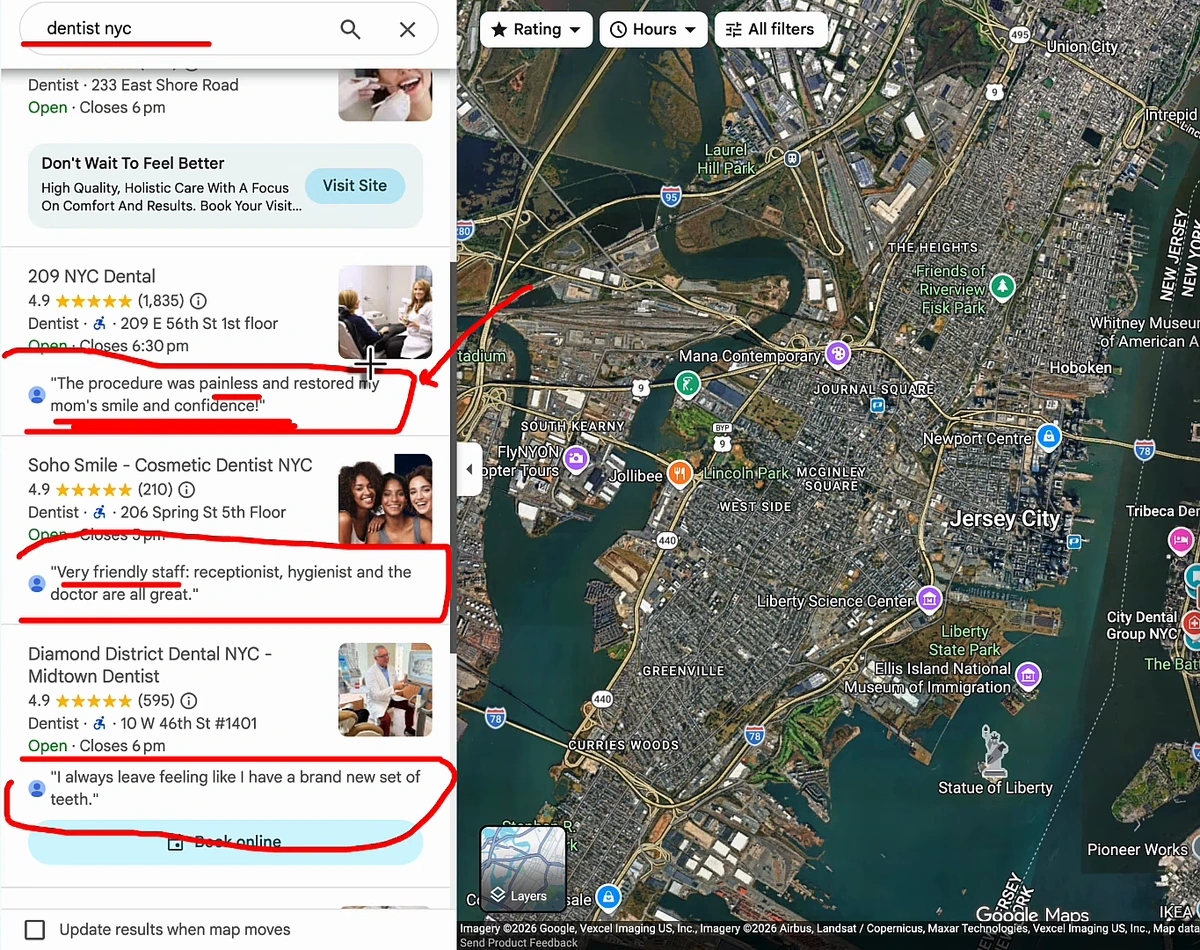
Two more things I weigh when auditing reviews. First, Local Guides: reviews from accounts Google has badged as Local Guides carry more weight in my experience than reviews from throwaway accounts. Second, Google aggregates reviews from across the web onto your listing — so collect them everywhere, especially on your own site. If chasing every customer is the bottleneck, that is what review automation is for.
Reply to every review — and treat the reply as SEO copy
I think it is genuinely dumb not to reply to reviews. The reply is read by two audiences: future customers skimming to see how you behave, and Google (plus every LLM) looking for context about what you do. Here is an example I pulled apart on camera — a detailed, keyword-rich review, answered with three words.
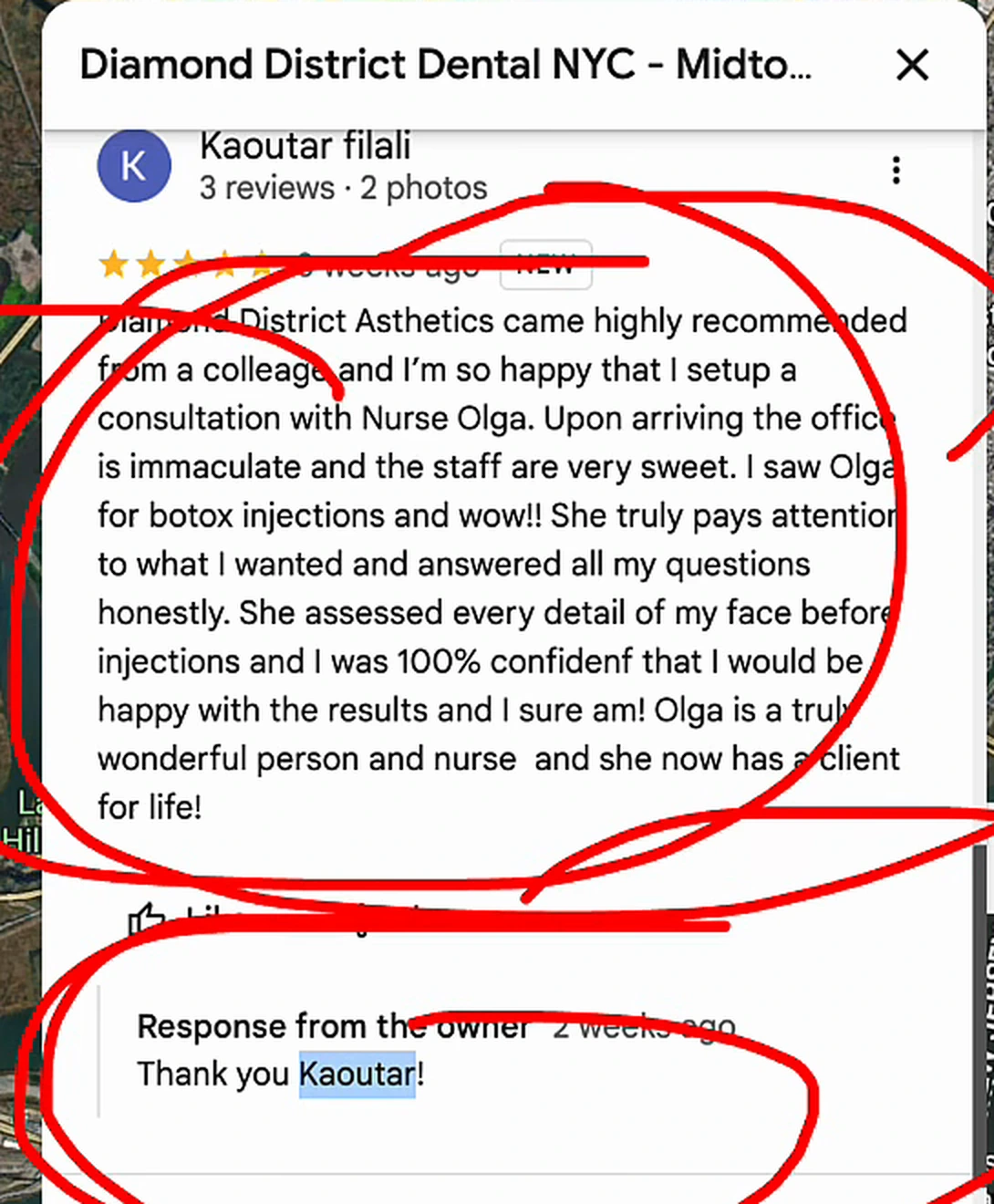
The fix costs thirty seconds: "Thank you for coming in for your consultation with Nurse Olga at our Midtown clinic — glad the results made you this happy." Brand, service, location, outcome. Every reply tells Google which searches you deserve to appear for — especially specific ones like mommy makeover surgery or emergency toilet drainage, where the pack is decided by whoever has the most relevant text attached to their entity.
Post like it's a social profile, and fill out everything
Your listing has a posts feed, and people scrolling profiles do see it — special offers, before-and-afters, team photos. There is a correlation between posting activity and rankings; not causation, but more points on the board and one more signal the entity is alive. My rule: post at least as often as the competitors above you, plus a bit more. If Google gives the feature, you use it. This is also the easiest thing to take off your plate with GBP posts automation.
Same logic for the profile: write a description that says exactly what you sell, how, and under which brand names — 99.9% of humans never read it, but Google does. Use real photos, never stock; a stock photo on a medical listing kills trust on sight. And fill out every field the dashboard offers, to 100%.
Steal the categories of whoever is already ranking
Every listing has one primary and several secondary categories, and this is the highest-leverage five-minute fix I know. You cannot see competitors' categories natively, but free "Google Business category" checker extensions in the Chrome web store reveal them on any listing.
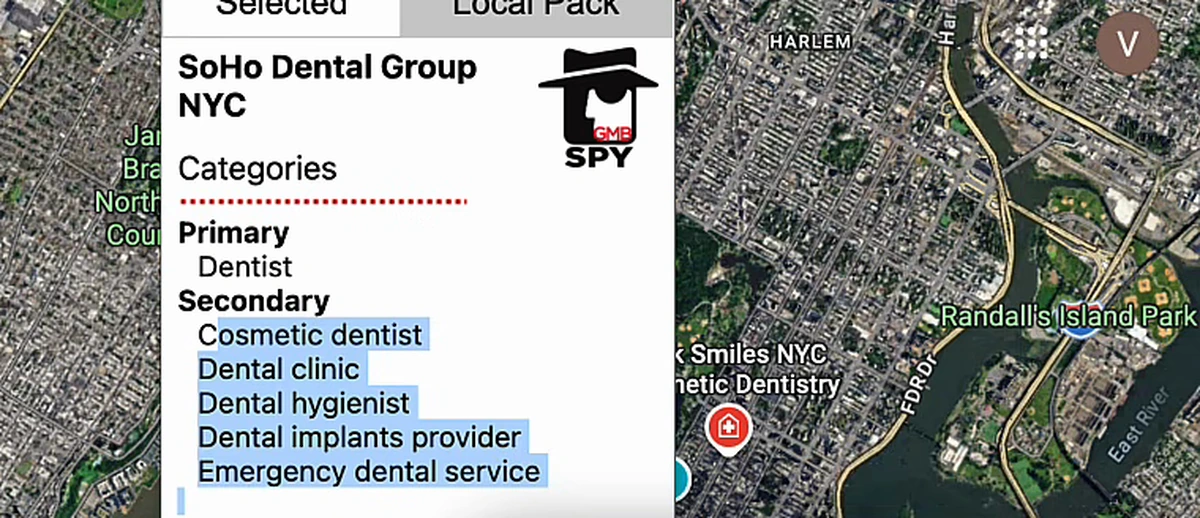
Pull the primary and secondary categories of the top three or four listings for your money keyword, and mirror them. With dentists it is obvious; with lawyers, plumbers or surgery clinics it gets iffy fast, and a surprising number of struggling listings simply sit in the wrong category. I have had clients where a category correction alone moved rankings meaningfully. Small change, outsized result.
Make your website pull for the listing
The pack and classic search are not separate games. How your site ranks on normal Google feeds how your listing ranks on Maps, and if your site barely exists, the listing fights alone.
The single move I push hardest: syndicate your reviews onto your own site — a dedicated /testimonials or /reviews page. It does three jobs at once. Visitors who skipped your Maps reviews still see social proof. The page becomes keyword- and location-optimised copy ("great rhinoplasty service in Dallas, Texas" is now text on your domain). And LLMs browsing your site can quote those reviews when someone asks for "a gentle dentist for my mom in NYC" — you get cited because the review lived where the model could read it.
While you are at it, keep a Q&A section on the site. Google has been phasing out the dedicated Q&A block on listings, and that data has to come from somewhere — most likely your pages.
Backlinks still decide the tiebreaks
Because classic rankings feed Maps rankings, links to your site are part of the Maps process whether you like it or not: ranking higher on regular Google raises the likelihood your listing ranks higher in the pack.
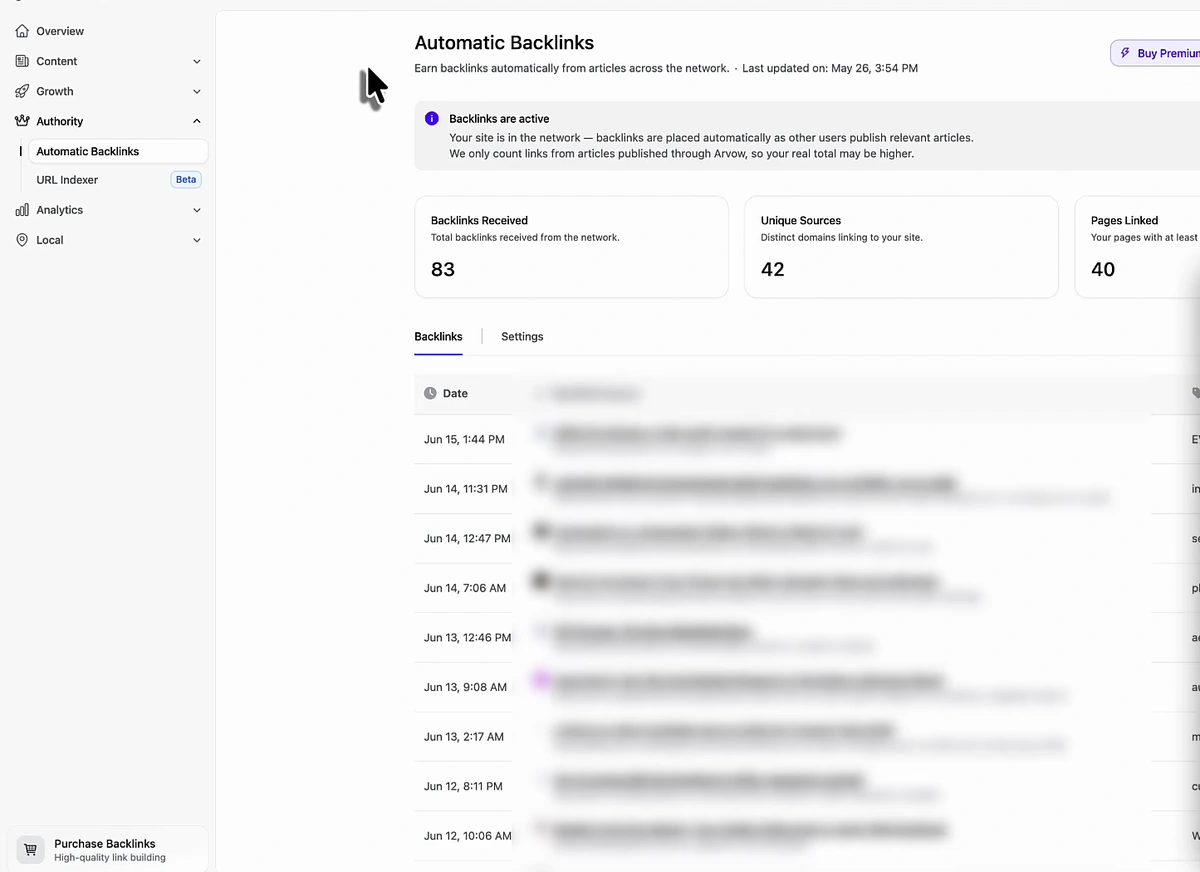
This is the part I have automated for myself. Arvow's automatic backlinks feature pools thousands of sites across hundreds of niches and exchanges relevant links between them on autopilot. I showed my dashboard live in the video: since enabling it on May 1st, it has built 83 backlinks from 42 unique referring domains, linking to 40 of my pages — including, as I demonstrated on camera, a link from a DR 70 site with real US and UK traffic.
The process, in order
- Fix categories first. Mirror the primary and secondary categories of the top 3–4 listings.
- Complete the profile to 100%. Keyword-rich description, real photos, every field filled.
- Start the review engine. Ask every customer, and instruct them: service + outcome + location.
- Reply to everything — brand, service, city in every reply.
- Post weekly, at least matching the competitors above you.
- Syndicate reviews to a /testimonials page and keep a Q&A section on your site.
- Build links and content so classic rankings pull the listing up with them.
- Re-check monthly: categories of new leaders, review velocity, post frequency. The entity has to keep looking alive.
Review replies that rank, weekly posts, photo checks, competitor tracking — we are automating all of it end-to-end. See Arvow's local SEO automation: the listing runs itself while you run the business.
FAQ
How do you rank number one on Google Maps?
Treat the listing as a living entity and feed every surface Google gives you: correct categories, a complete keyword-rich profile, reviews that mention service and location, SEO-written replies, weekly posts, and a website that ranks in classic search. No single factor wins; the accumulation does.
Do Google reviews really affect Maps ranking?
Yes, but not as a raw count. Reviews that name the service and the location give Google data to match against specific searches, and one review line is quoted directly in the pack. Reviews from Local Guide accounts also carry more weight in my experience than reviews from fresh accounts.
Should I reply to every Google review?
Every single one. The reply is read by prospects deciding between listings and parsed by Google and LLMs for context. A good reply repeats the brand name, the service and the city in natural language — a bare "thank you" wastes the slot.
How do I choose my Google Business Profile categories?
Copy the market. Use a category-checker Chrome extension to reveal the primary and secondary categories of the top three or four listings for your target keyword, then match the primary exactly and adopt the relevant secondaries. Wrong categories are one of the most common reasons a solid listing struggles.
Does my website affect my Google Maps ranking?
Strongly. Classic search rankings and Maps rankings feed each other, so content, backlinks and on-site review pages all pull the listing up. A dedicated testimonials page doubles as keyword-optimised copy and as source material LLMs can cite.
How long does it take to rank in the Maps pack?
Treat it as a monthly process, not a one-time fix. Category corrections can move rankings quickly, while review velocity and backlinks compound over months.
None of this is glamorous — it is boring, repetitive feeding of a profile most owners abandon after setup week. That is exactly why it works: the bar in most local markets is low. For the fundamentals in course form, take the free local SEO course; my five quick local SEO tips make a good checklist to keep beside this process.

Generate, publish, syndicate and update articles automatically
The AI SEO Writer that Auto-Publishes to your Blog
- Cancel anytime
- Articles in 30 secs
- Plagiarism Free