
Google Business Profile Automation: What to Automate and What to Never Automate (2026)

Two Google Business Profile tasks decide whether your listing looks alive: replying to reviews, and posting updates. Both are small. Both are endless. Both are the first thing to slide when the business gets busy — which is exactly when the listing most needs to look active.
That makes them the obvious candidates for Google Business Profile automation. This article walks through what the automation actually looks like when you set it up, using the review-reply and GBP-post automations in Arvow as the worked example — and, more importantly, where the line sits between the work you should hand to a machine and the work you must not.
Why activity signals matter on Maps
Search any city plus a trade and you will scroll past listings that have not been touched in years — businesses that closed, owners who moved on, profiles nobody has logged into since setup. Google has the same problem you do: it cannot tell from a dormant profile whether the business will answer the phone.
Reviews and posts are two of the cheapest signals that it will. A review reply is dated, and it is proof a human read something a customer wrote. A post is dated, and it is proof somebody logged in. Neither is hard. Both stop happening the moment the week gets busy.
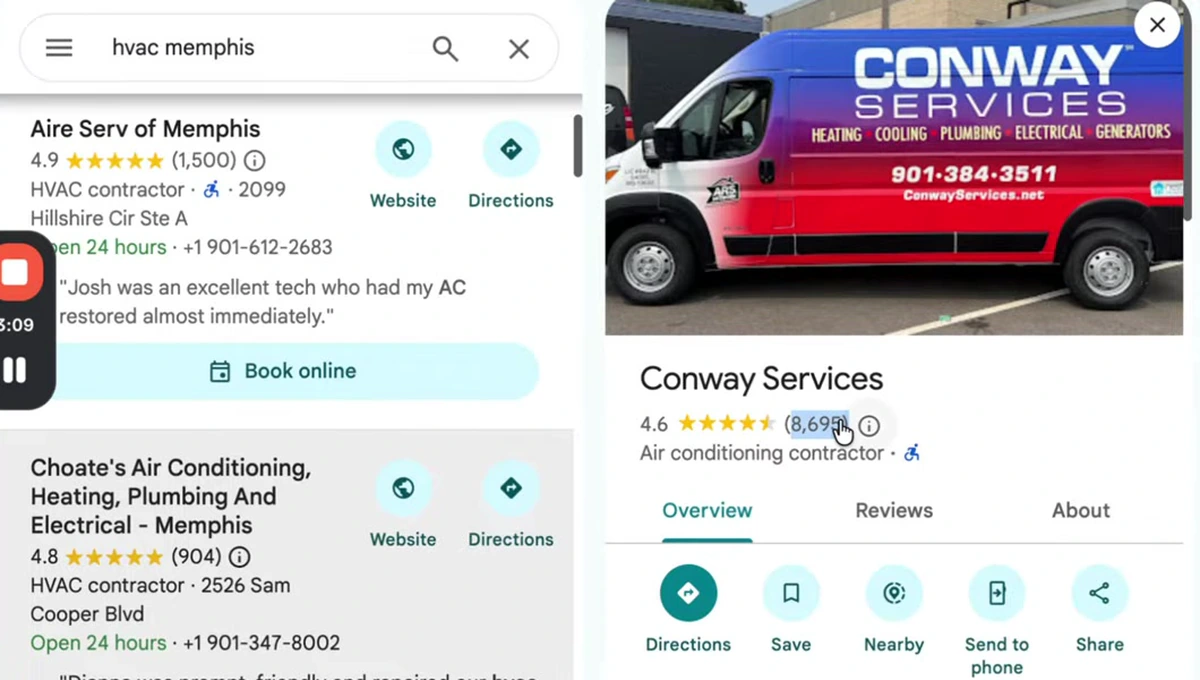
Here is the profile the source video uses as its example — an HVAC company in Memphis with 8,695 reviews, posting most weeks.
An honest reading of that screenshot
The video presents this listing as the number one result and attributes its position to posting and replying. Its own screenshot does not show that. In the results column on the left, the first listing is Aire Serv of Memphis at 4.9 stars from 1,500 reviews. Second is Choate's at 4.8 from 904. The 8,695-review profile is the one that has been clicked open, not the one ranked first — and it carries the lowest rating of the three at 4.6.
This is worth stating plainly because it changes what you should expect from automating these tasks. Google's own local ranking guidance describes three factors: relevance, distance and prominence. Review count and rating sit under prominence. Posts are not named in it at all. Distance — how near the searcher is to your address — is a factor you cannot automate, cannot buy, and which routinely outranks everything else in the list.
So the accurate version of the claim is narrower and more useful than the one in the video:
- Review volume and recency are a genuine prominence input. 8,695 reviews is a real moat.
- Rating is a separate input, and a high count does not compensate for a lower average. That is visible right there in the screenshot.
- Posts are best understood as a conversion and freshness asset, not a ranking lever. They occupy space on your listing, carry a call-to-action button, and show a searcher you are trading. That is worth doing. It is not worth doing because you believe it moves you up the pack.
Automating these tasks is still the right call — it just buys you consistency and a better-looking listing, not a rank. If ranking is the actual goal, the levers are laid out in how to rank #1 on Google Maps.
What a GBP post actually contains
Before automating them it helps to know what you are generating. A post is three things: an image, a short block of text, and a button.
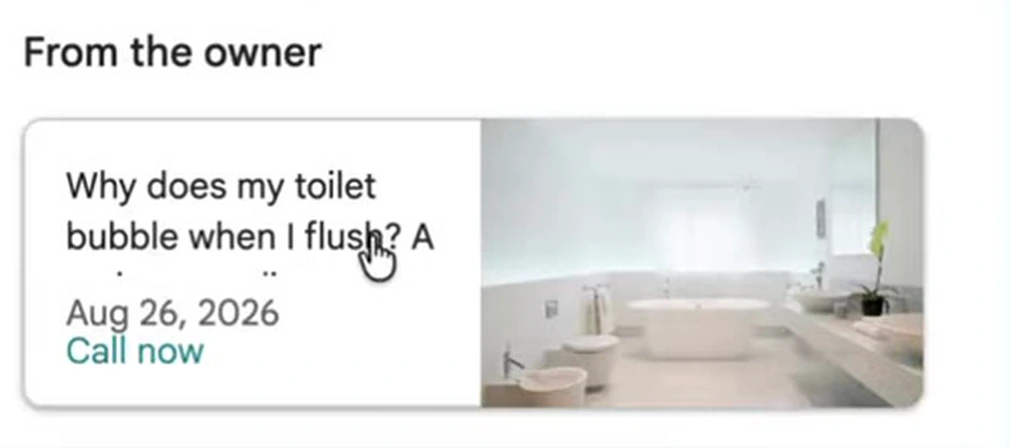
Note what that example is: a customer question answered on the listing itself. It is not a promotion. That is the pattern worth automating, because it is the pattern you can generate endlessly from what your business already knows.
Automation 1: review replies, rule by rule
The review-reply automation is not a single on/off switch, and the reason it is safe to use is that it is not. It is a table of rules, one per star rating.
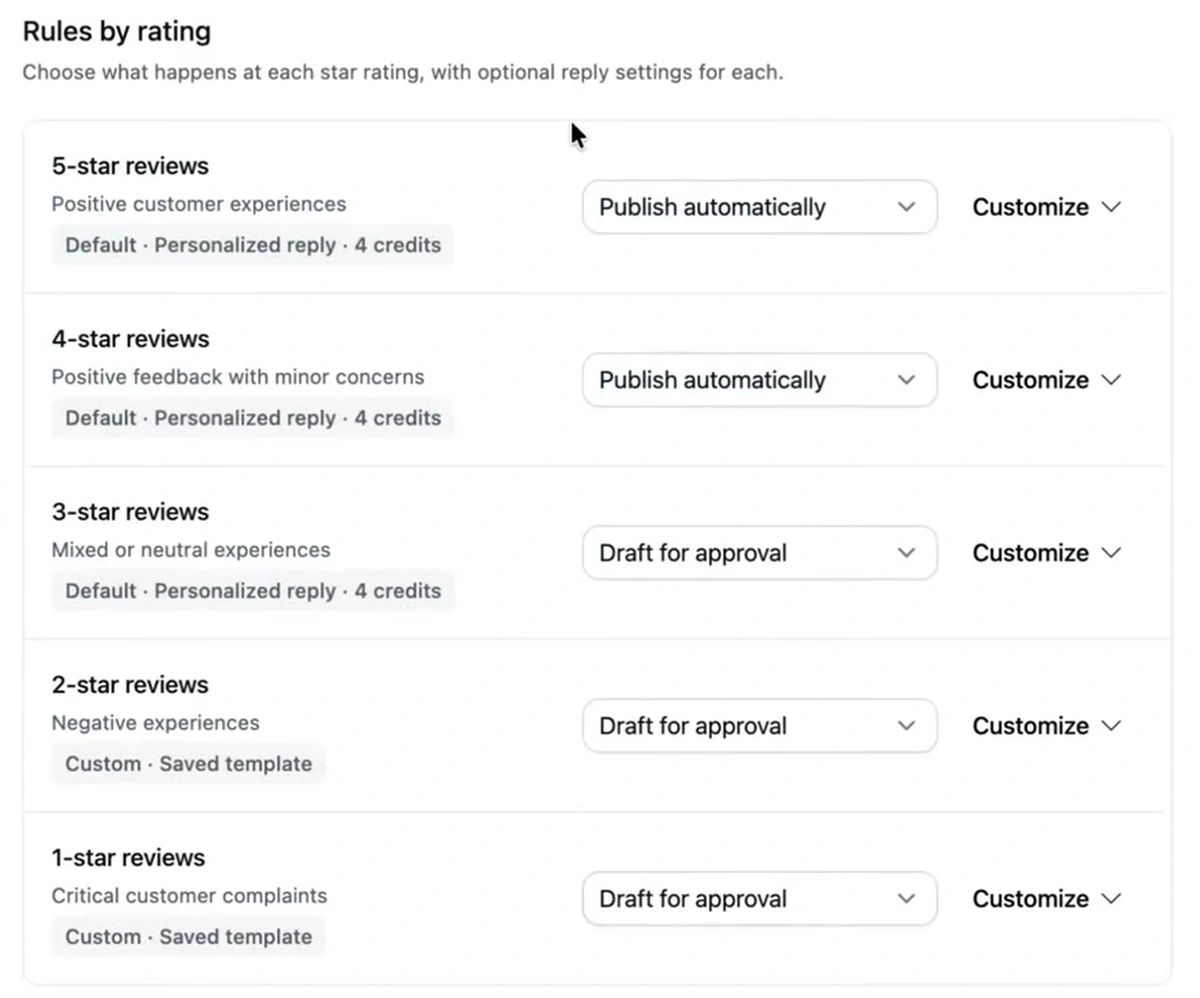
The default split is the correct one, and it is the single most important setting in this article:
| Rating | Described as | Default action |
|---|---|---|
| 5 stars | Positive customer experiences | Publish automatically |
| 4 stars | Positive feedback with minor concerns | Publish automatically |
| 3 stars | Mixed or neutral experiences | Draft for approval |
| 2 stars | Negative experiences | Draft for approval |
| 1 star | Critical customer complaints | Draft for approval |
Never move the bottom three rows to automatic. A five-star review has one correct response and a machine can write it. A one-star review is a dispute, sometimes a legal or safety matter, occasionally a factual claim you need to check against a job record before you say anything in public. An auto-published reply to a complaint is a permanent, timestamped, public statement made by software that does not know what happened. The reputational downside is unbounded and the time saved is a few minutes a week.
This is also where most local businesses already go wrong manually — replying warmly to praise and leaving criticism unanswered, or worse, arguing. If that is your habit, Google reviews and SEO covers what a good reply to a negative review looks like before you template it.
The safeguards, which are the actual product
Underneath the rating rules sits a second layer that matters more than the tone controls above it.
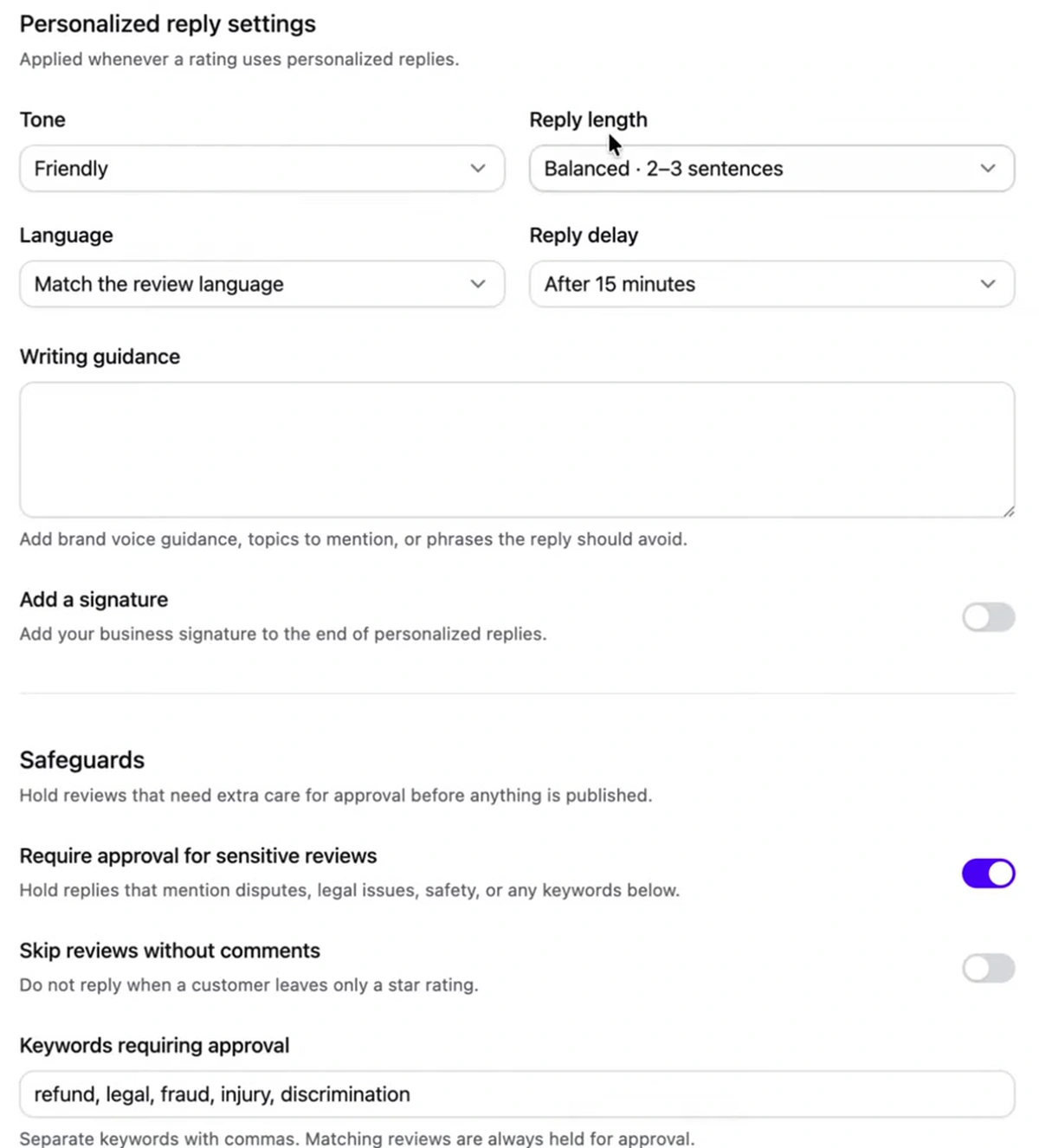
Four settings deserve deliberate choices:
- Require approval for sensitive reviews — holds replies to anything mentioning disputes, legal issues or safety. Leave this on. It is the backstop for the case a five-star review contains a complaint in the text.
- Keywords requiring approval — pre-filled with refund, legal, fraud, injury, discrimination. Add the words specific to your trade: for a contractor, "leak", "damage", "insurance"; for a clinic, anything clinical; for anyone who handles money, "chargeback".
- Reply delay — set to 15 minutes by default. A reply that lands seconds after the review reads as a bot to anyone paying attention. The delay is cosmetic and it is worth keeping.
- Match the review language — genuinely useful if you serve a mixed-language area, and a common manual failure.
The tone and length controls matter less than they look. "Friendly", two to three sentences, is right for almost every business, and fiddling with it is not where the risk lives.
Keywords in review replies: what they do and don't do
The source video suggests writing service keywords into your review replies to help your ranking. Treat that carefully. Review content — what customers write — is understood to contribute to relevance. Your replies are your own text on your own listing, which makes them much weaker as a signal, and stuffing them is obvious to the humans reading them.
The version worth doing: reply naturally and let the service and city appear because you are describing the job. "Glad we could get the AC back up the same day in Cordova" is a normal sentence. "Thank you for choosing our Memphis AC repair emergency HVAC services" is not, and the customer reading it is the person you are actually writing for.
Automation 2: GBP posts, and the one switch to get right
Post automation runs as a three-step setup — basics, content, schedule. The first step contains the decision.
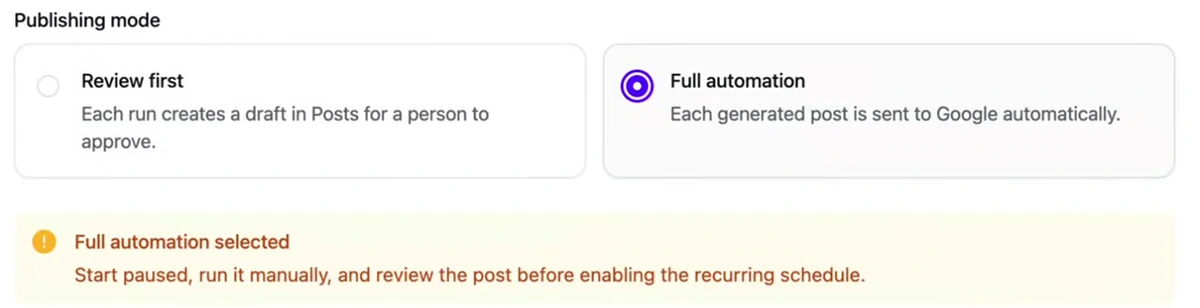
"Review first" puts each generated post in a drafts queue. "Full automation" sends it straight to Google. Notice that the tool itself flags the second one — "Start paused, run it manually, and review the post before enabling the recurring schedule." That is the right instruction and it applies whatever software you use.
Start on Review first for a month. Read every draft. When you find you are approving them unedited, switch. Posts are lower stakes than review replies — a mediocre post is a mediocre post, not a public argument with a customer — so full automation is a reasonable end state here in a way it never is for one-star reviews.
The content step draws on a Brand Brief and a Knowledge Base you populate first (website, PDFs, documents), plus optional guidance on what to focus on. Automation quality is decided here, not in the schedule. An automation pointed at an empty knowledge base will produce generic filler forever, and generic filler on your listing is worse than an empty Posts tab.
Cadence and cost
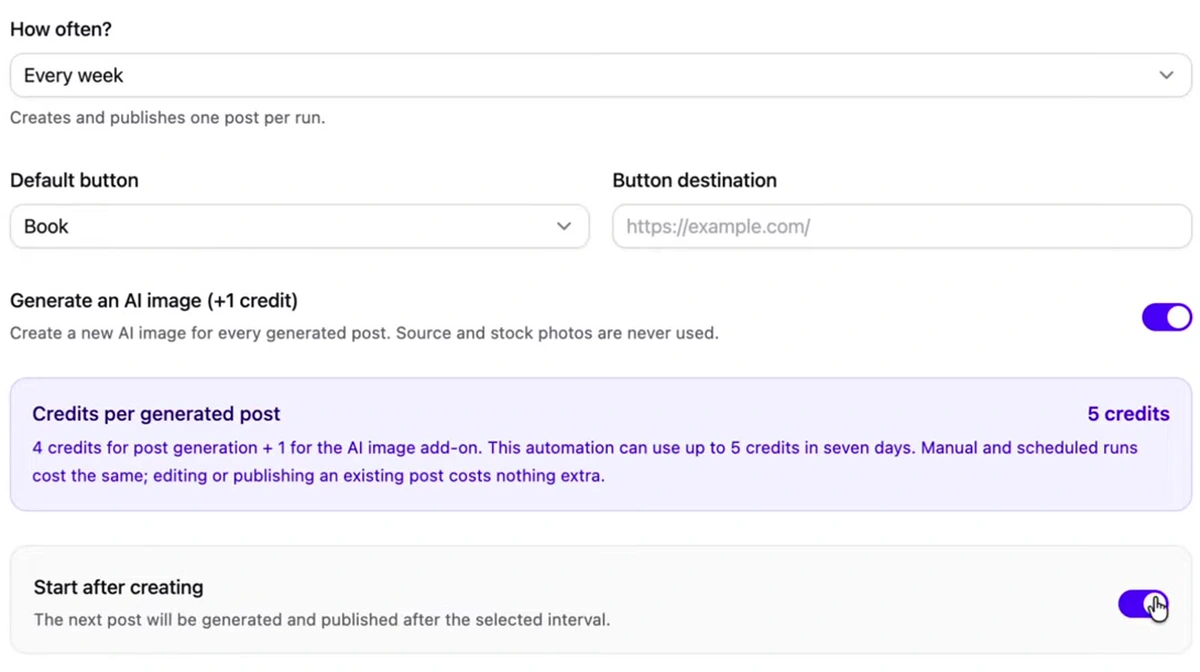
Weekly is the sensible default and matches what the Memphis profile above actually does. Each run generates and publishes one post at 5 credits — 4 for the copy, 1 for the AI image — and the panel notes that editing or publishing an existing post costs nothing extra, so reviewing drafts is free.
Two settings to set on purpose rather than accept:
- Default button and destination. "Call now" uses the phone number on the profile. "Book" or "Learn more" needs a URL, and it should be the page for that service — not your homepage.
- Start after creating. Leaving it off saves the automation paused so you can run it once and inspect the result, which is the same advice the publishing-mode warning gives.
What automation does not fix
Four things, because a listing that posts weekly and still does not ring is usually failing at one of them.
It does not get you reviews. Everything above is about replying. The 8,695-review profile got there by asking, over years. Automation makes replying sustainable; it does not generate the reviews.
It does not fix your fundamentals. Wrong primary category, missing service areas, thin business description, no photos, hours that are wrong on holidays — these outrank posting cadence, and they are one-time fixes. The usual suspects are collected in Google Business Profile mistakes and the setup itself in Google Business Profile SEO.
It does not move you closer to the searcher. Distance is a ranking factor and no amount of content changes your address.
It does not run itself unsupervised. The approval queue only works if someone opens it. An automation set to draft-for-approval with nobody approving is worse than no automation — you have negative reviews sitting with a drafted reply that never publishes. Put fifteen minutes in the calendar, weekly.
If you are doing this across many locations, the queue problem is the whole job, and managing multiple Google Business Profiles covers that shape. For the tooling itself, the review side is at Google review automation.
The short version: automate five- and four-star replies and your weekly posts. Keep every reply to three stars and below in an approval queue, add your trade's risk words to the keyword filter, and book fifteen minutes a week to clear the queue. That is the whole safe configuration.

Generate, publish, syndicate and update articles automatically
The AI SEO Writer that Auto-Publishes to your Blog
- Cancel anytime
- Articles in 30 secs
- Plagiarism Free