
Google's New "Report Owner Response" Button Changes How You Reply to Reviews in 2026

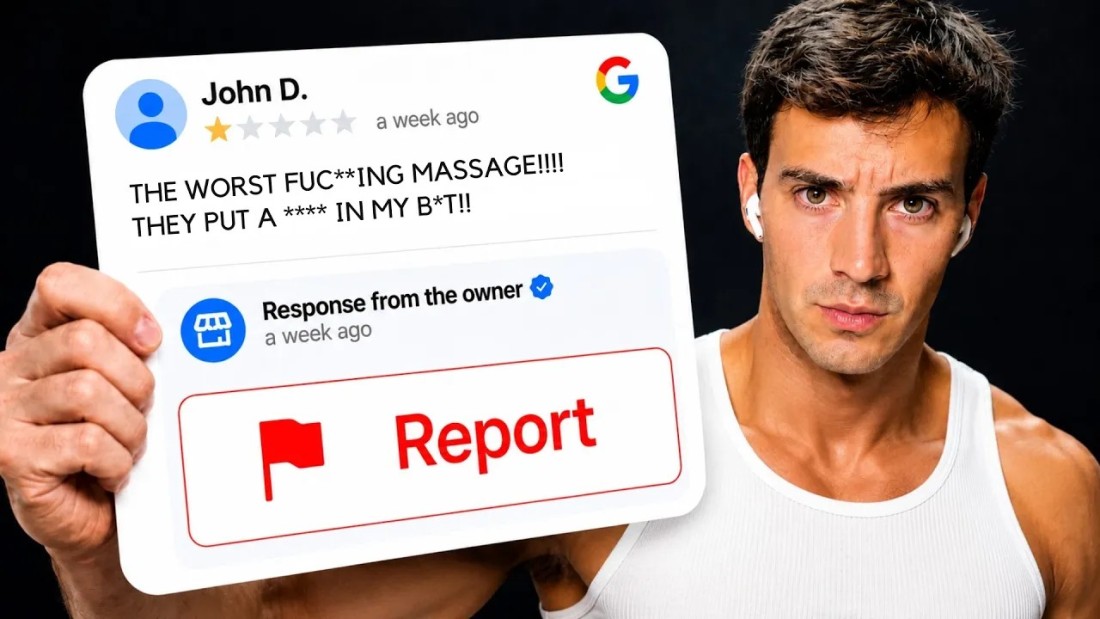
Google quietly added a third item to the menu on every Google Maps review that has a business reply attached to it. It sits under "Share review" and "Report review", and it says Report owner response.
That is a small interface change with a large consequence. Until now, the reply you wrote under a one-star review was effectively unpoliced — Google's content rules applied to it, but nobody had a one-click way to flag it. Now the customer you argued with does, and so does anyone else reading the listing.
What the button actually is
Open any Google Maps listing, go to Reviews, and click the three-dot menu on an individual review. On reviews that carry a "Response from the owner" block, the menu now offers three options instead of two.
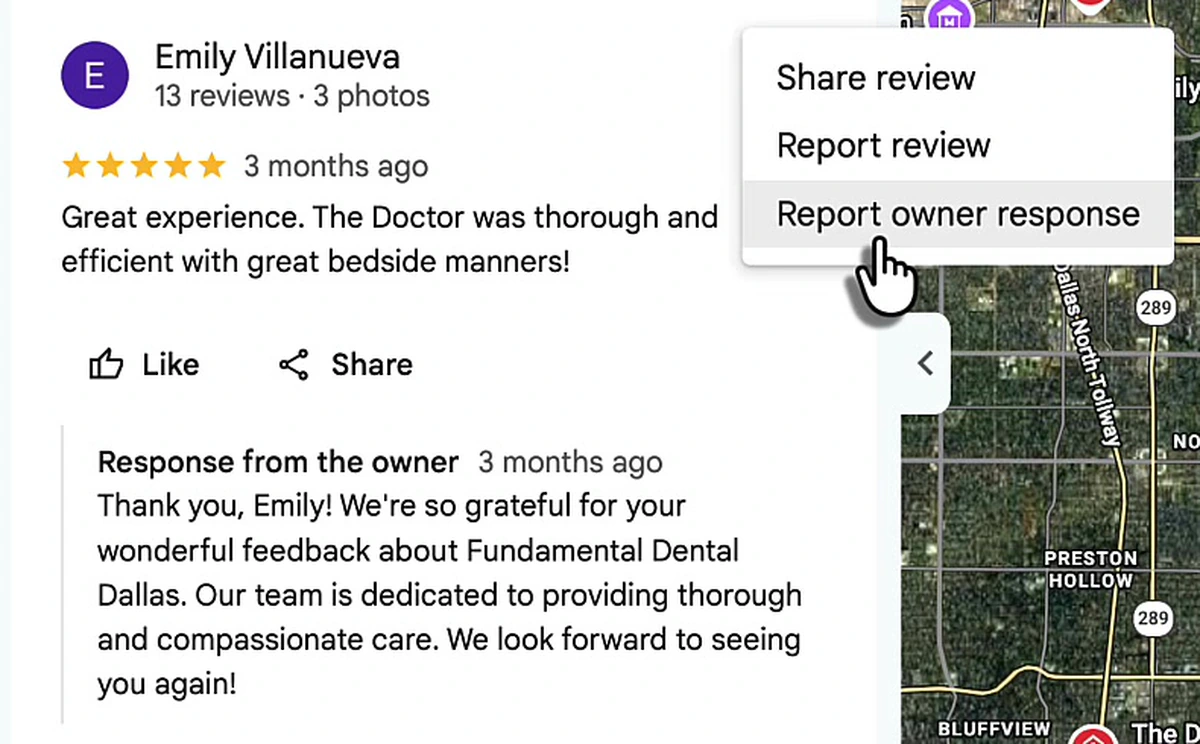
Two details matter. First, the button only exists where a reply exists, so it is a risk you create yourself the moment you respond. Second, it reports the reply, not the review — the flag goes against your text, not the customer's.
The reason Google built it is not mysterious. Business replies are user-generated content on Google's platform, and they fall under the same prohibited content policy as reviews. That policy bans posting personal information about an identifiable person without consent, and it names full names, medical information, financial information and personal identification data explicitly. Replies were the one surface where that rule had no enforcement path. Now it has one.
The fines are not hypothetical
The failure mode is predictable and human. An owner gets a one-star review at the end of a long day, believes it is unfair or fake, and writes a reply that corrects the record. Correcting the record means saying what actually happened — which appointment, which treatment, which invoice, sometimes which person.
In US healthcare that is a federal violation, and the enforcement record is public. The Department of Health and Human Services' Office for Civil Rights has settled a string of cases over exactly this:
- $50,000 — a North Carolina dental practice replied to a negative Google review left under a pseudonym and disclosed the patient's name along with treatment details.
- $23,000 — a California dental practice repeatedly replied to Yelp reviews with patients' full names, treatment details and insurance information.
- $10,000 — a Dallas dental practice settled over patient information disclosed in a response to a review.
Those specific penalties come from health privacy law, so a plumber is not exposed to the same statute. But the shape of the mistake is identical in every industry, and the consequences that do generalise are three: the reply gets reported and removed, the profile accumulates policy strikes, and in regulated trades — law, medicine, finance, childcare — you hand a regulator a timestamped, screenshotted admission. A reported reply is also visible evidence to every future customer reading that listing.
The honest summary is that replying badly has always been dangerous. What changed in August 2026 is that reporting a bad reply became a single click, performed by the person with the most motivation to click it.
So why not just stop replying?
Because replies are the only text in your review section you control, and Google reads all of it.
Search "emergency plumber nyc" in Maps and look at what sits under each listing. Google pulls a line of review text into the result and bolds the words that match the query — "They arrived promptly at our business to assess a backed-up drain", "Came quickly and fixed the problem quickly", "NYC Plumbing came out for leak detection and nailed it quickly."
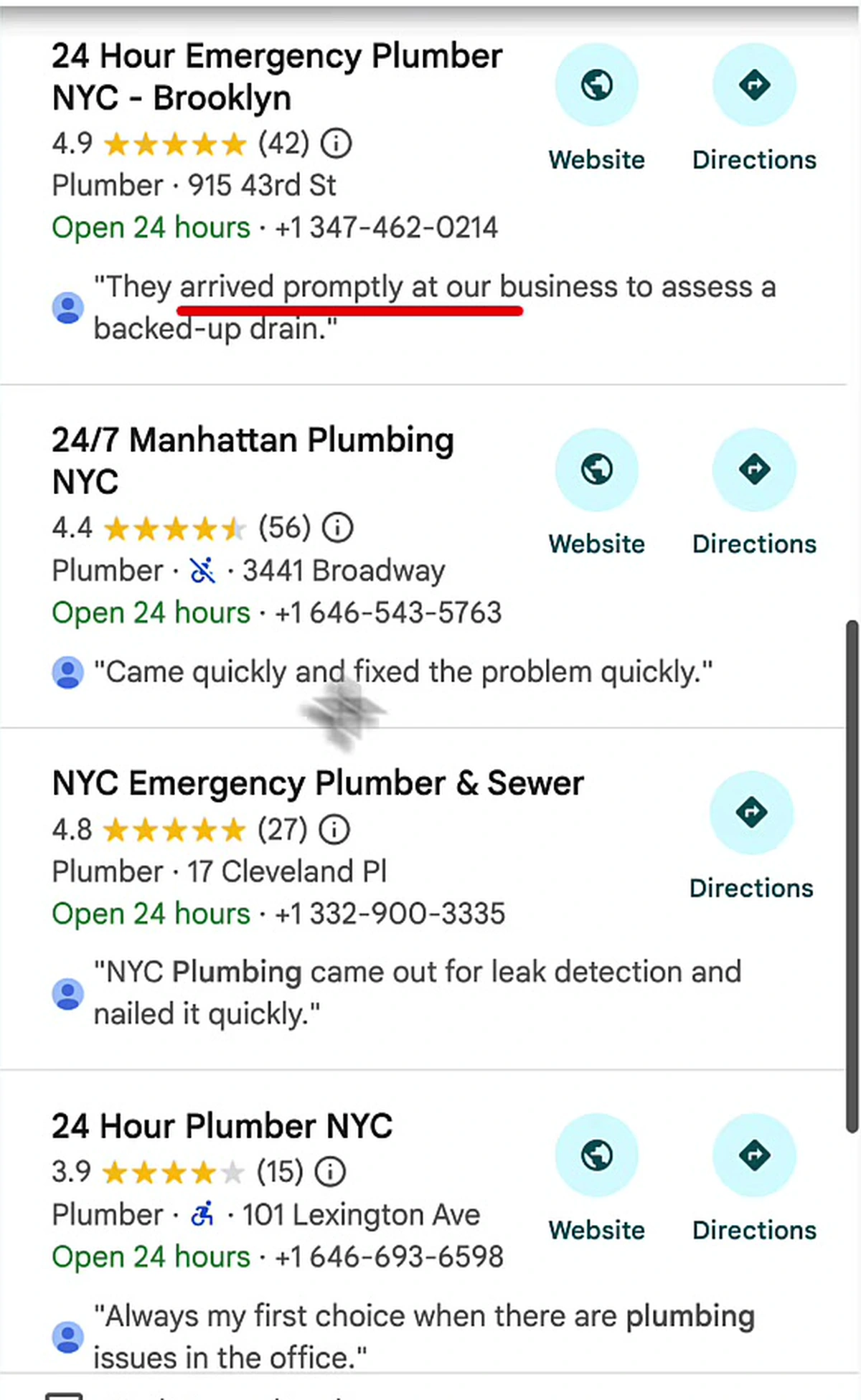
That snippet is chosen per query. The same listing shows different text to someone searching "leak detection" than to someone searching "24 hour plumber". The corpus it is drawn from is the review section — reviews and replies.
Open the listing and Google shows you how it has already parsed that corpus. A 27-review profile at 4.8 stars comes with topic chips: pool plumbing repair (4), problem assessment (2), cost (4), trenchless (2), plus six more.
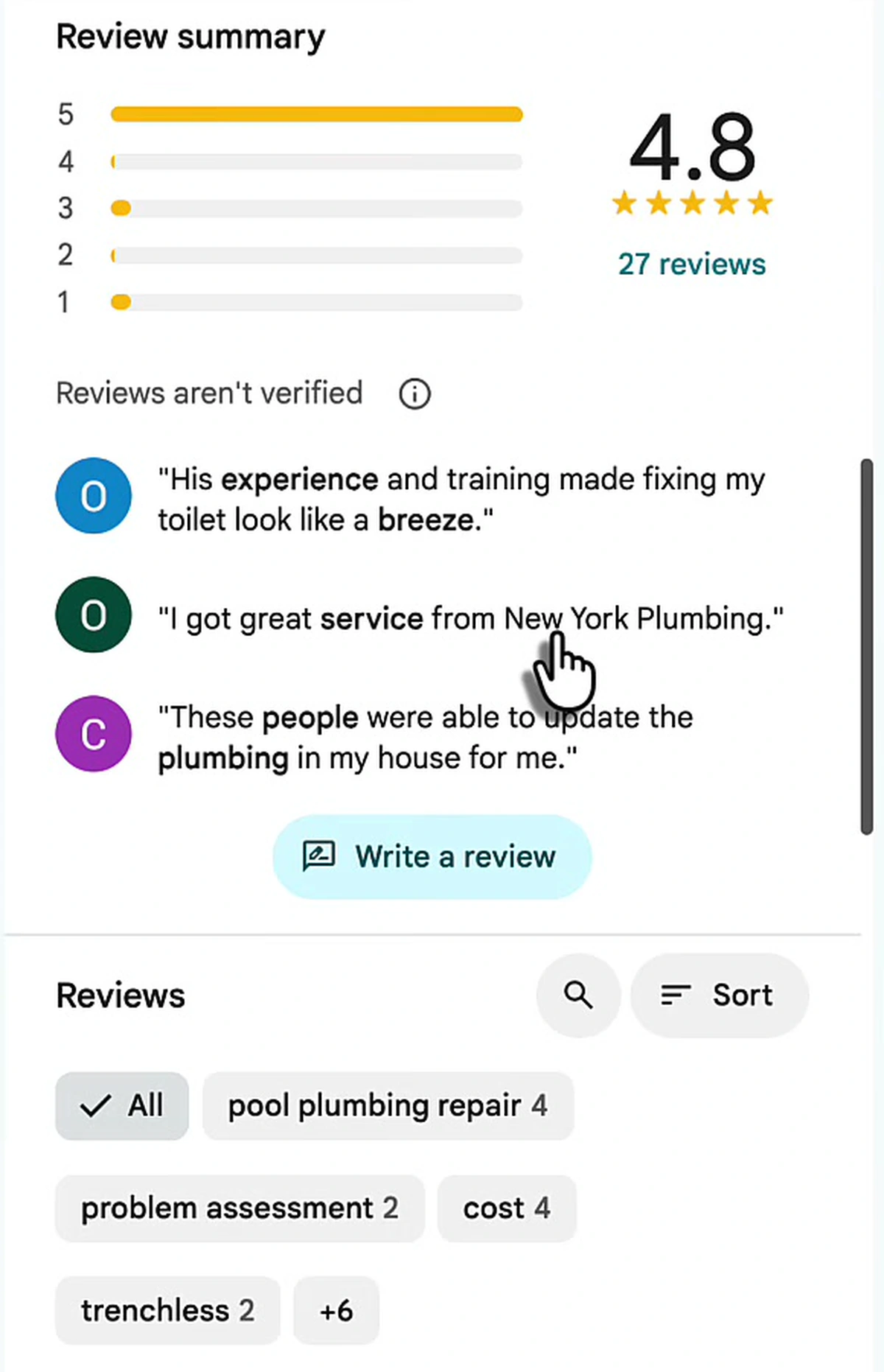
Those chips are Google telling you, in public, which services it believes this business performs — derived entirely from the language in the review section. If your trade name never appears in that text, it never becomes a chip. And you cannot make customers write "trenchless sewer replacement in Flatbush". You can write it back to them.
Where replies now matter most: AI answers
The bigger shift is that fewer people are opening Maps at all. Ask Google's AI Mode for an emergency plumber at 1am and it returns a shortlist — and under each business it prints a line labelled Evidence.
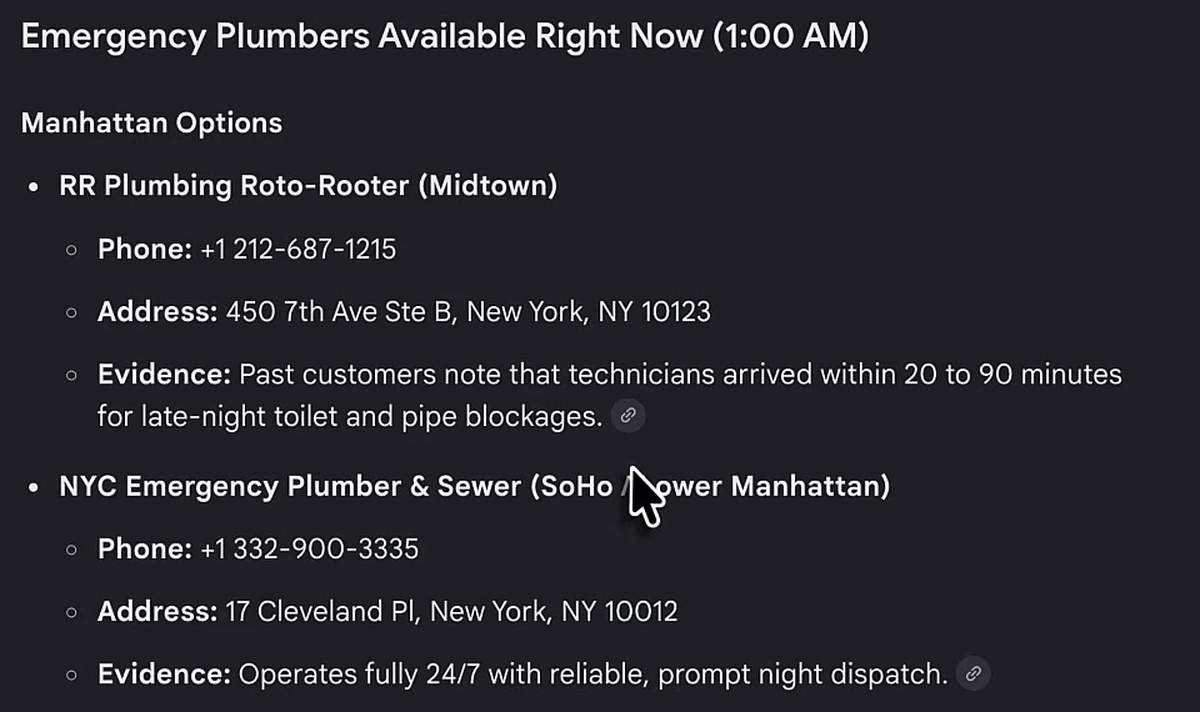
Read the evidence lines: "Past customers note that technicians arrived within 20 to 90 minutes for late-night toilet and pipe blockages" and "Operates fully 24/7 with reliable, prompt night dispatch." Neither is a fact from a website. Both are summaries of what the review section says.
This is the part most local businesses have not internalised. People are far more specific with a chatbot than with a search box — they type "my toilet is clogged, it's 1am, I need someone to come to my place" rather than "plumber". A model answering that query needs specific evidence to justify a recommendation, and the review section is the densest source of it. That is the same mechanism behind ranking in the Maps pack, applied to a surface where there are three results instead of twenty.
A reply that says "Thanks for the kind words!" contributes nothing to that. A reply that says "Thank you, Marcus — glad our team got the clogged toilet cleared at 1am the same night you called, and that the $300 quote held" contributes the service, the urgency, the response time and the price.
What a safe, useful reply contains
Every reply has to satisfy two constraints at once, and most owners only think about one of them.
| Include | Never include |
|---|---|
| The service performed ("emergency drain clearing") | The customer's full name or surname |
| The location or neighbourhood served | Their address, phone number or email |
| Your business name, written out | Medical, dental or treatment details |
| Timing or turnaround ("same night", "within two hours") | Invoice amounts, balances or insurance details |
| A first name, only if the reviewer used it publicly | Confirmation that a specific person was a client |
| An offline route ("call the office and ask for Dana") | Any rebuttal of the customer's account of events |
That last row is the one people fight. The instinct to defend yourself in public is strong and it is almost always wrong: the correction requires the details, the details are what get you reported, and the reply is permanent. Move the dispute to a phone call and leave a short, calm, keyword-carrying reply on the listing.
Length matters too. Two to three sentences reads as professional; six reads as defensive. Keep the same register across every reply — this is one of the Business Profile mistakes that quietly signals an unmanaged listing.
Automating replies without creating new risk
The real problem with review replies is not that owners are careless. It is that a dentist's job is dentistry, and writing keyword-carrying, policy-safe responses at 10pm is not something anyone does consistently for two years. Consistency is the whole game — review signals compound only if the cadence never breaks.
This is why we built Google review automation into Arvow. It connects to your Business Profile, pulls in the reviews, and lets you decide what happens at each star rating rather than replying by hand.
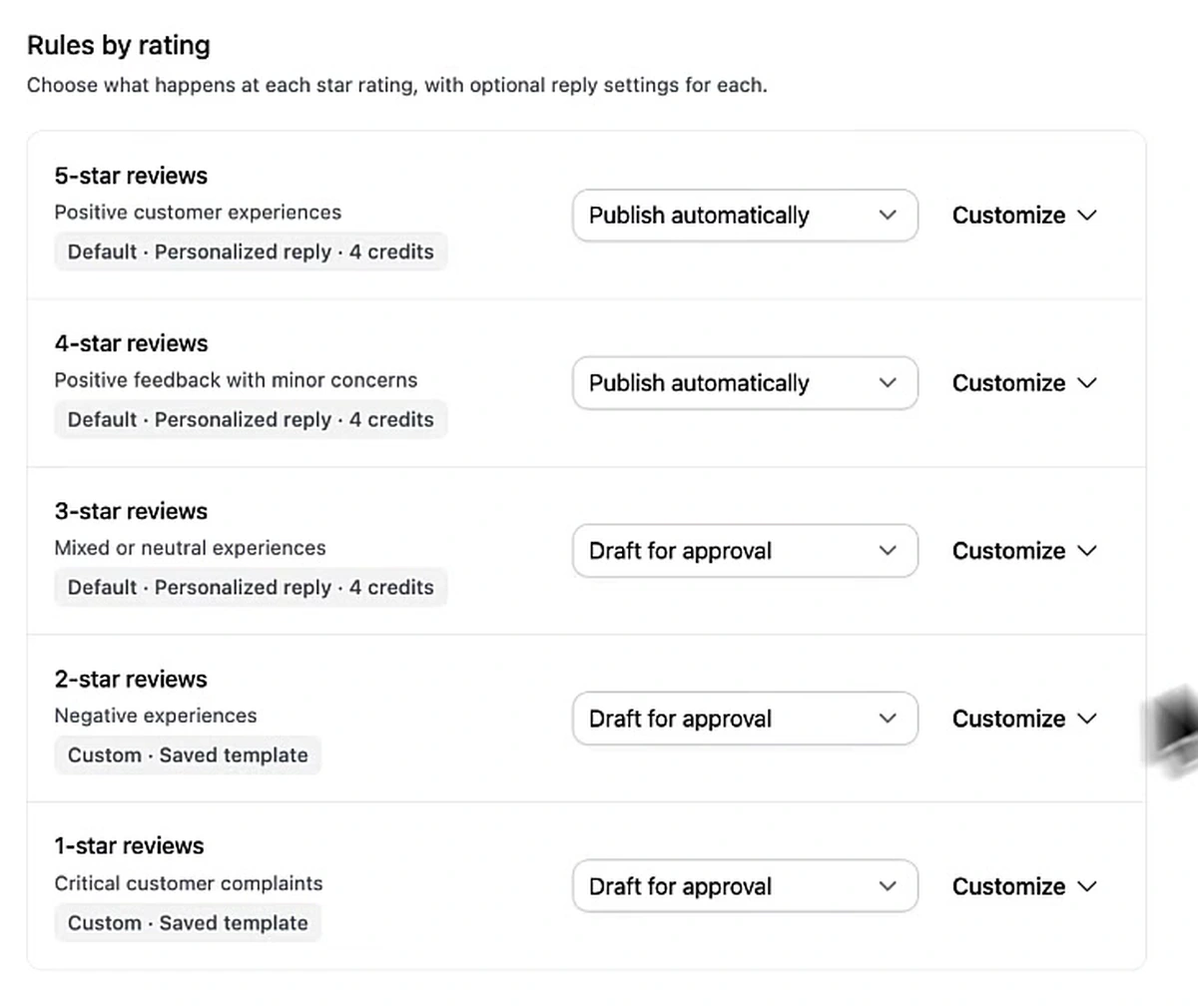
The split in that screenshot is the important part, and it maps directly onto the risk. Five- and four-star reviews are "positive customer experiences" and "positive feedback with minor concerns" — nothing in them tempts anyone to disclose anything, so they publish automatically. Three, two and one star are "mixed or neutral", "negative experiences" and "critical customer complaints" — every reported-reply case starts in that bottom half, so those are drafted and wait for approval.
Underneath, the reply settings decide what the agent actually writes.
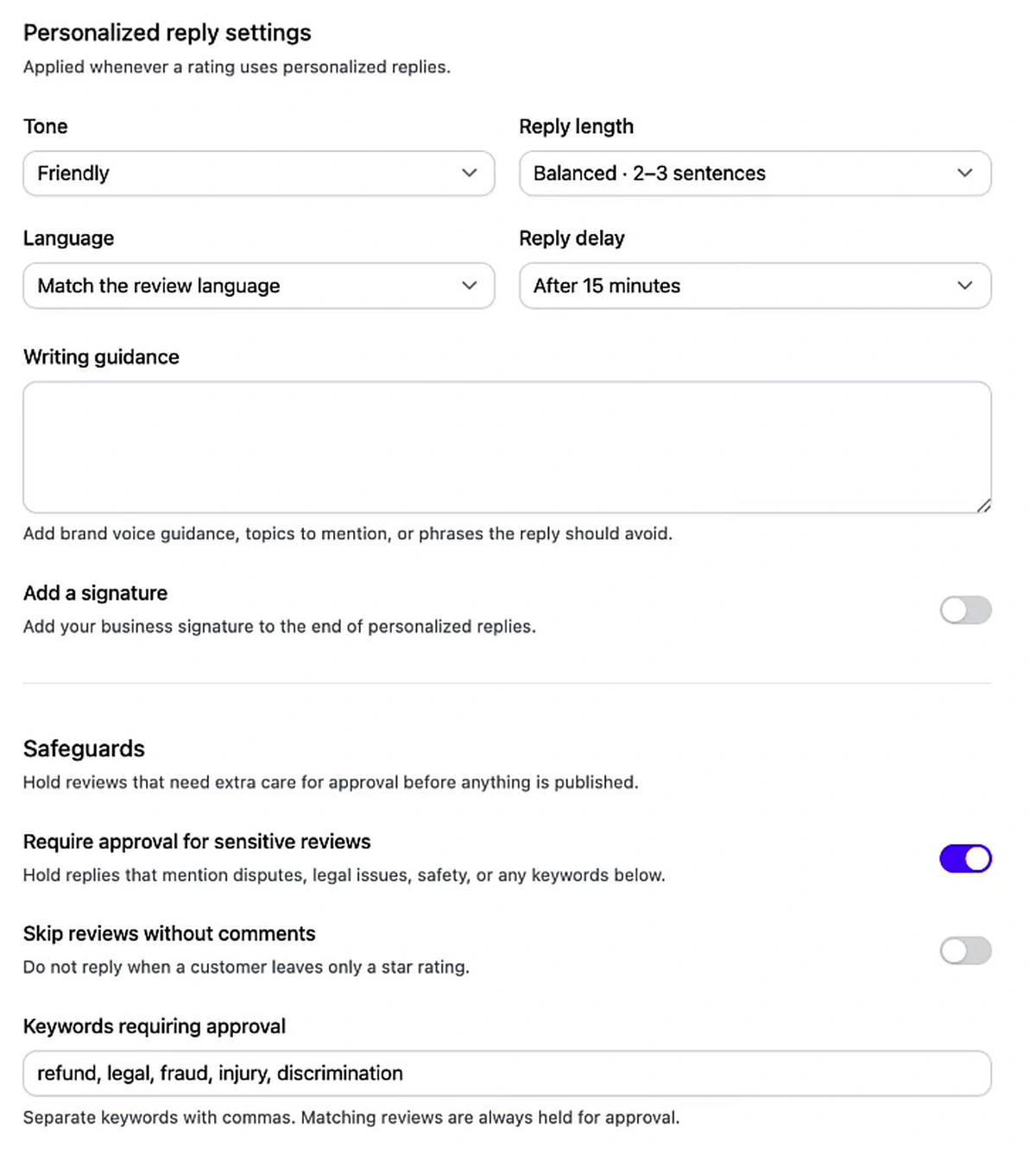
Four settings do most of the work:
- Reply length: balanced, 2–3 sentences. Caps the defensive essay before it can be written.
- Language: match the review language. Replying in the reviewer's language keeps the text useful for local queries in that language.
- Reply delay: after 15 minutes. A reply that lands eleven seconds after the review reads as a bot to customers and to Google.
- Writing guidance. Free text for brand voice, the phrases to use, and the phrases to never use.
The safeguards block is the one that exists specifically because of the report button. Require approval for sensitive reviews holds any reply that touches disputes, legal issues or safety. Alongside it sits a keyword list — refund, legal, fraud, injury, discrimination — where a match forces human approval regardless of star rating. That is the correct default: a four-star review that mentions an injury is more dangerous than a one-star review that says "slow".
Skip reviews without comments is the last one, and it is off by default in that screenshot. Turning it on means you do not reply to bare star ratings. There is a reasonable argument either way — a reply to a bare rating still adds indexable text, but it also adds text with nothing to respond to, which reads as filler.
Replies are one half of the profile. Scheduled Business Profile posts are the other half, and they are the surface most local businesses leave completely empty.
The order I would do this in
- Audit what is already published. Read every reply on your listing today. Anything naming a customer, an amount, a treatment or a dispute should be edited or deleted before somebody reports it.
- Write the rules before the replies. Decide which ratings publish automatically and which wait for a human. Four and five automatic, three and below held, is a sane starting point.
- Set the keyword list. Refund, legal, fraud, injury, discrimination, plus whatever is specific to your trade.
- Fix the template. Two to three sentences: brand name, service performed, location, timing. No customer identifiers.
- Then turn on automation and check the approval queue weekly rather than the reviews inbox daily.
None of this guarantees a top-three position; proximity alone can outweigh a great deal of good work in local search. What it does is remove a category of self-inflicted damage while making every review you already have work harder. If you want the rest of the local picture around it, the free local SEO course covers the profile, the citations and the site.
FAQ
What is Google's "Report owner response" button?
It is a third option in the three-dot menu on a Google Maps review, alongside "Share review" and "Report review". It lets any user flag the business's reply — not the review — for violating Google's content policies. It only appears on reviews that already have a response from the owner.
Can a business get in trouble for how it replies to a Google review?
Yes. Replies fall under Google's prohibited content policy, which bans posting personal information about an identifiable person without consent, including full names, medical details and financial information. Beyond removal, US healthcare providers have been fined by the Office for Civil Rights for disclosing patient information in review replies, with settlements including $50,000, $23,000 and $10,000.
Should I stop replying to Google reviews now?
No — replies are the only text in your review section you control, and Google pulls review-section language into map pack snippets, topic clusters and AI Mode answers. Reply to everything; just reply short, name the service and location rather than the customer, and never rebut someone's account of events in public.
Do review replies affect AI search results?
They feed them. Google's AI Mode prints an "Evidence" line under each recommended business, synthesised from review-section language — arrival times, service types, hours. Replies are the half of that corpus you author, so they are the only way to make sure the specifics you want cited are actually present.
Is it safe to automate Google review replies with AI?
With guardrails. Publish automatically for four- and five-star reviews, hold three stars and below as drafts for approval, force human review on a keyword list such as refund, legal, fraud, injury and discrimination, cap replies at two to three sentences, and add a delay so replies do not post instantly.
What should a good review reply actually say?
Your business name written out, the service performed, the location or neighbourhood, and the timing — in two to three sentences. "Thank you for choosing [business] — glad we cleared the blocked drain in Flatbush the same night you called" carries four useful signals. "Thanks!" carries none.
Google did not add this button to punish businesses. It added it because business replies were the last piece of user-generated content on Maps with no reporting path, and enough owners abused it to make that untenable. The businesses this hurts are the ones treating replies as a place to argue. The businesses it helps are the ones already treating replies as the part of the listing they get to write.

Generate, publish, syndicate and update articles automatically
The AI SEO Writer that Auto-Publishes to your Blog
- Cancel anytime
- Articles in 30 secs
- Plagiarism Free