
How to Track Your Brand in Google AI Overviews & AI Mode (2026)

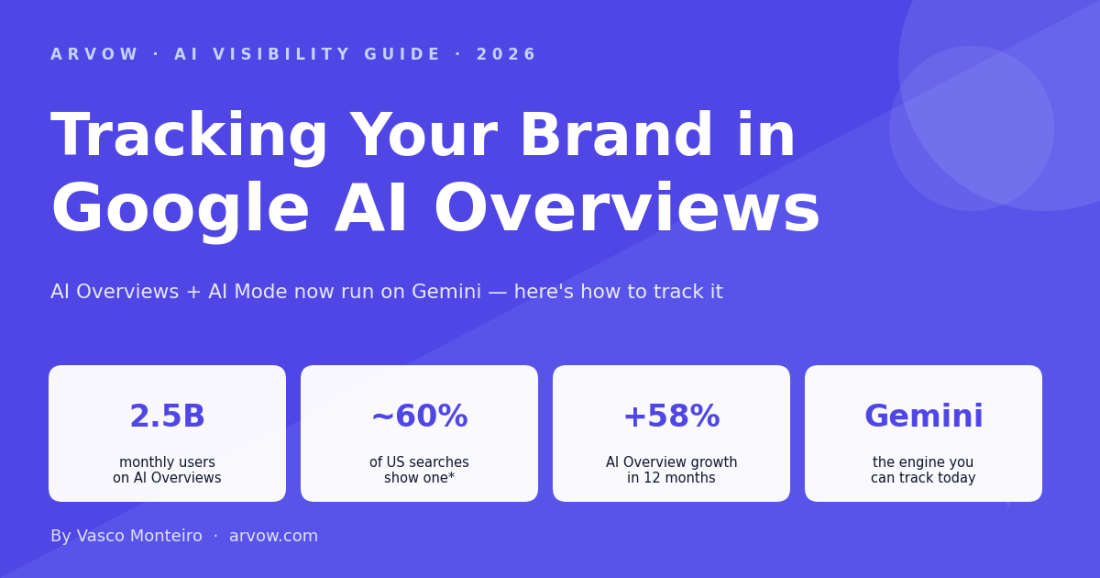
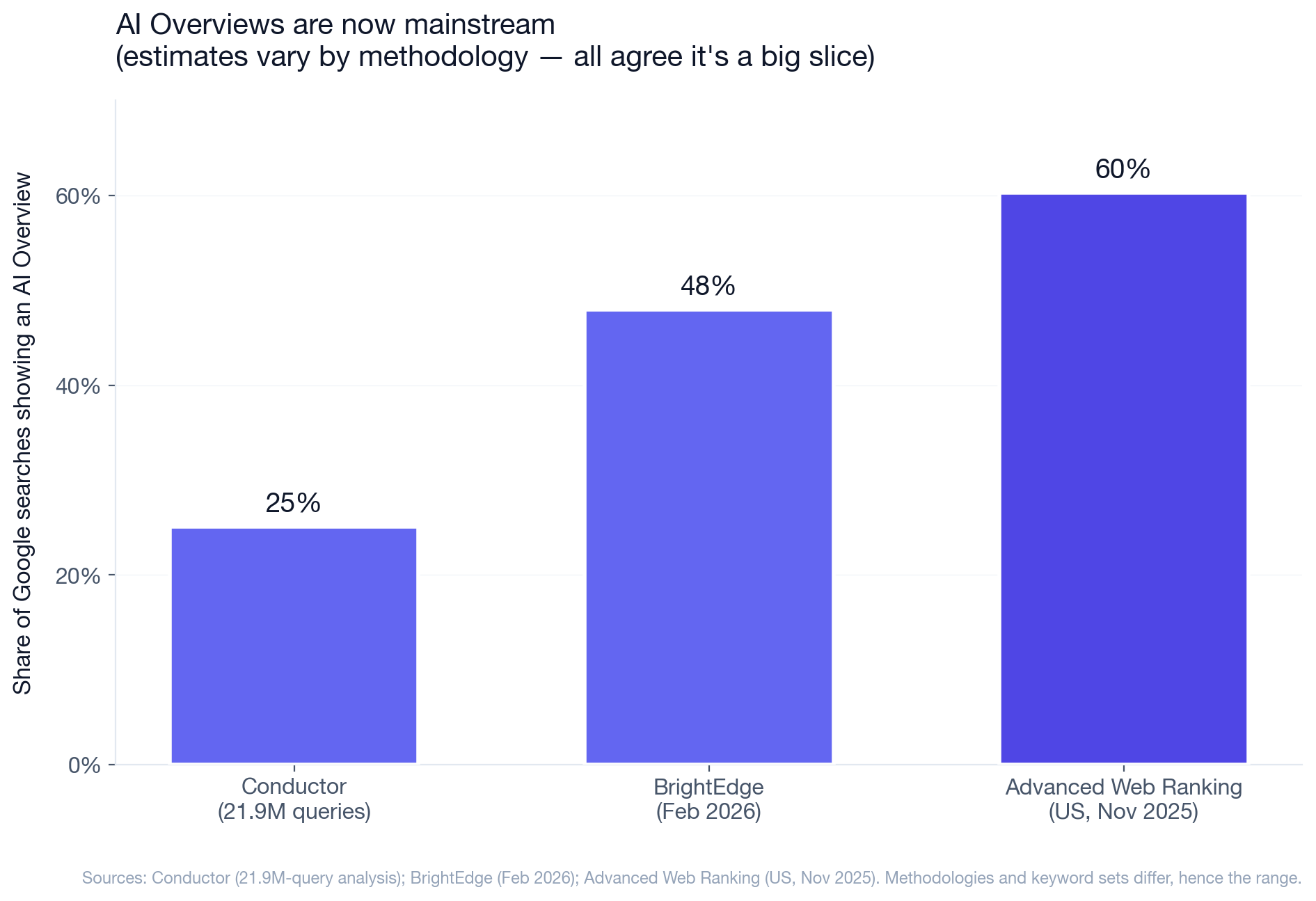
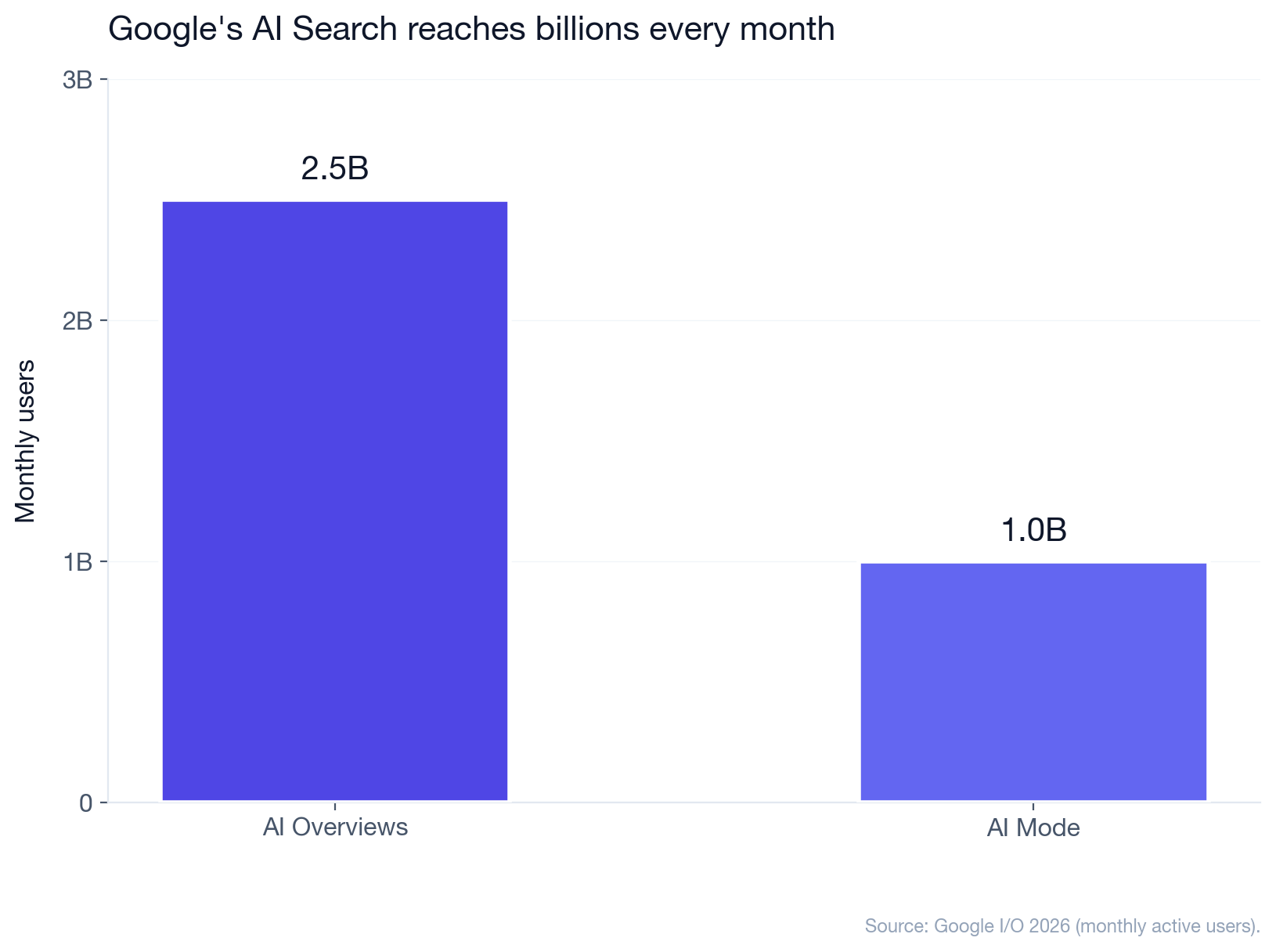
If your buyers use Google, they're already seeing AI Overviews. By Google's own I/O 2026 figures, AI Overviews now reach over 2.5 billion monthly users, and AI Mode — Google's full conversational search — passed 1 billion. Depending on whose data you trust, an AI Overview shows up on anywhere from a quarter to ~60% of searches. And it sits at the very top of the page, above the classic blue links. Being named in that box is the new featured snippet: if Google's AI recommends you there, you've won the query before the user scrolls.
2.5B monthly users on AI Overviews |
~60% of US searches show one* |
+58% AI Overview growth in 12 months |
Gemini the engine you can track today |
The problem: AI Overviews are genuinely hard to track. Here's the realistic way to do it — and the shortcut most guides miss.
Why AI Overviews are so hard to track
Unlike classic rank tracking, there's no clean way to monitor AI Overviews at scale:
- No export or API for what the Overview says about you.
- They're personalized — location, search history, and account all change what each user sees, so there's no single "ranking" to record.
- They're volatile — the same query can show an Overview today and not tomorrow, citing different sources each time.
- They're generated prose, not a list — a synthesized answer with a handful of cited links, not ten ranked results you can scrape.
So the "open Google and check every query by hand" approach falls apart past a few keywords. You need a signal you can actually track over time — not a one-off screenshot.
The shortcut: AI Overviews run on Gemini
Here's the part that makes tracking tractable. At Google I/O 2026, Google confirmed it's merging AI Overviews and AI Mode into one AI Search experience, with Gemini 3.5 Flash as the default model. In other words, the model deciding whether your brand gets cited in an AI Overview is Gemini.
That matters because while you can't easily scrape AI Overviews, you can track your visibility in Gemini directly. Your Gemini visibility is the closest automated, trackable proxy for AI Overview presence — a leading indicator that tends to move before, and alongside, your appearances in the Overview box itself. It's not a perfect mirror, but it's a signal you can watch every day instead of guessing.
How to actually track it (the realistic stack)
Combine one automated signal with one manual check:
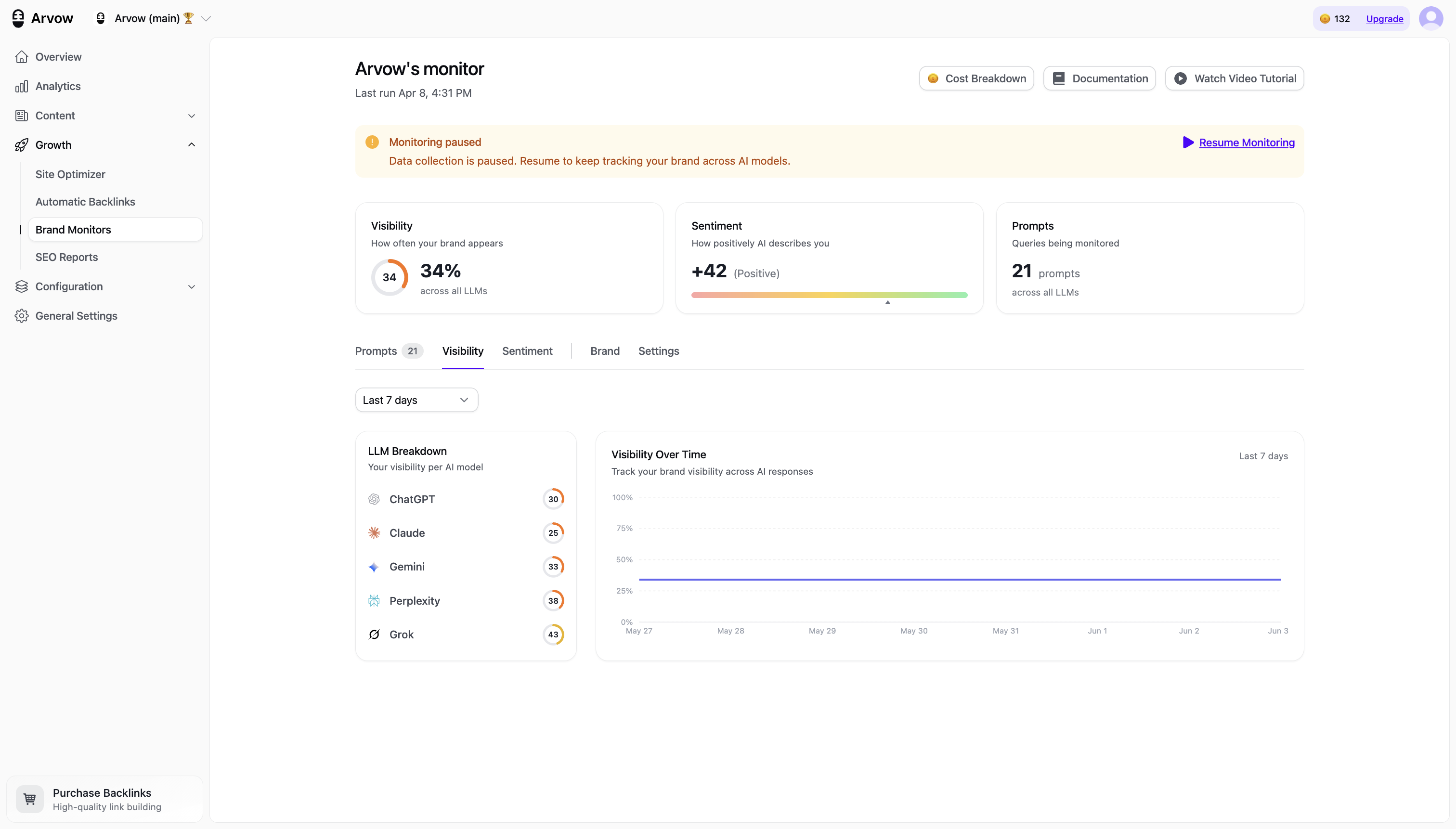
1. Track your Gemini visibility (automated proxy). In Arvow's LLM Brand Monitor, watch the Gemini line specifically, for the prompts that map to your real money queries. When Gemini starts naming you — or naming a competitor instead — that's your earliest read on AI Overview movement.
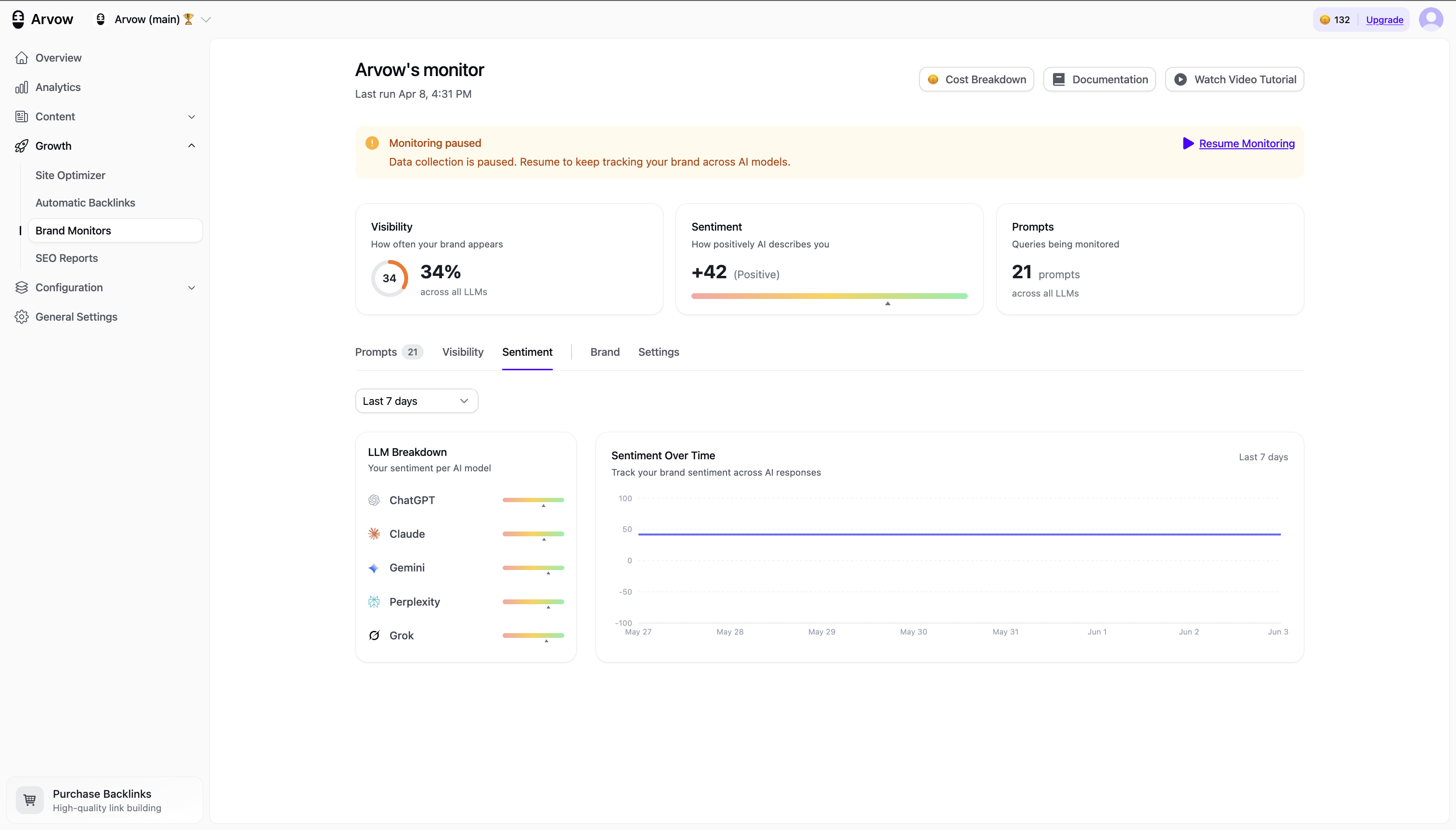
2. Spot-check the actual Overviews (manual ground truth). Once a month, take your 10–20 highest-intent buyer queries, run them in Google (ideally logged-out and across the locations you care about), and record three things: does an AI Overview appear, is your brand mentioned, and are you cited or linked? It's tedious, but on a tight, high-value query set it's the only way to see the real box.
3. Combine them. The Gemini trend tells you which direction you're moving every day; the monthly manual audit confirms it on the queries that actually drive revenue. Neither alone is enough — together they're a workable system that doesn't pretend to data nobody has.
What makes you show up in an AI Overview
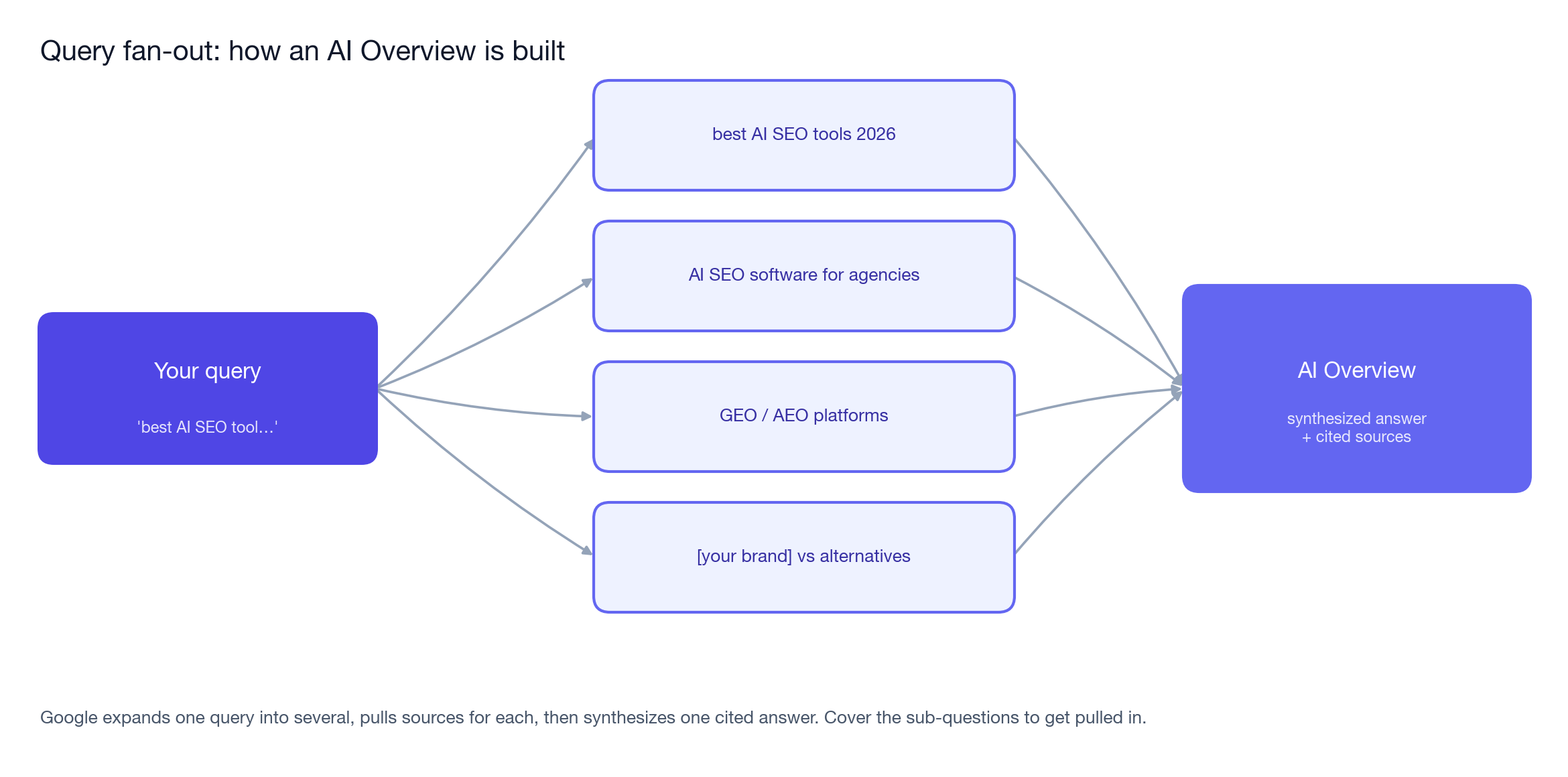
AI Overviews and AI Mode don't just match a keyword — they fan your query out into multiple related sub-queries, pull sources for each, and synthesize one answer (Google calls this "query fan-out"). To be the cited source:
- Answer the sub-questions, not just the head term. A page that covers the obvious follow-ups gets pulled into more of the fan-out than one that only targets the exact keyword.
- Be quotable and structured. Clear, direct answers, descriptive headings, FAQs, and schema markup make it easy for the model to lift you cleanly into the Overview.
- Keep doing classic SEO. AI Overviews overwhelmingly cite pages that already rank — the Overview is a re-packaging of strong content, not a separate game. We go deeper in our SEO vs AEO guide and the data-backed GEO statistics report.
What not to expect
Be skeptical of any tool promising "100% accurate AI Overview tracking." Because Overviews are personalized and volatile, no monitor sees exactly what each user sees — the honest setup is the one above: Gemini visibility as the automated proxy, plus manual spot-checks for ground truth. Anything claiming perfect, comprehensive AI-Overview coverage is overpromising on data that doesn't exist yet.
Get a daily read on AI Overviews. Track your Gemini visibility — the closest automated proxy — in Arvow's LLM Brand Monitor, included on the Business plan and above.
Track the proxy in a few minutes
Arvow's LLM Brand Monitor tracks your Gemini visibility — alongside ChatGPT, Claude, Perplexity and Grok — so you have a daily leading indicator for AI Overviews instead of a monthly guess. It's included on the Business plan and above. For agencies running this across clients, it sits in the broader agency stack next to the AI SEO Agent that produces the content AI Overviews actually cite. If you'd rather compare dedicated trackers first, start with our roundup of AI visibility tools.
Written by Vasco Monteiro, founder of Arvow. I track our own Gemini visibility as a leading indicator for Google AI Overviews using the exact stack above.
Generate, publish, syndicate and update articles automatically
The AI SEO Writer that Auto-Publishes to your Blog
- Cancel anytime
- Articles in 30 secs
- Plagiarism Free