
ChatGPT Dots for SEO: How to Set Up an SEO Agent Workflow (2026)

ChatGPT dots are OpenAI's always-on agents: a single ongoing chat that remembers your business, runs tasks on its own computer, and comes back to you for approval. OpenAI announced them at DevDay on September 29, 2026. Within two weeks SEOs were using them to run whole content pipelines.
In the video below, Tim walks through the SEO workflow he runs inside his dot: a business brief, competitor research, a blog strategy, an approved outline, then hand-offs to Arvow for the article and to a social scheduler for the posts. This article is the written version, with the screens from the video and the details you need to set it up yourself.
What ChatGPT dots are
A dot is not a new chat window. It is one long conversation that you keep coming back to, on desktop, web or your phone. Here is what changes compared with a normal ChatGPT chat:
- It is persistent. You don't start a fresh chat per task. The dot keeps the thread, reads your earlier chats and builds on what it learned yesterday.
- It is proactive. It schedules tasks, sends push notifications and opens the conversation itself ("based on yesterday, what should we do today?").
- It has its own computer. In the video, Tim's dot panel lists "dadot's computer: Ready" next to its recent activity. You can also give it access to your own machine and files.
- You can call it. There is a Call button, so you can talk the workflow through instead of typing.
On access: at launch, coverage of OpenAI's announcement says dots are rolling out to ChatGPT Pro and Business Premium subscribers in eligible markets, with the first dot included at no extra cost. Chatting with a dot does not count toward ChatGPT usage limits, but tasks it starts in Codex or ChatGPT Work do. Tim also says his dot uses noticeably fewer tokens than doing the same work in a normal chat. That is his observation, not a published figure. Plans and limits are moving fast, so check the dots page before you budget for it.
Set up your dot
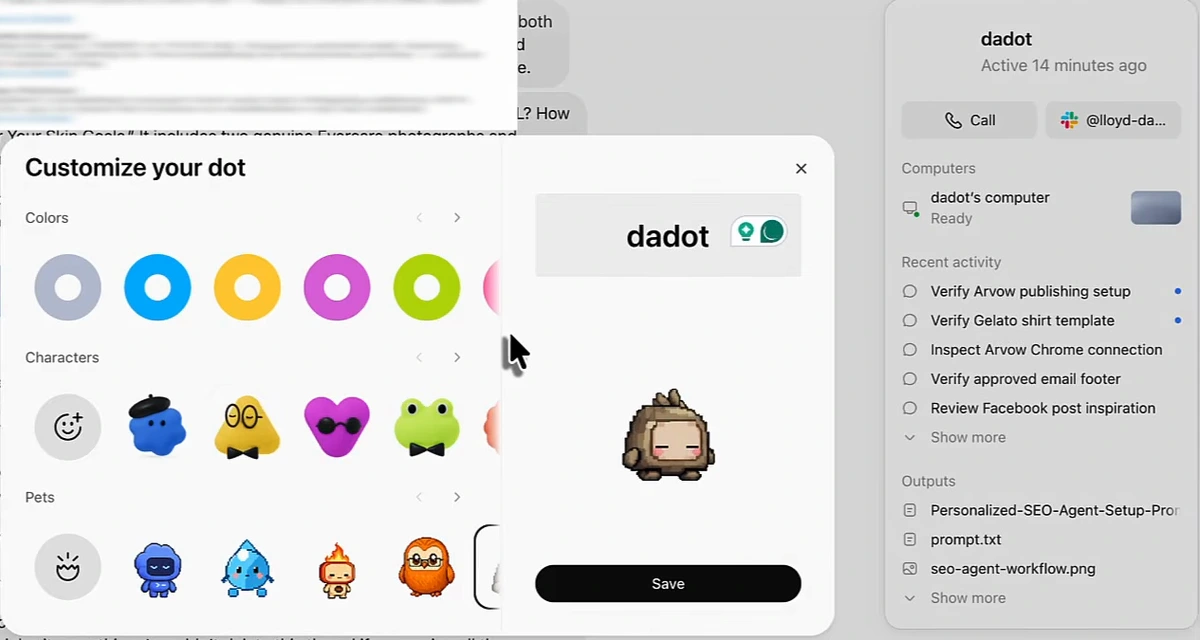
- Go to the dots page on chatgpt.com and click Create your dot. ChatGPT opens and walks you through the setup.
- Name it and pick a color and character. Tim's is called "dadot". This is cosmetic, but it's how the dot appears in your chat list and notifications.
- Find it in your sidebar. The dot sits above your normal chats. Keep talking to it in the same thread from then on.
- Connect the apps it needs. Tim's panel shows a Slack connection, and the recent-activity list shows the dot checking his Arvow publishing setup and Chrome connection. The more tools you connect, the more of the workflow it can run without you.
Look at the side panel in the screenshot. The "Recent activity" list is the dot doing setup work on its own (verify the publishing setup, inspect a connection, review post ideas), and "Outputs" holds the files it made, including the SEO agent prompt and the workflow diagram used later in the video. That panel is the quickest way to audit what your dot has been doing.
The SEO workflow, step by step
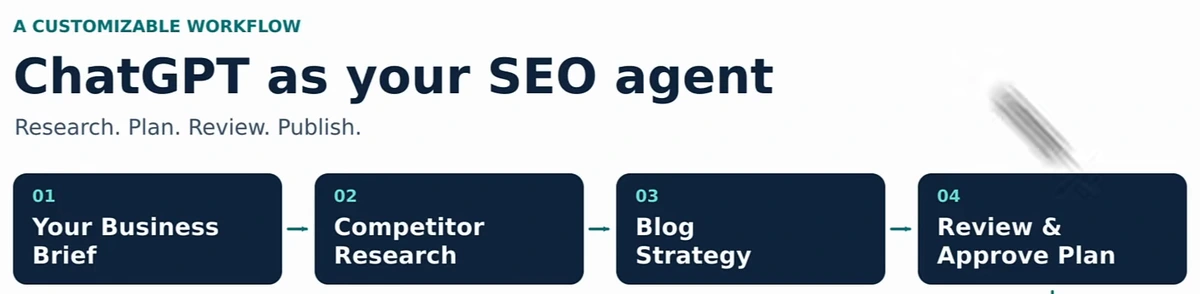
The workflow has four core steps that the dot does on its own, plus optional hand-offs to other tools:
| Step | What the dot does | What you do |
|---|---|---|
| 1. Business brief | Collects your brand, offer, audience, locations, goals and constraints. It can pull a lot from your earlier ChatGPT chats. | Fill the gaps it asks about. |
| 2. Competitor research | Looks at what competitors do well and, more importantly, what they don't cover. | Name up to five competitors, or let it find them. |
| 3. Blog strategy | Turns the gaps into a list of articles aimed at keywords you can win. | Check it fits the business. |
| 4. Review and approve | Writes an outline, then a draft, and stops for approval. | Approve or correct. |
| Optional: Arvow | Sends the approved brief to Arvow, which writes the article and publishes it to your site. | Choose draft or auto-publish. |
| Optional: social | Turns each article into social posts and sends them to a scheduler. | Approve the posts. |
| Measure and improve | Tracks results against a baseline and suggests changes. | Decide what to keep. |
Competitor research is the step that decides whether the rest is worth doing. If your plan is the same list of topics every competitor already covers, the dot will just help you publish faster into a crowded SERP. For the reasoning behind letting an AI run this loop, see our piece on agentic SEO.
The SEO agent prompt
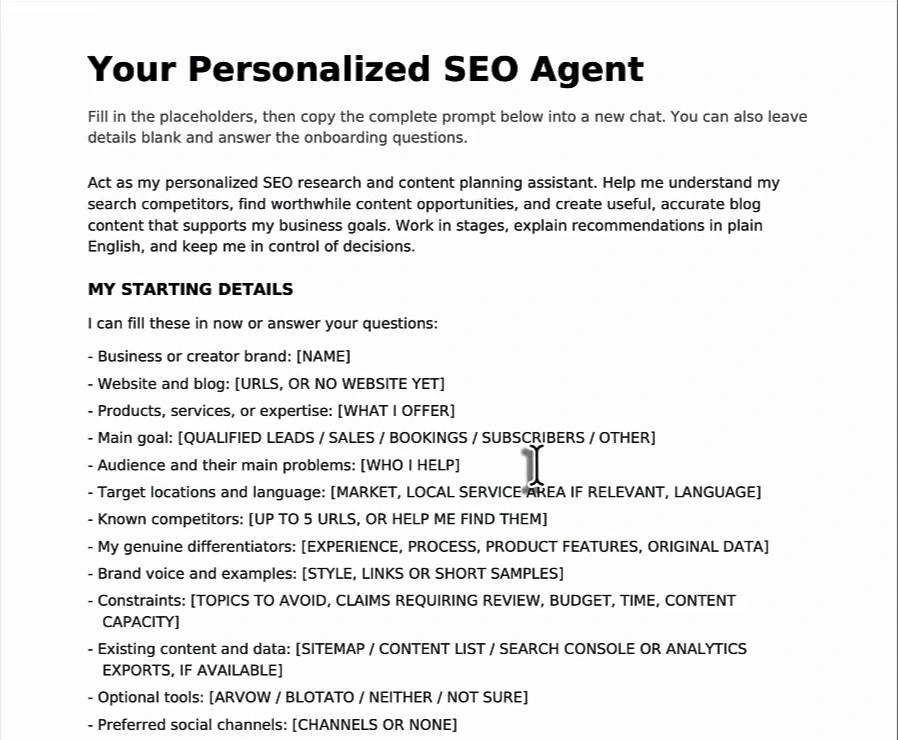
Tim gives the full prompt to viewers who comment "prompt" under the video. You don't need his exact wording to copy the structure. The first page sets the role ("personalized SEO research and content planning assistant") and asks for your starting details: brand, site, offer, main goal, audience and their problems, locations and language, up to five competitors, your genuine differentiators, brand voice, constraints, existing content and data, and which optional tools you use.
The rest of the document is eight stages and a set of working rules:
- Learn my business first
- Check your tools and evidence
- Research competitor strengths and weaknesses
- Build a distinctive blog strategy
- Create an approved outline, then a draft
- Optional Arvow workflow
- Optional social repurposing and Blotato
- Measure and improve
Two details in it are worth copying even if you write your own. First, it tells the dot to ask only the questions that change the plan, in a first batch of no more than six, and not to treat empty placeholders as facts. Second, it makes the dot label assumptions and keep you in control of decisions. Those two rules are what stop an always-on agent from inventing your business.
Hand the writing to Arvow
ChatGPT can write a decent blog post. What it doesn't do on its own is the technical layer: alt text, images, heading structure, internal links from your sitemap, publishing to your CMS. In Tim's setup the dot does the research and the outline, then hands the article to Arvow over MCP (the Model Context Protocol connection that lets the dot drive Arvow's tools). Three Arvow settings matter for this.
1. A knowledge base about your brand
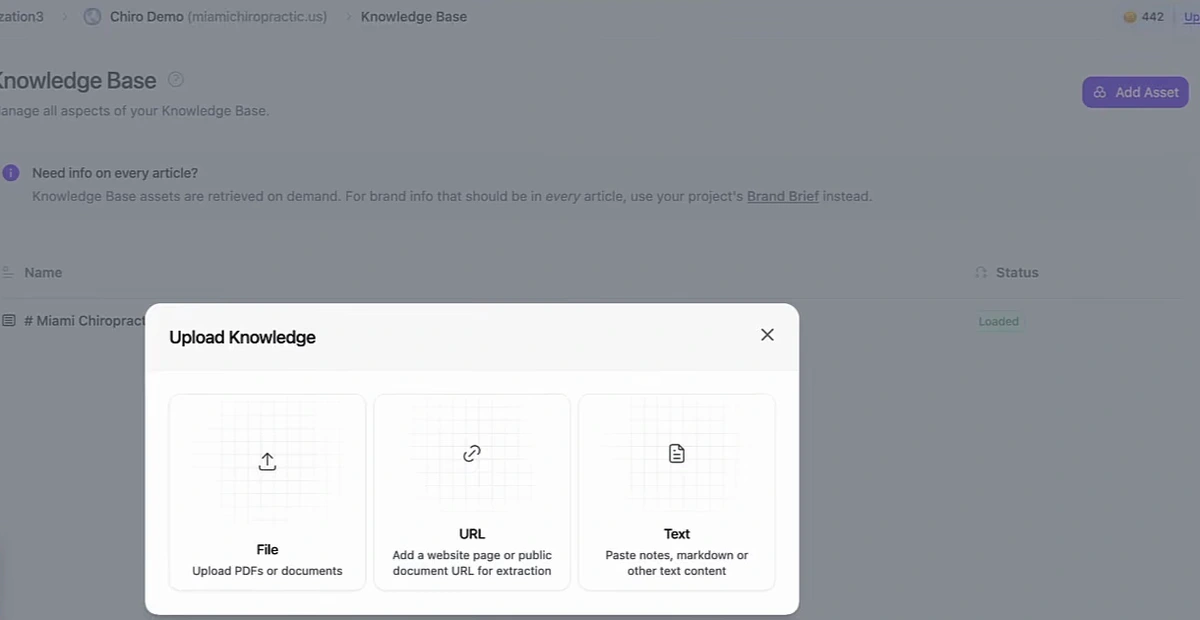
Upload case studies, service details, pricing notes and brand assets so articles are built from your information, not generic web knowledge. The note on that screen is easy to miss: knowledge-base files are pulled in only when relevant. Anything that must appear in every article, like your service area or guarantee, belongs in the project's Brand Brief.
2. A custom template for the dot's articles
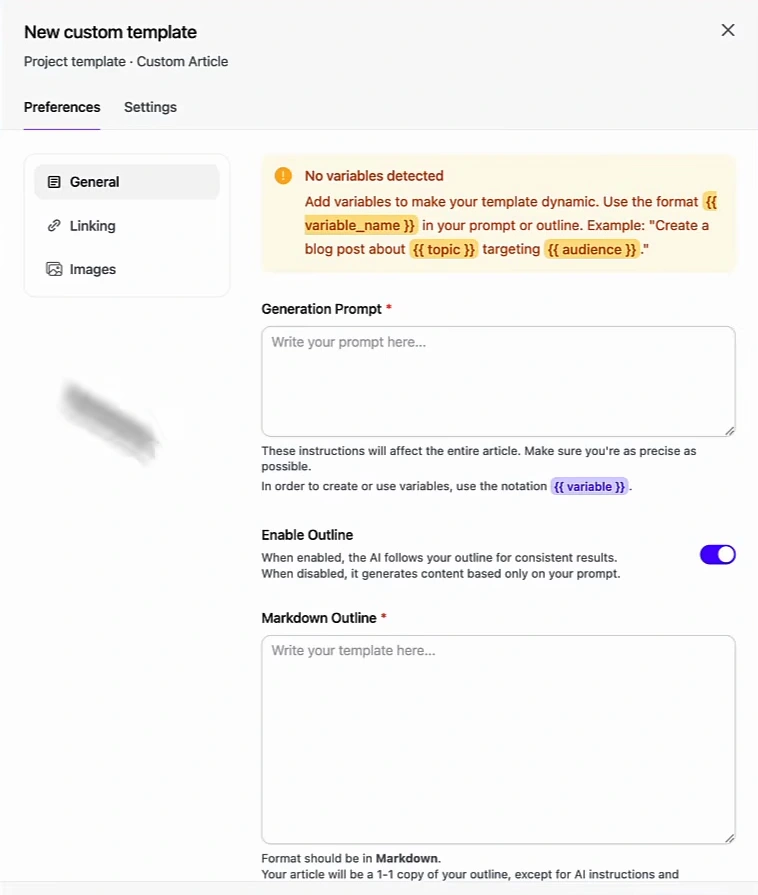
Create a template just for this workflow. Tim asks his dot to write the template's generation prompt and outline for him, since the dot already knows the brand. Use variables (written as {{ topic }} or {{ audience }}) for anything that changes per article. Keep fixed facts out of the template unless they are true for every page you'll generate. A hard-coded city or phone number in a template will end up in every article it writes.
3. Tell the template how many internal links you want
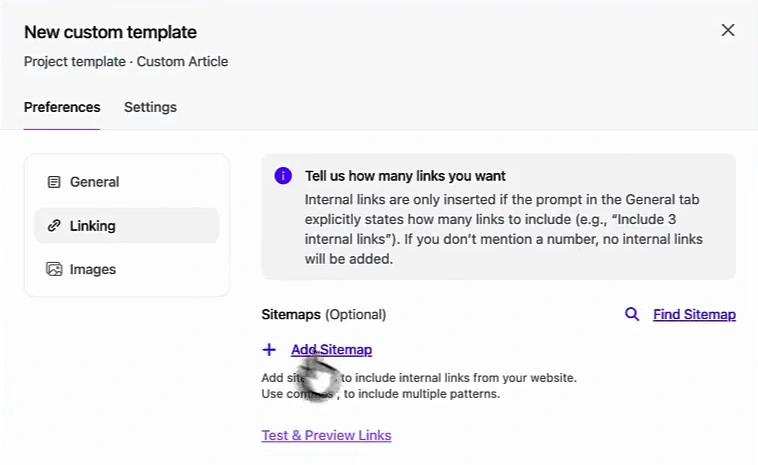
Add your sitemap on the Linking tab, then put a number in the General prompt ("include 3 internal links"). Without the number, Arvow adds none, even with a sitemap attached. Internal links are a big part of why these articles help each other rank, so this one line matters. Our guide to internal linking strategy covers how many and where.
Publishing: draft or live
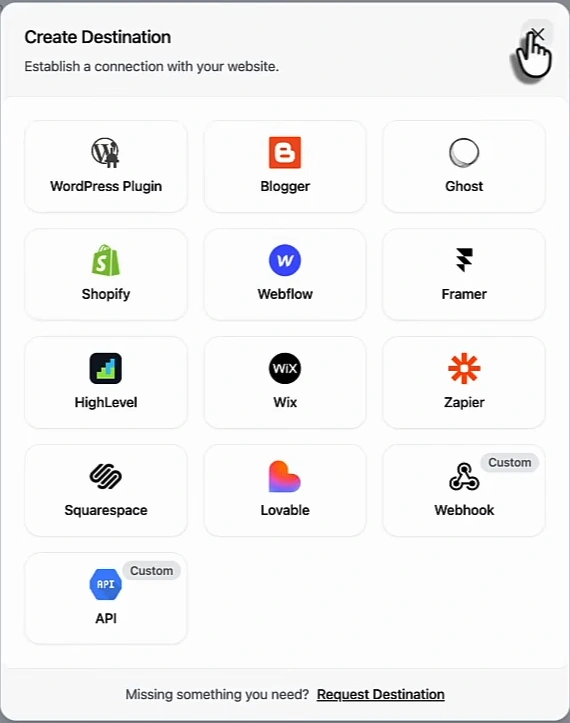
Connect your site as a destination and choose whether articles land as drafts or go live. With drafts, the dot finds the topic and writes the outline, Arvow builds the article, and you still review it in your CMS. That is the setting we'd start with. Switch to auto-publish once a few weeks of drafts have needed no edits. Through the same MCP connection the dot can also reach Arvow's other tools: Google Business Profile posts and review replies, a keyword planner, automatic backlinks, the site optimizer and the LLM brand monitor.
Turn the blog into social posts
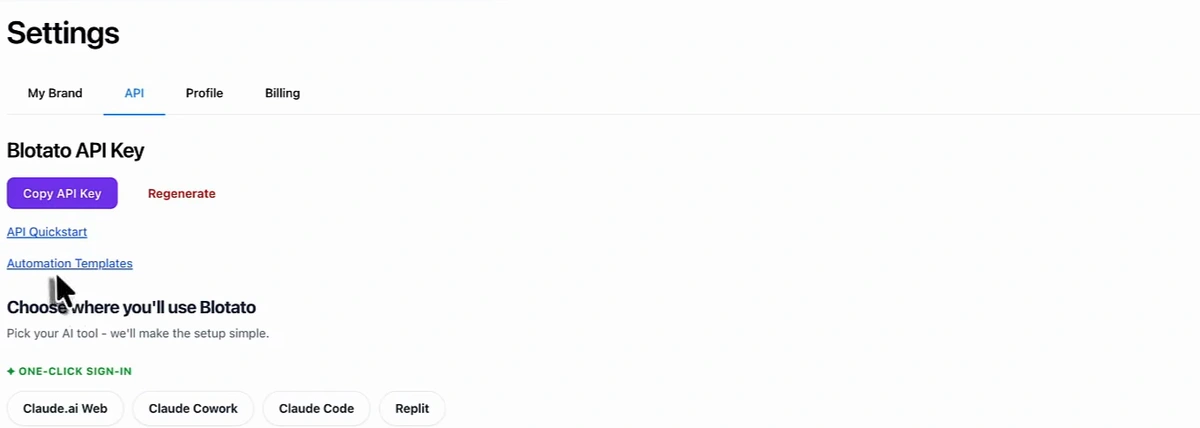
The last stage reads your blog's RSS feed and turns each new article into daily social posts. In the video the dot writes the posts (and can generate or pick images), then sends them to Blotato, a social scheduler, which publishes to the connected Instagram, Facebook and other accounts. Tim says his team runs its social channels this way end to end. The posts are built on articles that were themselves built on competitor research, which is why they have something to say.
Blotato is a third-party tool. Any scheduler your dot can reach through MCP or an API will work the same way. If your site runs on WordPress, see also automatically posting WordPress blog posts to social media.
Schedule it and keep approvals on
Once each stage works, give the dot a standing instruction, for example: "Every morning at 8:00, research one blog post and the matching social posts, then ask me for approval." The dot runs the research, asks for your yes, then creates and schedules everything.
Two more things from Tim's setup:
- Use your own photos. His dot has access to a folder of labelled customer and business photos on his computer and picks relevant ones for articles and posts. Real photos beat stock images, and labels are what let the dot choose.
- Expect to tune it. It won't be perfect out of the gate. Run the workflow, correct it in the same thread, and give it more information. Because the dot remembers, every correction carries into the next run.
What the video does and doesn't show
Tim says the workflow is bringing his sites more traffic, backlinks and AI citations. The video shows the setup, not those results: there is no traffic chart or citation report on screen, and the chat history is blurred. Treat it as a well-built process to try, not a measured case study. If you want to know whether your articles are being cited, read how to get cited by ChatGPT and set up monitoring before you switch the workflow on, so you have a baseline.
Keep the approval steps in. An always-on agent that can publish to your site and your social accounts is useful exactly because it is fast, which is also why a quick human check before anything goes live is worth keeping.
FAQ
What are ChatGPT dots?
Always-on ChatGPT agents that OpenAI announced on September 29, 2026. Each dot is one ongoing conversation with memory, its own cloud computer and connections to your apps. It can schedule and run tasks and check in with you for approval.
Do I need ChatGPT Pro to use dots?
At launch, dots were rolling out to Pro and Business Premium subscribers in eligible markets, with Enterprise, Edu and Healthcare workspaces able to try a beta once an admin enables it. Check OpenAI's dots page for current availability.
Can a ChatGPT dot publish blog posts to my website?
Not directly in Tim's setup. The dot plans and outlines, then hands the article to a tool connected through MCP (Arvow here), which writes it with the technical SEO in place and publishes to your CMS as a draft or live post.
Is this different from an SEO agent built in Claude Code?
The idea is the same: an AI that researches, plans and publishes using connected tools. A dot is a hosted, persistent chat you can call or message from your phone; Claude Code runs in your terminal. See our Claude Code SEO guide for that route.
Want the writing, internal links and publishing handled when your dot sends over a brief? See Arvow's AI SEO agent.

Generate, publish, syndicate and update articles automatically
The AI SEO Writer that Auto-Publishes to your Blog
- Cancel anytime
- Articles in 30 secs
- Plagiarism Free