
Image Alt Text at Scale: Fixing 174 Missing Alts With an AI Agent (2026)

A site audit told us we had 174 images with no alt text. Not 174 pages — 174 individual images, spread across a hundred crawled pages, most of them uploaded years ago by someone who has since left, or pulled in by a page builder that never asked for a description.
That is the shape this problem always takes. It is never one decision you got wrong. It is hundreds of tiny omissions that were each individually reasonable to skip, and that collectively make your site worse for screen reader users, invisible in image search, and harder for a crawler to interpret. And it is genuinely miserable to fix by hand.
This is what handing that job to an AI agent actually looks like — the queue it produces, the approval step in the middle, and the honest limits of what fixing alt text will and won't do for your rankings. The screenshots come from a walkthrough recorded in July 2026, run against arvow.com itself.
Why alt text is a bulk problem, not a writing problem
Writing one good alt attribute is easy. You look at the image, you describe what it shows and why it is on the page, you type a sentence. Thirty seconds.
The manual version of fixing 174 of them is not 174 × 30 seconds, though. It is: log into the CMS, find the media library, wait for the grid to load, click an image, work out which page it even appears on, decide what the description should be in that context, type it, save, go back, wait for the grid to load again. Repeat. Somewhere around image forty you start writing "product photo" for everything, which is worse than leaving it blank, because now the omission is invisible to the next audit.
That is the actual failure mode. Not that people don't know alt text matters — that the cost per unit is small and the unit count is large, so it never reaches the top of anyone's week.
What the agent produces: a queue, not a rewrite
The first thing worth noticing is that nothing gets changed. The crawl produces a list of proposals, one row per image, each with the image's URL, the page it sits on, and a suggested alt attribute.
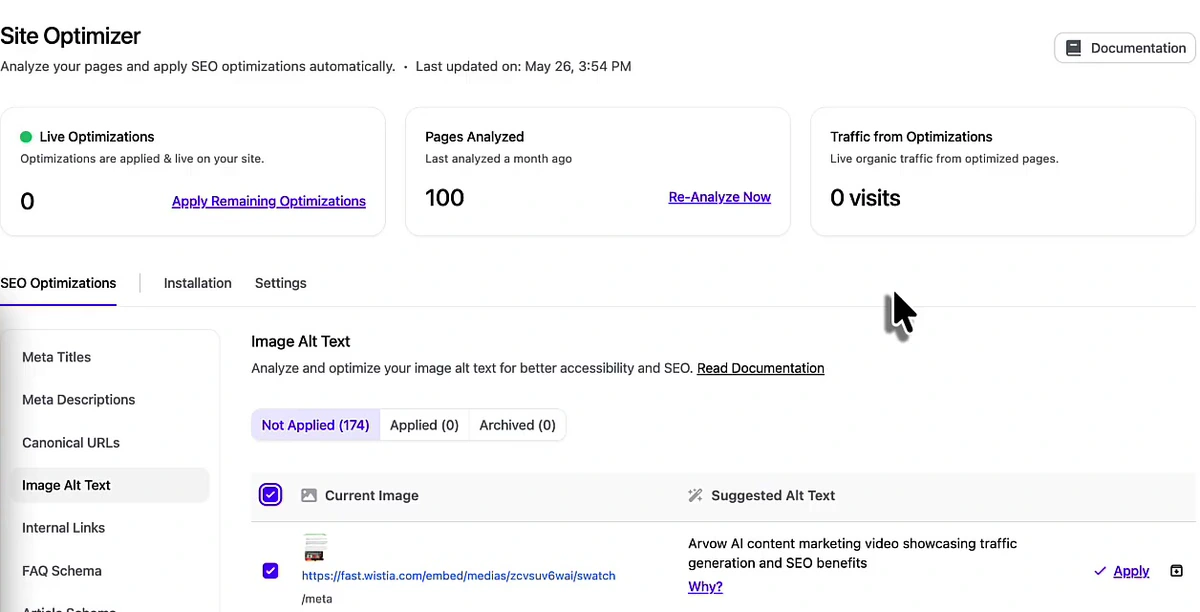
The suggestions are longer and more specific than what most people write by hand. For a screenshot of a flight comparison interface, the proposal reads: "Flight fare comparison tool with fields for origin (LAX), destination (JFK), departure, and return dates, alongside a partially visible product recommendation interface." That is a description of the image, not a keyword insertion — which is the correct instinct. Alt text is meant to stand in for the image when the image isn't available, and the W3C's decision tree for images is still the best guide to when a description is needed at all versus when an image should be marked decorative.
The tradeoff is length. Some of these run past what a screen reader user wants to sit through, and a purely decorative image should get an empty alt rather than a paragraph. The queue does not currently distinguish decorative from informative — that judgement stays with you, which is the argument for reading the list rather than mass-approving it blind.
The approval step is the actual product
Every row carries a Why? link, and it expands into a written justification for that specific suggestion. Here is one from the meta titles panel, which uses the same mechanism:
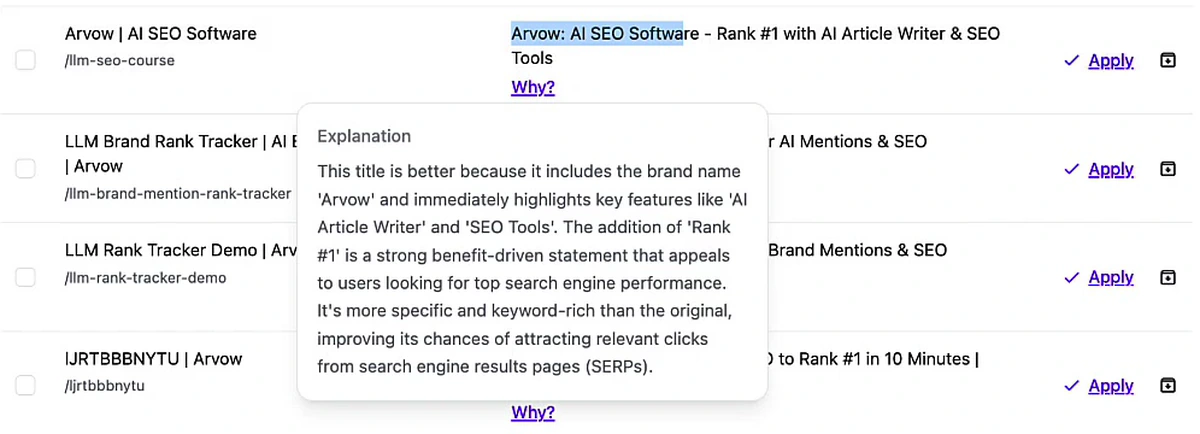
This matters more than it looks. An agent that silently rewrote 174 alt attributes across your live site would be a liability — you would have no way to audit what changed or to argue with any single decision. An agent that proposes 174 changes with reasons attached is something you can supervise at speed: skim the reasoning, spot the pattern, approve in blocks.

The Archive action is the part people miss. A queue that only lets you approve becomes worthless the second you disagree with it, because the rejects pile back up every crawl and you stop opening it. Being able to say "no, and stop asking" is what keeps the list at zero.
Applying changes without a CMS login
The claim made in the video is that the agent never logs into your site to make these changes. That is accurate, and it is worth understanding rather than taking on faith: the optimisations are served through a script installed on the site, so approved changes appear in the rendered page without anything being written back into WordPress, Shopify, Webflow or wherever your content actually lives.
The upside is obvious — no CMS credentials handed to a third party, no plugin rewriting your database, and it works the same way regardless of platform. The tradeoff is equally real and worth stating plainly: the fixes live in the delivery layer, not in your content. Remove the script and the alt attributes go with it. If you want them permanently in your source, the queue is a very good worklist to copy from, but you still do the writing-back yourself.
The same queue handles internal links and metadata
Alt text is one tab of seven. The same crawl produced 27 internal linking suggestions on the same site, each one a source page, a proposed anchor phrase, and a target URL.
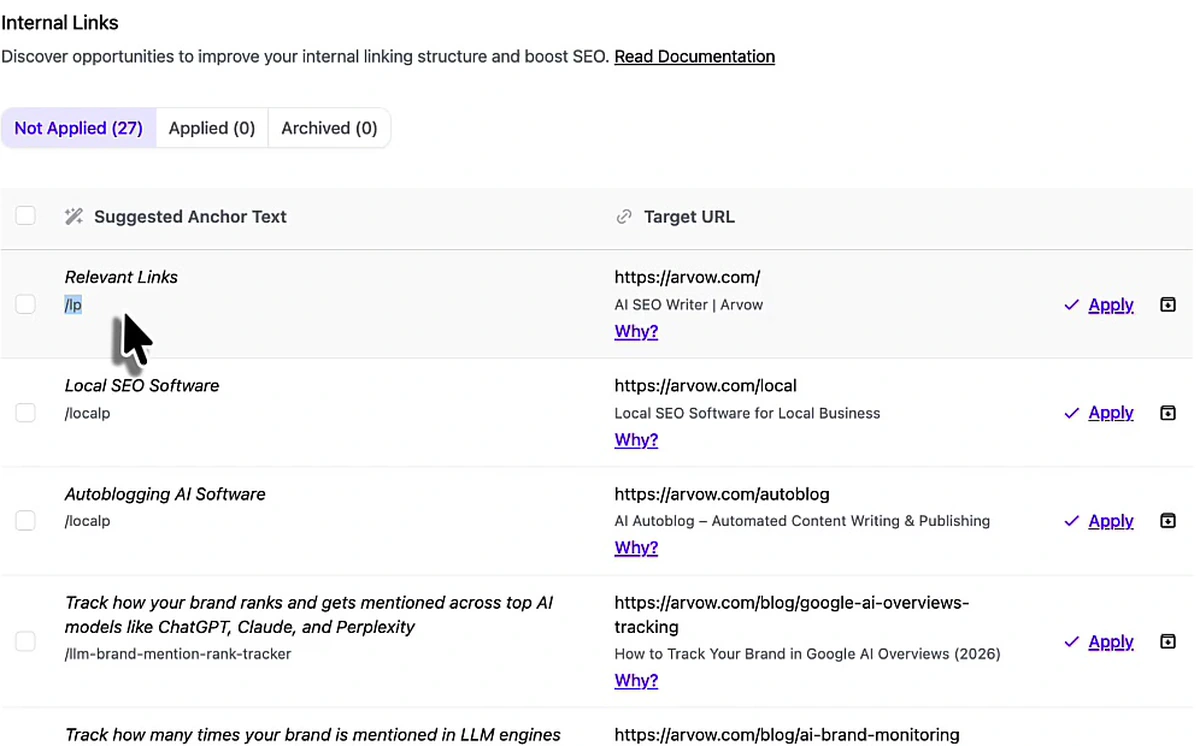
That is the honest reason internal linking gets automated well and alt text gets automated well by the same tool: both are problems where the work is trivial and the decision is what costs time. If you want the manual and tool-assisted versions of that specific job, we compared them in internal linking tools, and the meta description side has its own walkthrough in the meta description generator guide.
What this is actually worth
Here is the part that usually gets skipped in a demo. Alt text is not a strong ranking factor for your text pages. Fixing 174 of them will not move a competitive keyword. What it does do, reliably:
- Accessibility. Screen reader users get a description instead of a filename. This is the primary reason to do it and it does not need an SEO justification.
- Image search. Alt text is one of the main signals Google uses to understand what an image depicts, which matters if image or visual search sends you anything at all.
- Context for crawlers and language models. An image with a real description contributes to what the page is understood to be about. For a page that is mostly screenshots — a product tour, a tutorial — that gap is not trivial.
- Broken-image fallback. When the image fails to load, the alt text is what remains.
In the screenshot above, the "Traffic from Optimizations" card reads 0 visits — because at the time of recording nothing had been applied on that project yet. Take that as a useful reminder rather than a hidden flaw: a queue of proposals is not a result, and a tool that shows you zero when you have done nothing is telling you the truth. The number only becomes interesting after the changes are live and a few crawl cycles have passed.
Treat bulk alt text as hygiene, not strategy. It belongs in the same bucket as fixing canonicals and filling in missing meta descriptions: cheap, unglamorous, and the kind of thing that quietly costs you if it stays undone for two years. The strategy lives elsewhere — in what you publish and who links to you.
The alt text queue is one panel of Arvow's AI SEO agent, which also handles internal links, meta titles and descriptions, canonicals and schema from the same crawl. For how the whole automated stack fits together, start with the complete guide to AI SEO automation.
How to run this on your own site
- Crawl first, decide nothing. Get the count before you get opinions about it. A hundred pages is enough to tell you whether this is a ten-image problem or a two-hundred-image problem.
- Read the first twenty suggestions properly. This is your calibration sample. If the descriptions are accurate and appropriately scoped, the remaining 150 are probably fine too. If they are keyword-stuffed or wrong about what the image shows, stop.
- Archive the decorative images. Dividers, background textures, spacer graphics — these should have empty alt attributes, not descriptions. Rejecting them is a real edit, not a skipped one.
- Apply in blocks, not all at once. Twenty at a time, checking the rendered page after the first block. You are verifying the delivery mechanism works before you trust it with everything.
- Re-crawl on a schedule. New images arrive with every post. The count goes back up on its own; the point of automating it is that clearing it stops being a project.
Frequently asked questions
Does alt text improve Google rankings?
Barely, for your normal text pages — it is not a lever that moves competitive keywords. It matters properly for image search, where it is one of the main things Google uses to work out what a picture shows, and for accessibility, which is the real reason to do it. Fix it because it is cheap and it is broken, not because you expect a ranking jump.
Should every image have alt text?
No. Purely decorative images — dividers, background flourishes, spacer graphics — should have an empty alt attribute (alt="") so screen readers skip them. Describing them is noise. Informative images, screenshots, charts and product photos all need a real description. The W3C decision tree linked above walks through the distinction case by case.
How long should alt text be?
Long enough to convey what the image shows and why it is there, usually one sentence. If you need three, the information probably belongs in the page text with the image marked decorative. Some AI-generated suggestions run long; trimming them is a reasonable edit to make before approving.
Can an AI agent change my site without CMS access?
Yes, via a script installed on the site that applies approved optimisations at render time. That avoids handing over CMS credentials and works across platforms — but the changes live in that delivery layer, so they depend on the script staying installed rather than being written into your source content.
What else does the same crawl find?
On the site in the screenshots: 174 missing image alts and 27 internal linking opportunities, plus meta title, meta description, canonical URL, FAQ schema and article schema suggestions from the same pass. Alt text is simply the one with the largest raw count, because sites accumulate images far faster than they accumulate pages.
Is it safe to bulk-approve all of them?
Read a sample first, then yes for the informative images. The two things worth checking manually are decorative images that should be empty rather than described, and any image where the description is confidently wrong — an AI reading a screenshot can misidentify an interface. Both are caught by skimming twenty rows, not by opening all 174.
The reason this specific job is a good first thing to automate is that it has no upside worth arguing about and no downside worth fearing. Nobody's competitive position rests on their alt attributes. But 174 missing descriptions is 174 small ways your site is harder to use and harder to understand than it needs to be, and that is exactly the kind of debt that never gets paid off by hand.

Generate, publish, syndicate and update articles automatically
The AI SEO Writer that Auto-Publishes to your Blog
- Cancel anytime
- Articles in 30 secs
- Plagiarism Free