
The Complete Guide to AI SEO Automation: How to Rank #1 on Google and Get Featured in ChatGPT (5-Step Framework)


Table of Contents
Imagine waking up every morning to find that your website has published 5-10 high-quality articles while you slept, automatically ranking for valuable keywords on both Google and ChatGPT. Your organic traffic is growing 200-300% monthly, and AI search engines like ChatGPT, Perplexity, and Claude are citing your brand thousands of times each month.
This isn't theoretical—it's exactly what dozens of businesses have achieved using fully automated AI SEO systems.
💡 What Makes This Different: Unlike generic "AI content tools," this is a complete automation system that handles keyword research, content generation, publishing, technical SEO, and performance tracking—all on autopilot.
Real Results: The Numbers Don't Lie
Before we dive into implementation, let's look at what's possible with properly configured AI SEO automation:
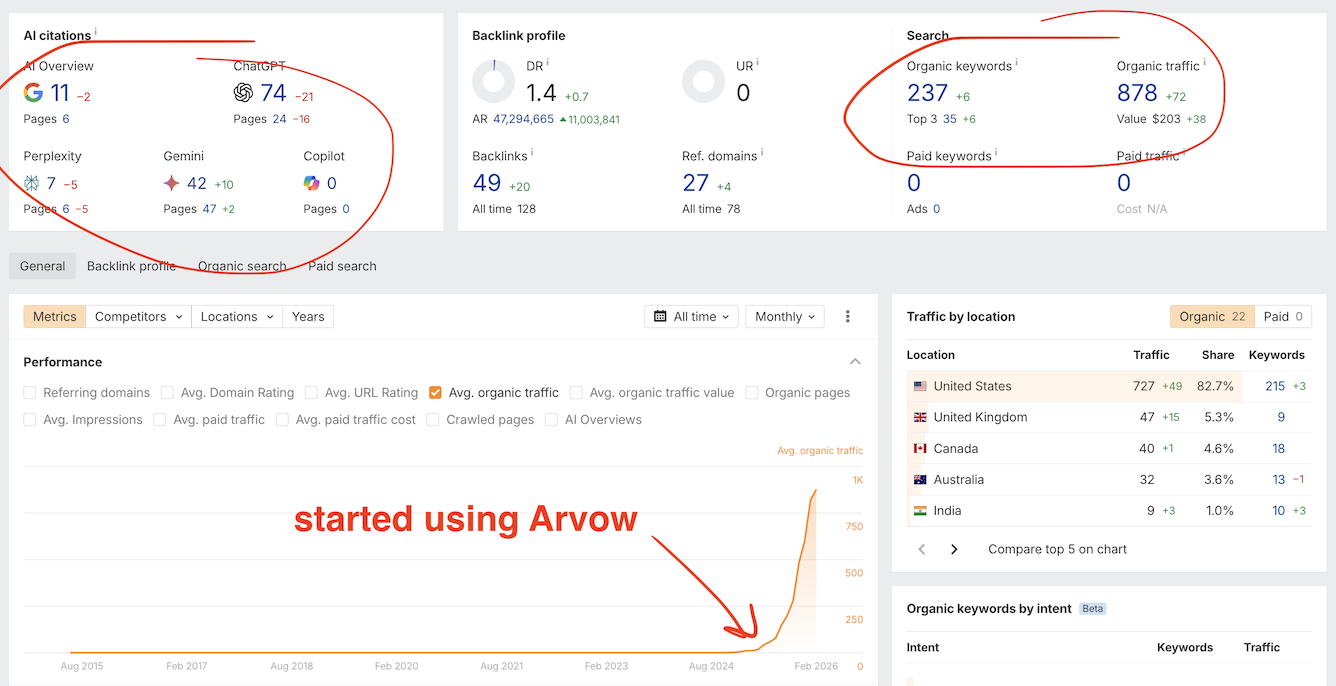
Case Study 1: E-commerce Site
Before Automation | After 4 Months |
Strategy: Automated content translation from English YouTube videos to French
Implementation details:
Monitored 5 top English gardening YouTube channels
Auto-converted videos to French articles (2-3 daily)
Embedded original videos with French transcripts
Average article rank: Position 3-8 in French Google
Conversion rate: 3.2%
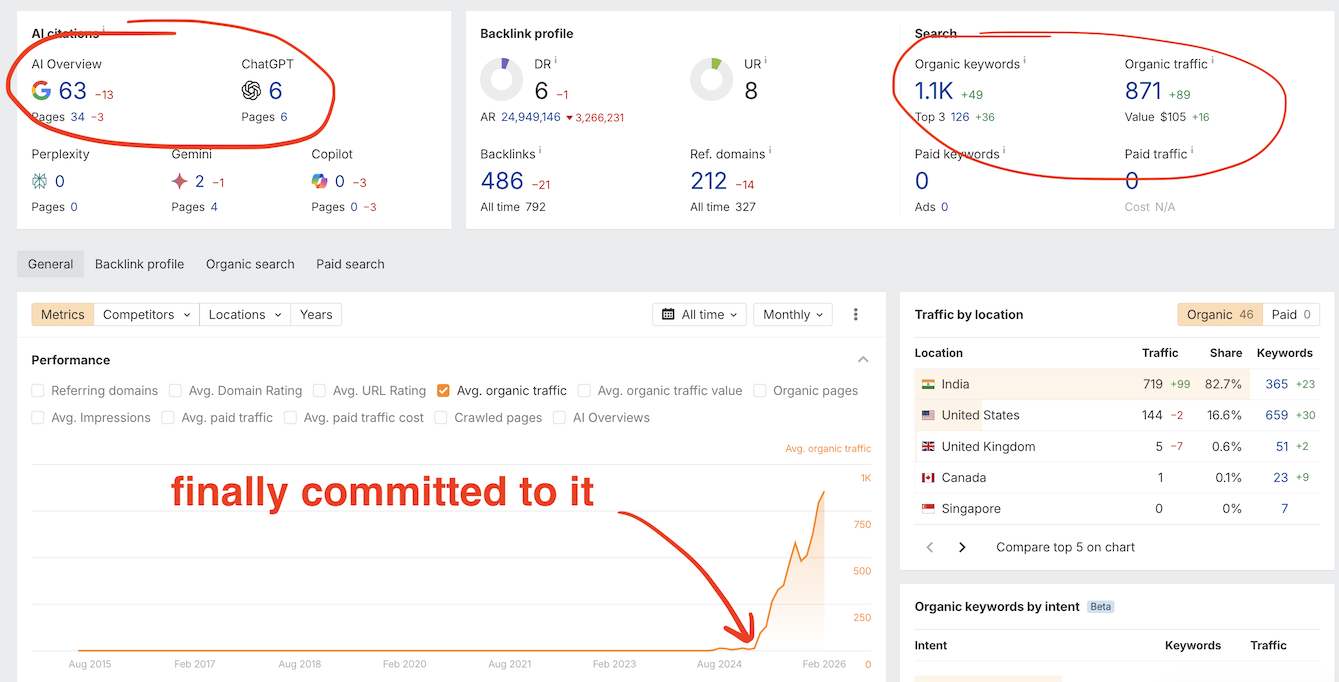
Case Study 2: B2B SaaS Company 💼
Before Automation | After 6 Months |
Key metric: 38% increase in leads specifically from AI search engines
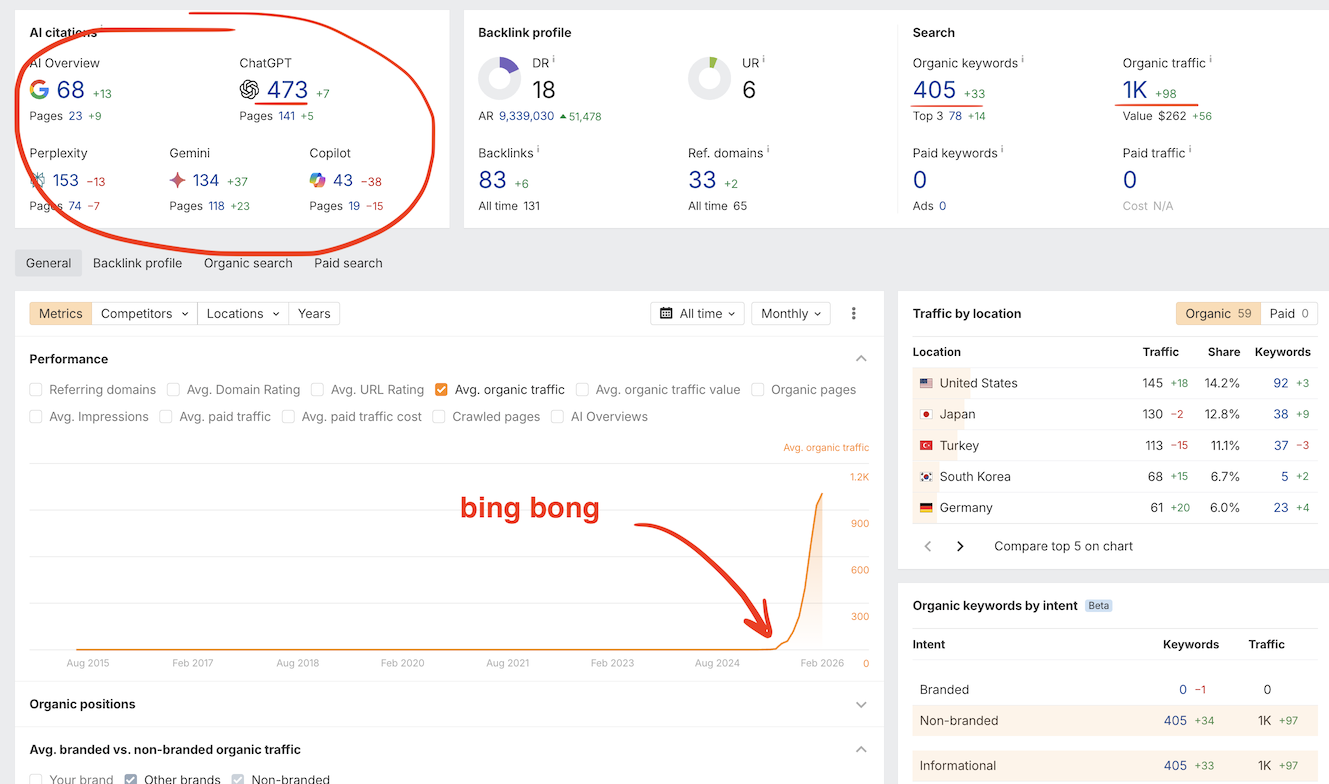
Case Study 3: Local Service Business 🔧
Before Automation | After 3 Months |
ROI: 10:1 (spent $180/month, generated $18,000 additional revenue)
"We went from 2,000 to 25,000 monthly visitors in 4 months using this exact system. The knowledge base made all the difference—our content actually sounds like us, not generic AI garbage."
— Sarah Chen, Head of Marketing at GardenPro
Understanding What We're Building (The Complete System)
This AI SEO automation handles five critical functions working together 24/7:
System Component #1: Automated Keyword & Prompt Research
✅ Key Innovation: This isn't one-time keyword research. The system continuously discovers new opportunities based on your competitors, trending topics, and your growing site authority.
What makes it "living":
Refreshes weekly with new keyword opportunities
Adapts as your site gains authority
Tracks competitor content strategies in real-time
Identifies LLM prompt patterns people actually use
Prioritizes by commercial intent and conversion potential
System Component #2: Brand Knowledge Base (The Anti-Slop System)
⚠️ Critical Component: Skip this, and you'll generate generic AI garbage that won't rank. Configure it properly, and your content will be indistinguishable from expert human writing.
What goes in your knowledge base:
Brand documents: Style guides, SOPs, methodologies, case studies
YouTube transcripts: Every tutorial, presentation, or expert talk
Website content: Your entire sitemap automatically extracted
Product/service docs: Technical specs, features, differentiators
Expert knowledge: Founder interviews, team expertise
Before/After Knowledge Base Impact
❌ Without Knowledge Base (Generic AI Slop): |
✅ With Knowledge Base (Brand-Specific Expertise): |
System Component #3: Autonomous Content Generation & Publishing
The complete content lifecycle handled automatically:
Keyword selection: AI pulls from your living keyword feed
Content generation: Creates articles using your knowledge base
Multimedia enrichment: Adds relevant images, videos, tables
Link insertion: Internal links to products/services, external links to sources
Publishing: Posts directly to WordPress, Shopify, Ghost, etc.
Indexing: Automatically submits to Google Search Console
System Component #4: AI Agents for Technical SEO
Multiple autonomous AI agents continuously crawl your site fixing:
Issue Type | What Gets Fixed | Impact |
|---|---|---|
Meta Tags | Titles, descriptions optimized for CTR | 15-30% CTR improvement |
Image Alt Text | Descriptive, keyword-rich alt attributes | Accessibility + image SEO |
Schema Markup | Article, Product, FAQ, HowTo schemas | Rich results + LLM citations |
Internal Links | Strategic linking structure | Better crawling + conversions |
Canonicals | Prevents duplicate content issues | Consolidated ranking signals |
System Component #5: Dual Tracking (Google + LLM Visibility)
💡 Future-Proof Strategy: While most tools only track Google, this system monitors both traditional search AND AI engine citations—where 60%+ of searches are heading.
Traditional metrics tracked:
Keyword rankings on Google/Bing
Organic traffic trends
Page-level performance
Conversion tracking
LLM visibility metrics tracked:
Brand mentions across ChatGPT, Claude, Gemini, Perplexity, Grok
Sentiment analysis (positive/neutral/negative)
Citation format and positioning
Competitive comparison frequency
The Three Pillars of SEO Success
⚠️ Critical Concept: Focusing on just one pillar severely limits results. This automation addresses all three simultaneously—which is why it works so well.
Pillar | What It Includes | Why It Matters |
|---|---|---|
On-Page SEO | Content quality, keyword targeting, structure, UX | Determines what you rank for |
Off-Page SEO | Backlinks, brand mentions, social signals | Signals trustworthiness and authority |
Technical SEO | Speed, schema, meta tags, internal linking | Ensures proper crawling and indexing |
💡 Related Reading: Want to learn more about SEO fundamentals?
Quick Start: 30-Minute Setup Guide
⚡ Your First Automated Article in 30 Minutes
Goal: Get your first AI-generated article published to test the system
Checklist:
☐ 5 min: Connect WordPress/Shopify
☐ 10 min: Create keyword feed (add your domain + 3 competitors)
☐ 10 min: Upload 3-5 PDFs to knowledge base
☐ 5 min: Generate test article and review
Result: Your first automated article published within 30 minutes!
Step 1 of 7: Connect Your CMS
🔧 Difficulty: ⭐⚪⚪⚪⚪ (1/5 - Very Easy)
Time: 5 minutes
Technical skill required: None (copy/paste API keys)
Why this matters: The system needs direct access to publish content. This is what makes it truly hands-off.
Supported platforms:
✅ WordPress (most popular)
✅ Shopify (for e-commerce)
✅ Ghost (clean, fast CMS)
✅ Webflow (design flexibility)
✅ Custom platforms (via API)
Quick Connection Steps:
Navigate to Blog Automation → Connect CMS
Select your platform from the list
Follow platform-specific instructions:
WordPress: Install plugin OR enter API credentials
Shopify: Authorize app in Shopify admin
Ghost: Create API key and paste
Test connection (click "Test" button)
Create workspace to organize campaigns
💡 Pro Tip: If you manage multiple sites, create separate workspaces for each. This keeps campaigns organized and prevents cross-contamination.
Troubleshooting: Connection failed?
Common issues:
WordPress: Make sure REST API is enabled (usually enabled by default)
Shopify: Check that you authorized the app with blog permissions
Ghost: Verify API key has "write" permissions, not just "read"
Still stuck? Most platforms have video tutorials showing exact steps.
Step 2 of 7: Create Your Keyword Feed
🔧 Difficulty: ⭐⭐⚪⚪⚪ (2/5 - Easy)
Time: 10-15 minutes
Technical skill required: Basic competitive research
This is the engine that powers everything. Unlike one-time keyword research, feeds continuously discover new opportunities.
What You Need:
Your website URL
2-5 seed keywords (your core topics)
3-5 competitor URLs
Target country & language
Real Example: Gardening E-commerce Store
Website: epicgardening.com Seed Keywords: - gardening supplies - raised garden beds - drip irrigation systems Competitors: - gardenersupplycompany.com - gardeners.com - planetnatural.com Target Country: United States Target Language: English
How to Find the Right Competitors
Do this:
Google your main seed keyword
Note the top 5-10 results
Exclude marketplaces (Amazon, eBay, Etsy)
Exclude mega-brands (unless you're also a large brand)
Choose 3-5 direct competitors of similar size
⚠️ Common Mistake: Choosing competitors that are too big (e.g., if you're a $1M business, don't benchmark against $100M brands). Choose similar-sized competitors for realistic keyword opportunities.
What Happens After You Create the Feed
Within 30-60 seconds, the AI will:
✅ Analyze your website's current content and authority
✅ Crawl all competitor sites
✅ Cross-reference with search volume data
✅ Identify 50-100+ keyword opportunities
✅ Classify by search intent (informational/transactional)
✅ Score by ranking difficulty and traffic potential
Then, every week:
🔄 Re-analyzes competitors for new content
🔄 Discovers trending keywords in your niche
🔄 Adapts as your site gains authority
🔄 Removes keywords you've already targeted
Understanding Keyword Value
Example from feed: "drip irrigation for garden beds"
Why this keyword is valuable:
Specific intent: Searcher knows exactly what they want
Purchase funnel position: Far down the funnel (ready to buy)
Product alignment: Directly relates to products you sell
Commercial value: High conversion potential
✅ Best Practice: Let the feed run for 1-2 weeks before judging results. It learns your site's strength and gets smarter about keyword selection.
Click to see example keyword feed output
Sample keywords discovered (81 total):
drip irrigation for garden beds (Difficulty: 23, Volume: 720)
best soil for raised beds (Difficulty: 31, Volume: 1,400)
cedar vs plastic garden beds (Difficulty: 18, Volume: 390)
how deep should garden beds be (Difficulty: 15, Volume: 880)
garden bed drainage solutions (Difficulty: 22, Volume: 510)
...and 76 more automatically discovered keywords
Step 3 of 7: Build Your Knowledge Base
🔧 Difficulty: ⭐⭐⚪⚪⚪ (2/5 - Easy)
Time: 30-60 minutes (one-time setup)
Technical skill required: File uploads
⚠️ CRITICAL: This is THE difference between "AI slop" and "expert content." Don't skip this step. Spend the time to do it right.
What to Include (Priority Order)
Tier 1: Must-Have (spend 30 minutes on this)
Brand documents:
Company overview/about page
Product/service documentation
Any internal SOPs or guides
Your website content:
Just enter your sitemap URL (auto-extracts everything)
Founder/expert knowledge:
YouTube channel (if you have one)
Podcast transcripts
Webinar recordings
Tier 2: Should-Have (if you have time)
Case studies showing real results
Customer testimonials and reviews
White papers or research you've published
Email sequences or sales materials
FAQ documents
Tier 3: Nice-to-Have (add later as you scale)
Team member interviews or bios
Industry reports and analysis
Competitive research documents
Historical content archives
Implementation Steps:
Navigate to Customization → Knowledge Base
Click "Create New Knowledge Base"
Name it descriptively (e.g., "EpicGardening Brand KB")
Add assets:
Upload PDFs/docs: Drag and drop
Add website: Paste sitemap URL
Add YouTube channel: Paste channel URL
Paste text: For shorter content
Save and activate
💡 Pro Tip: If you have a YouTube channel (even with just 10-20 videos), add it. YouTube transcripts are gold for knowledge bases because they contain your natural speaking voice and explanations.
The Transformation This Creates
❌ Without Knowledge Base: |
✅ With Knowledge Base: |
How the Knowledge Base Gets Used
When generating content, the AI:
Receives keyword/topic from your feed
Searches your knowledge base for relevant information
Extracts specific methodologies, data points, and brand voice
Generates content incorporating this unique knowledge
Cites your proprietary approaches and frameworks
Uses your natural language patterns and terminology
Troubleshooting: My content still sounds generic
Problem: Even with knowledge base, content lacks personality
Likely causes:
Knowledge base isn't connected to your template (check settings)
Not enough source material (add more documents/videos)
Source material is too generic (add your unique processes)
Quick fix: Add at least 3 YouTube video transcripts or 5 detailed documents that showcase your specific approach. The AI needs your unique perspective to work with.
Step 4 of 7: Configure Your Content Template
🔧 Difficulty: ⭐⭐⭐⚪⚪ (3/5 - Medium)
Time: 20-30 minutes
Technical skill required: Understanding of content structure
This determines exactly how your automated content looks and performs.
Understanding the Default Template
The default provides a solid starting point:
✅ H1 title (keyword-optimized)
✅ Featured image (AI-generated or stock)
✅ Introduction (2-3 paragraphs)
✅ Table of contents
✅ Key takeaways section
✅ Body content (H2/H3 structure)
✅ In-article images (3-5)
✅ In-article videos (relevant YouTube embeds)
✅ Bullet points and tables
✅ Internal links (3-6 per article)
✅ External links (2-3 to authoritative sources)
✅ FAQ section
✅ Conclusion with CTA
✅ Best Practice: Start with default template, publish 10 articles, review performance, then customize based on what works.
Key Configuration Options
1. Video Settings
Enable Videos: Yes (highly recommended)
Video Sources:
Option A: Let AI find most relevant videos (easiest)
Option B: Specify YouTube channels (e.g., only your channel + trusted sources)
Number of Videos: 1-2 per article
Placement: After introduction, within relevant sections
2. Image Settings
Image Type: AI-generated (recommended for speed)
Number of Images: 3-5 for standard articles
Style: Choose one:
"Hyper-realistic professional photography"
"Clean illustration style"
"Professional product photography"
"Infographic style with data visualization"
3. Internal Linking (Critical for Conversions)
Why this matters: Articles that link to your products/services convert 3-5x better than those that don't.
Sitemap URL: https://yoursite.com/sitemap.xml
Links per section: 4-6 links
Priority pages to link to:
Product pages (e.g., /products/garden-beds)
Service pages (e.g., /services/installation)
High-converting landing pages
Important category pages
💡 Pro Tip: The AI automatically links contextually. If an article mentions "cedar garden beds," it will link to your cedar garden bed product page if it exists in your sitemap.
4. External Linking (Builds Authority)
Why external links matter: Google rewards content that cites authoritative sources. It signals your content is well-researched.
External links per article: 3-5
Preferred sources:
.edu domains (universities, research)
.gov domains (government data)
Major publications (industry journals)
Scientific studies and research
Excluded sources:
Your competitors
Low-quality or spammy sites
Unrelated domains
5. Call-to-Action Setup
⚠️ Don't Skip This: Articles without CTAs get traffic but don't convert. Always include a relevant CTA.
CTA Examples by Business Type:
E-commerce: | "Shop our [product category] collection →" |
SaaS: | "Start your free trial - no credit card required →" |
Local Service: | "Schedule your free consultation today →" |
B2B: | "Download our complete [topic] guide →" |
6. Knowledge Base Connection
⚠️ CRITICAL: Don't forget to connect your knowledge base to the template. This is where most people mess up.
Template Settings → Knowledge Base:
Select your created knowledge base from dropdown
Brand voice: Professional but conversational
Expertise level: Expert (write for informed audience)
Include statistics: Yes
Include case studies: Yes
Testing Your Template
Template Testing Checklist:
Generate 1 test article manually
Review these specific elements:
Does it sound like your brand? ✓/✗
Are internal links relevant? ✓/✗
Are images high-quality and on-topic? ✓/✗
Is the CTA clear and compelling? ✓/✗
Would you publish this manually? ✓/✗
If 4/5 checks pass: Proceed
If fewer than 4 pass: Adjust template and test again
Advanced: Custom Templates for Comparison Pages
Why comparison pages work: They capture competitor keywords and high-intent traffic.
Structure:
H1: [Your Product] vs [Competitor] - Complete Comparison Introduction H2: Quick Comparison Table H2: [Your Product] Key Features H2: [Competitor] Key Features H2: Pricing Comparison H2: Pros and Cons H2: Which Is Right For You? CTA: "See why [X] customers chose us → Learn more about comparison page strategy
Step 5 of 7: Enable Autoblog Campaign
🔧 Difficulty: ⭐⭐⚪⚪⚪ (2/5 - Easy)
Time: 10 minutes
Technical skill required: None
This is where the magic happens. Everything comes together into full automation.
Creating Your Campaign
Navigate to Campaigns → Autoblogs
Click "New Campaign"
Name: "Main Blog Automation" (or something descriptive)
Select automation mode:
Full Automation: Publishes directly (recommended after testing)
Automation with Review: Generates content, you approve before publishing
Select your keyword feed
Select your CMS integration
Critical Decision: Publishing Frequency
⚠️ Important: Start conservative, then scale up. Don't go from 0 to 10 articles/day immediately.
Frequency Recommendations by Business Type:
Business Type | Week 1-2 | Week 3-4 | Month 2+ |
|---|---|---|---|
E-commerce | 1-2 daily | 3-5 daily | 5-10 daily |
B2B SaaS | 1 daily | 2-3 daily | 3-5 daily |
Local Services | 3-5 weekly | 1 daily | 2-3 daily |
Media/News | 3-5 daily | 5-8 daily | 10-20 daily |
✅ Best Practice: Monitor results for 2 weeks before increasing frequency. If traffic is growing and content quality is good, scale up by 2x.
Debunking the "Too Much Content" Myth
💡 Critical Understanding: Google does NOT penalize high publishing frequency. They penalize LOW QUALITY content, regardless of frequency.
What Google actually penalizes:
❌ Thin, low-value content
❌ Duplicate or near-duplicate content
❌ Content that doesn't satisfy search intent
❌ Obvious spam patterns
What Google rewards:
✅ Helpful, valuable content (regardless of frequency)
✅ Content that thoroughly answers questions
✅ Unique perspectives and expertise
✅ Regular updates and freshness
Advanced Settings
Publishing Schedule:
☑ Randomize posting times (looks natural)
☑ Publish between 6 AM - 6 PM (your timezone)
☐ Avoid weekends (optional, niche-dependent)
Batch Settings:
Articles per batch: 5-10
Wait time between batches: 2-4 hours
Quality Controls:
☑ Minimum word count: 1,200 words
☑ Require featured image
☑ Require internal links (minimum 3)
☑ Require external links (minimum 2)
What Happens After You Click "Enable"
The system begins its autonomous cycle:
Feed monitoring: Checks keyword feed every hour
Content generation: AI creates article using knowledge base
Quality checks: Verifies word count, links, images
Publishing: Posts directly to your CMS
Indexing: Submits to Google Search Console
Logging: Records all activity in dashboard
Monitoring Your Campaign
View real-time activity in the campaign dashboard:
📊 Published count: Total articles live
📈 Publication timeline: Visual graph of publishing activity
✅ Success rate: Percentage published without errors
🔗 Live previews: Click to see published articles
⚠️ Error tracking: Any issues flagged
Troubleshooting: Articles not publishing?
Check these common issues:
CMS connection: Go to integrations, click "Test Connection"
Keyword feed empty: Verify feed has populated keywords
Knowledge base not connected: Check template settings
Publishing permissions: Ensure API has write access
Still stuck? Check campaign error logs for specific error messages.
🎉 Congratulations! Your Automation is Live
Your system is now publishing high-quality content on autopilot. Next, let's set up the technical SEO agents to maximize results.
Step 6 of 7: Deploy AI Agents for Technical SEO
🔧 Difficulty: ⭐⚪⚪⚪⚪ (1/5 - Very Easy)
Time: 5 minutes setup, agents run automatically
Technical skill required: None
Why this matters: Technical SEO issues can reduce your rankings by 20-40%. These agents fix problems automatically so you never have to think about it.
What the Site Optimizer Does
Multiple AI agents work together to continuously improve your site:
Crawler Agent: Scans your site weekly
Analysis Agent: Identifies issues and opportunities
Recommendation Agent: Suggests specific fixes with reasoning
Implementation Agent: Applies approved fixes automatically
Verification Agent: Confirms fixes worked
Setup (5 Minutes)
Navigate to Site Optimizer
Enter your website URL
Select language
Choose scan scope:
All pages (comprehensive, slower)
Top 50 pages (quick start)
Specific sections (targeted)
Set crawl frequency: Weekly (recommended)
Click "Start Analysis"
Issues the Agents Fix
1. Page Titles (Meta Titles)
What gets analyzed:
Length (50-60 characters optimal)
Keyword inclusion
Brand name placement
Uniqueness across pages
Click-worthiness
Real example transformation:
❌ Current: "Garden Beds | ArvoGardening" |
✅ Agent Recommends: "Cedar Raised Garden Beds - 40% Higher Yields | Free Shipping | ArvoGardening" |
2. Meta Descriptions
What gets analyzed:
Length (150-160 characters)
Compelling CTA
Keyword relevance
Unique value proposition
3. Image Alt Text
What gets fixed:
Missing alt attributes
Generic alt text ("image1.jpg")
Keyword stuffing in alt text
Example fix:
❌ Before: <img src="bed.jpg"> (no alt text) |
✅ After: <img src="bed.jpg" alt="Cedar raised garden bed with vegetables in sunny backyard"> |
4. Internal Linking Structure
Issues identified:
Orphan pages (no internal links)
Weak linking to important pages
Broken internal links
Missed linking opportunities
Example recommendation:
Page: /blog/garden-bed-soil-guide
Suggested link to: /products/premium-garden-soil
Recommended anchor text: "our premium organic garden soil blend"
Agent reasoning: "Article discusses soil requirements for optimal plant growth. Linking to product page provides immediate value to readers ready to purchase. Page has high commercial intent, and internal link will boost product page authority."
5. Schema Markup
Critical for both Google and LLM visibility.
Schema types implemented:
Article schema: For blog posts
Product schema: For e-commerce pages
FAQ schema: For FAQ sections (critical for LLM citations)
HowTo schema: For tutorial content
LocalBusiness schema: For service businesses
💡 Pro Tip: FAQ schema is especially important for LLM visibility. AI models heavily cite content with structured FAQ data.
Using the Dashboard
After first scan, you'll see:
Page Titles: | 23 issues found | Review All |
Meta Descriptions: | 31 issues found | Review All |
Image Alt Text: | 47 missing | Review All |
Internal Links: | 12 opportunities | Review All |
Schema Markup: | 18 pages need schema | Review All |
Reviewing and Applying Fixes
For each issue, you can:
✅ Apply: Agent fixes it automatically
✅ Bulk Apply: Fix all similar issues at once
❌ Discard: Ignore this recommendation
✏️ Edit: Customize the agent's recommendation
✅ Best Practice: Review the first 5-10 recommendations carefully. Once you trust the agent's judgment, use "Bulk Apply" for efficiency.
Ongoing Monitoring
After initial fixes:
Agents scan weekly for new issues
Auto-fix enabled items get fixed without your input
You receive weekly summary of changes
Dashboard shows improvements over time
💡 Impact: Most sites see 10-30% ranking improvements just from fixing technical issues. This is "free" traffic you're currently missing.
Step 7 of 7: Track Performance (Google + LLM)
🔧 Difficulty: ⭐⚪⚪⚪⚪ (1/5 - Very Easy)
Time: 10 minutes
Technical skill required: None
Why dual tracking matters: 60%+ of searches are shifting to AI engines. Track both or miss half the opportunity.
Traditional SEO Tracking (Google/Bing)
Standard metrics via Reports dashboard:
📈 Organic traffic trends
🎯 Keyword rankings
📄 Page-level performance
💰 Conversion tracking
📊 Competitor comparison
LLM Visibility Tracking (The Future)
💡 Why This Matters: ChatGPT has 100M+ weekly users. If you're not tracking AI engine visibility, you're blind to a massive traffic source.
Setup (10 Minutes)
Navigate to Analytics → LLM Tracker
Click "New Monitor"
Enter your website URL
System auto-generates relevant prompts based on your niche
Review and customize prompt library
Enable tracking for:
☑ ChatGPT
☑ Claude
☑ Gemini
☑ Perplexity
☑ Grok
Click "Start Tracking"
What Gets Tracked
1. Visibility Score: How often you're mentioned
Example: Tracked 1,000 prompts → Mentioned in 450 → 45% visibility score
2. Sentiment Analysis: How positively AI discusses your brand
Positive (70-100): "Highly recommended," "industry leader," "best option"
Neutral (40-69): Factual mentions without strong endorsement
Negative (0-39): Criticism, warnings, or negative comparisons
3. Citation Format: How you're being cited
Direct links to specific pages
Brand mentions without links
Product recommendations
Feature comparisons
Case study references
4. Competitive Position: Ranking vs. competitors
Example dashboard view:
Prompt: "What's the best way to automate blog posting?"
Your mention: Position 2 (listed in comparison table)
Sentiment: 85 (Positive)
Quote: "Arvow offers comprehensive automation including keyword research, content generation, and technical SEO fixes—ideal for businesses wanting complete hands-off operation."
Competing brands mentioned: [Brand A], [Brand C]
How to Improve LLM Visibility
Based on tracking data, optimize for citations:
Add comprehensive FAQ sections (AI models love Q&A format)
Include specific data points (numbers, stats, comparisons)
Create comparison content (frequently cited)
Build topical authority (be THE source in your niche)
Update content regularly (freshness matters)
💡 Want to master LLM SEO? Check out our resources:
Weekly Performance Reviews
⏰ Your Weekly 10-Minute Check-In
Review traffic trends (up/down/flat?)
Check top-performing new articles
Review LLM visibility changes
Adjust publishing frequency if needed
Note any patterns or insights
That's it. 10 minutes/week to monitor a fully automated system.
🎉 System Complete! You're Now Running a Full AI SEO Automation
Your content machine is publishing daily, fixing technical issues automatically, and growing your visibility across Google and AI search engines.
Next: Learn the bonus strategies to 10x your results
Bonus Strategy 1: YouTube Channel Feed Automation
💡 Hidden Gem: This is one of the most powerful strategies. The French e-commerce case study used this to go from 0 to 24K visitors.
The Concept
Instead of keyword research → Content, you do:
YouTube videos → Auto-convert to articles → Publish
Why This Works Exceptionally Well
Pre-validated content: Videos with views prove demand
Multimedia richness: Embed video + written content
Freshness signals: New videos = automatic new content
Cross-platform visibility: Rank for video AND text searches
Translation opportunity: Enter untapped markets
Implementation (15 Minutes)
Navigate to Feeds → Create Feed
Select "YouTube Channel Feed"
Find 3-5 channels in your niche that:
Have 50k+ subscribers
Upload weekly or more
Cover commercial topics (not pure entertainment)
Add channel URLs
Configure:
Update frequency: Daily check
Target language: Original language
Translation: (Optional) Select languages to auto-translate
Create Autoblog campaign using YouTube feed
Enable and monitor
Real Case Study Breakdown
French E-commerce Site Strategy:
Monitored 5 top English gardening channels
Auto-converted to French articles (2-3/day)
Embedded original English videos with French transcripts
Results in 4 months:
Traffic: 0 → 24,000/month
350+ articles published
Average rank: Position 3-8
Revenue: $15,000+/month
Language Arbitrage Opportunity
💡 Massive Opportunity: English markets are 10-50x more competitive than most other languages. Translation opens blue ocean markets.
Language | Competition | Opportunity Score | Market Size |
|---|---|---|---|
English | Very High | ⭐⭐ (2/5) | 1.5B speakers |
Spanish | High | ⭐⭐⭐ (3/5) | 500M+ speakers |
Portuguese | Medium | ⭐⭐⭐⭐ (4/5) | 260M speakers |
French | Medium | ⭐⭐⭐⭐ (4/5) | 300M speakers |
German | Medium-Low | ⭐⭐⭐⭐⭐ (5/5) | 130M speakers |
Polish | Low | ⭐⭐⭐⭐⭐ (5/5) | 45M speakers |
Turkish | Very Low | ⭐⭐⭐⭐⭐ (5/5) | 80M speakers |
Bonus Strategy 2: News Feed for Topical Authority
💡 Authority Hack: A dedicated news section makes you THE authoritative source in your niche. Google and LLMs love comprehensive topical coverage.
The Strategy
Create a "News" section that auto-publishes 3-5 industry news articles daily:
Aggregates news from major sources
Filters for your niche
Auto-summarizes with your analysis
Links to related products/services
Establishes topical authority
Real Example: Tesla Accessories Store
Before news section:
Traffic: 8,000/month
Domain authority: DR 35
Brand perception: "Just another accessories store"
After adding Tesla news section:
Traffic: 11,200/month (+40%)
Domain authority: DR 52 (in 6 months)
Brand perception: "The go-to Tesla resource"
Return visitor rate: Up 85%
Implementation
Create Feed → News Feed
Configure:
Keywords: Your niche topics
Sources: Major news + industry publications
Update frequency: Every 6 hours
Create news section on site: yoursite.com/news
Set up Autoblog for news feed (3-5 articles/day)
Add news section to main navigation
✅ Best Practice: Always add your unique analysis to news articles. Don't just summarize—provide your expert perspective on what it means for your customers.
Understanding the Risks (And How to Mitigate Them)
⚠️ Honest Assessment: No strategy is risk-free. Here's what could go wrong and how to prevent it.
Risk #1: Generic AI Content
What happens: Content sounds robotic, doesn't rank, provides no value
Likelihood without knowledge base: Very High (80%)
Likelihood with knowledge base: Low (10%)
Prevention:
✅ Spend 1-2 hours properly configuring knowledge base
✅ Include YouTube transcripts and detailed docs
✅ Test 10 articles before enabling full automation
✅ Review monthly and adjust
Risk #2: Google Penalties
What happens: Site gets penalized or deindexed
Likelihood with proper setup: Very Low (2-5%)
Prevention:
✅ Start with conservative publishing frequency
✅ Ensure knowledge base is properly configured
✅ Add relevant internal/external links
✅ Keep content genuinely helpful (not just keyword stuffing)
✅ Monitor Google Search Console for warnings
💡 Reality Check: Google's official stance is they DON'T penalize AI content if it's helpful. Focus on quality, not production method.
Risk #3: Scaling Too Fast
What happens: Sudden content spike triggers manual review
Prevention:
✅ Week 1-2: 1 article/day
✅ Week 3-4: 2-3 articles/day
✅ Month 2: 3-5 articles/day
✅ Month 3+: Scale based on results
Common Problems & Solutions
Problem: Publishing 100+ Articles But Zero Rankings
Symptom: Articles are publishing, but traffic isn't growing
Likely causes:
Knowledge base not connected to template
Targeting wrong keywords (too competitive or zero volume)
Content doesn't satisfy search intent
No internal/external links
Technical SEO issues preventing indexing
Diagnostic steps:
Check template → Verify knowledge base is selected
Review 5 published articles → Do they sound like your brand?
Check Google Search Console → Are articles being indexed?
Review keyword feed → Are keywords appropriate difficulty?
Run Site Optimizer → Fix any technical issues
Problem: Content Sounds Generic/Robotic
Solution priority order:
Add more knowledge base content (biggest impact)
Upload 5-10 YouTube video transcripts
Add detailed product/service documentation
Include case studies with specific data
Adjust template tone settings
Change from "formal" to "conversational"
Enable "include examples"
Set expertise level to "expert"
Review article template
Ensure knowledge base is connected
Check that "brand voice" is enabled
Problem: Articles Publishing to Wrong Category/Format
Solution: Check CMS integration settings
WordPress: Verify default category assignment
Shopify: Check blog assignment
Ghost: Verify tag configuration
Fix in automation settings → CMS integration → Default categories/tags
Expected Timeline: What to Expect Month-by-Month
📅 Month 1: Foundation Phase
Traffic: +5-15% (minimal)
Articles published: 30-60
Rankings: 5-10 keywords entering top 100
Focus: Testing, refinement, building foundation
What to do: Monitor quality, adjust templates, fine-tune frequency
📅 Month 2-3: Early Growth
Traffic: +50-100%
Articles published: 120-200 total
Rankings: 30-60 keywords in top 50
LLM mentions: Starting to appear (50-200/month)
What to do: Increase publishing frequency, start seeing patterns
📅 Month 4-6: Compound Growth Begins
Traffic: +200-400%
Articles published: 400-600 total
Rankings: 100-300 keywords in top 20
LLM mentions: 1,000-3,000/month
What to do: Scale up, add bonus strategies, optimize winners
📅 Month 7-12: Sustained Scaling
Traffic: +500-1000%
Articles published: 1,000-2,000+ total
Rankings: 500-1,500 keywords in top 10
LLM mentions: 5,000-15,000/month
What to do: Maintain system, focus on conversions, add advanced strategies
ROI Calculator: Is This Worth It?
Cost Breakdown
Expense | Monthly Cost |
|---|---|
AI SEO Platform (Arvow) | $60-200 |
Additional AI credits (optional) | $20-50 |
Your time (2 hours monitoring) | $0-100 |
Total Monthly Investment | $80-350 |
Compare to Alternatives
Approach | Monthly Cost | Output | ROI Timeline |
|---|---|---|---|
Freelance Writers | $1,000-10,000 | 10-20 articles | 6-12 months |
In-house Team | $12,000-20,000 | 30-50 articles | 6-12 months |
SEO Agency | $3,000-15,000 | 20-40 articles | 6-12 months |
AI Automation | $80-350 | 100-300 articles | 3-6 months |
Break-Even Analysis
Scenario: E-commerce with $100 average order value
Month 3 conservative estimate:
Traffic increase: +2,000 visitors/month
Conversion rate: 2%
New orders: 40/month
Revenue: $4,000/month
Cost: $180/month
ROI: 22:1
Month 6 conservative estimate:
Traffic increase: +8,000 visitors/month
Conversion rate: 2.5%
New orders: 200/month
Revenue: $20,000/month
Cost: $180/month
ROI: 111:1
Frequently Asked Questions
Will Google penalize me for publishing AI content daily?
No. Google's official guidance (as of 2025) is they evaluate content quality, not production method.
What Google penalizes: Low-quality, unhelpful content (regardless of source)
What Google rewards: Helpful, valuable content (regardless of source)
As long as your knowledge base is properly configured and content provides value, publishing frequency doesn't matter.
How much does this actually cost per month?
Platform: $60-200/month depending on volume
AI credits: $20-50/month for high-volume publishing
Total: $80-250/month
Compare to: $1,000-10,000/month for writers or agencies
ROI: Typically 10-100:1 after 3-6 months
What if my niche is highly technical or specialized?
This is where knowledge base shines. For technical niches:
Upload comprehensive technical documentation
Include expert video transcripts
Add white papers and research
Include detailed case studies
The AI incorporates technical depth automatically. We've seen success in: medical devices, enterprise software, legal services, engineering, financial advisory.
Can I use this for e-commerce product descriptions?
Yes! Create a product feed instead of keyword feed:
Import product catalog
AI generates unique descriptions
Creates buying guides and comparisons
Publishes to product pages
Especially powerful for large catalogs (1,000+ products).
How long until I see results?
Realistic timeline:
Month 1: Minimal traffic impact (setup phase)
Month 2-3: 50-150% traffic increase
Month 4-6: 200-400% traffic increase
Month 7+: 500-1000%+ traffic increase
Note: Results vary by niche competitiveness and starting authority.
What if I don't have a YouTube channel or much content?
You can still succeed with minimal assets:
Upload your website content (sitemap auto-extraction)
Add any PDFs or documents you have
Include your About page and service descriptions
Even with just this, you'll get better results than no knowledge base
Future improvement: Record 5-10 short videos explaining your approach (even phone recordings work). Add transcripts to knowledge base. This significantly improves output quality.
Your Next Steps
🚀 Getting Started Checklist
Today (30 minutes):
☐ Sign up for platform
☐ Connect your CMS
☐ Create basic keyword feed
This Week:
☐ Build knowledge base properly
☐ Configure content template
☐ Publish first 5-10 test articles
Next 2 Weeks:
☐ Enable automation at 1 article/day
☐ Set up Site Optimizer
☐ Configure LLM tracking
☐ Monitor and adjust
Month 2+:
☐ Scale publishing frequency
☐ Add bonus strategies (YouTube/News feeds)
☐ Optimize based on performance data
☐ Enjoy compounding traffic growth
Final Thoughts: The Future is Automated
The businesses winning in SEO today aren't outworking competitors—they're out-automating them. While others manually research keywords, write content, and fix technical issues, you're publishing 10x more high-quality content with 1/10th the effort.
The case studies are undeniable:
24,000 monthly visitors in 4 months (French e-commerce)
45,000 monthly visitors in 6 months (B2B SaaS)
12,000 monthly visitors in 3 months (Local service)
These aren't outliers—they're typical results when the system is properly configured.
✅ The Key to Success: Don't skip the knowledge base. That's the difference between "generic AI garbage" and "expert content that ranks and converts."
Traditional SEO is becoming commoditized. AI-powered automation is the new competitive advantage. The question isn't whether to automate—it's whether you'll do it before or after your competitors.
"We were skeptical about AI content at first. But after properly configuring the knowledge base, our automated articles rank just as well as our manual ones—and we're publishing 20x more. Our organic traffic has tripled in 5 months."
— Marcus Reynolds, CEO of TechFlow Solutions
The traffic is waiting. The system works. Now it's your turn.
Generate, publish, syndicate and update articles automatically
The AI SEO Writer that Auto-Publishes to your Blog
- Cancel anytime
- Articles in 30 secs
- Plagiarism Free