
5 Local SEO Tips to Rank #1 on Google Maps ($5,729 Value)

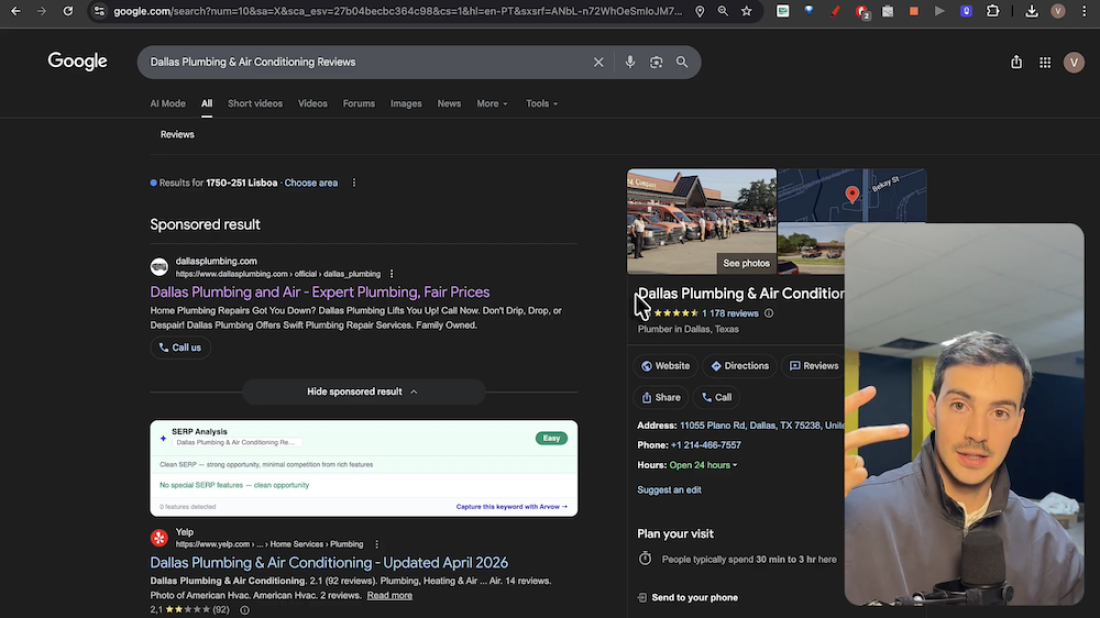
Table of Contents
If you run a local business — or you're an SEO agency managing local clients — ranking in the Google Maps local pack is one of the highest-ROI things you can do. Top-three placement on Google Maps drives calls, bookings, and walk-ins directly. But most local business owners are either doing nothing to rank or they're doing the wrong things.
These aren't generic local SEO tips pulled from a blog post somewhere. These are the exact moves we use with local SEO clients — the same strategies taught in our $5,729 local SEO course — condensed into five practical tips you can implement this week.
Full video walkthrough:
We're using a Dallas plumber as the running example, but everything in this guide applies to any local business in any niche — dentists, lawyers, rhinoplasty surgeons, HVAC companies, restaurants, whatever you're ranking.
Tip 1: Analyze Who's Already Ranking (And Why)
Before you change a single thing on your Google Business Profile, open Google and search your target keyword. "Dallas plumber." "Best dentist in Austin." "Rhinoplasty surgeon Miami." Whatever you want to rank for.
Then look at the top three results in the local map pack. Skip the sponsored listings — those are paying for placement and don't tell you anything about organic rankings. Focus on the businesses Google is choosing to promote organically.
Here's the mindset shift: Google is telling you what it wants. These businesses didn't rank by accident. They're doing something better than everyone else, and your job is to reverse-engineer what that is.
What to look for in the top rankers
Do they have the keyword in their business name?
How many reviews do they have, and how recent are they?
Are they responding to reviews?
When was their last photo uploaded?
Are they posting updates to their Google Business Profile?
Is their website fast and well-structured?
You can inspect competitors systematically using the Arvow SEO Inspector Chrome extension, which includes a dedicated local SEO audit tab. It checks UX, CTAs, citations, schema markup, and on-page signals for any local business URL you enter — yours or a competitor's.
One important observation: the business with the most reviews doesn't always rank first. A plumber with 19,000 reviews might rank fourth while a plumber with fewer reviews ranks first. That's because review count is just one signal among many — and it's not the most important one.
Tip 2: Get Keywords Into Your Business Name (Carefully)
Look at the top-ranking Google Maps results for almost any competitive local keyword and you'll notice a pattern: the winners often have the target keyword in their business name.
For "Dallas plumber," the top results include names like "Public Service Plumbers," "Metroflow Plumbing," "Dallas Plumbing." Compare that to a business called "Miles Electric, AC, and Plumbing" — where plumbing is the third service mentioned. Google can't tell as easily whether that business is primarily a plumber, and it ranks lower as a result.
This is sometimes called keyword stuffing the business name, and while some competitors clearly game the system, having your primary service keyword in your name is a legitimate ranking signal.
How to apply this without breaking rules
You can't just rename your LLC overnight. But you can:
Use a "doing business as" (DBA) name that includes your primary keyword.
Add a location or service descriptor if it's part of how you legally operate (e.g., "Smith & Co — Dallas Plumbing").
Keep your Google Business Profile name aligned with your real business name — Google's guidelines require this, and fake stuffing can get you suspended.
The key is that when Google evaluates relevance for "Dallas plumber," a business name that includes "plumbing" or "plumber" sends a stronger signal than one that doesn't.
Tip 3: Treat Your Google Business Profile Like a Living Entity
Click through the top-ranking businesses on Google Maps and you'll see the same pattern over and over. They all have:
Dozens or hundreds of recent photos (not stock photos — real photos of their work, their team, their trucks)
Videos showing what they do
Regular posts with promotions, updates, or news
Recent review activity
Reply threads on every review
Now compare that to the average local business: photos uploaded five years ago, no posts, no video, reviews sitting unanswered.
Google wants to promote businesses that are actively engaged with their customers. Think of your Google Business Profile the way you'd think of a physical storefront on a busy street. If you walked past two plumbing shops — one with clean signage, fresh paint, and a "NEW PROMO" sign in the window, and one with boarded-up windows and faded branding — which one do you walk into?
Google thinks about it the same way.
What to do weekly
Upload new photos of completed jobs, team members, vehicles, equipment
Post updates using the GBP posts feature — promotions, seasonal tips, before/afters
Record short videos of jobs in progress or customer interactions
Update service areas and business info whenever anything changes
This isn't about gaming the algorithm. It's about demonstrating to Google (and to potential customers viewing your listing) that you're a real, active business worth recommending.
Tip 4: Reviews + Keyword-Rich Replies = Compound Local SEO Signals
Reviews matter. But how you handle reviews matters just as much.
Here's what happens when a customer writes a review: they often mention specifics — "plumber came to my house in Dallas," "fixed my clogged toilet," "unblocked the drain." Those are keywords Google sees and associates with your business. Every review is a tiny relevance signal.
Now here's the leverage point most businesses miss: your reply is another opportunity to add keywords and signals.
If a customer writes "John was great, fixed my issue fast, highly recommend," your reply shouldn't just be "Thanks for the review!" It should be something like: "Thank you so much, Sarah! We're glad we could help resolve your toilet clogging issue at your Oak Lawn home in Dallas. Our plumbing team always aims for fast, professional service."
See what happened? You just reinforced:
The service (toilet clogging, plumbing)
The location (Oak Lawn, Dallas)
Your positioning (fast, professional)
Do this across hundreds of reviews over time and you've built a massive bank of hyper-relevant location and service signals — all sitting on your Google Business Profile.
How to systematically get more reviews
Send review request links (Google provides a short URL for this) after every completed job
Train your team to ask verbally at the end of service
Include a QR code on invoices or receipts
Follow up via text 24 hours after job completion
And reply to every review — positive and negative. Negative review responses are especially important for showing professionalism to future customers reading your profile.
Tip 5: Fix Your Website (Because GBP + Site Are Correlated)
Your Google Business Profile doesn't rank in isolation. There's a direct correlation between how well your website ranks and how well your GBP ranks. You can't win local SEO with just a great GBP and a broken website.
Here's what to check on your site.
User experience and calls-to-action
Look at your homepage right now. Where's your phone number? Where's your "Schedule Now" button? Can a visitor find it in one second?
If your site uses three different colors for CTAs — one color for "Contact," another for "Schedule," another for the phone number — visitors get confused and leave. Consistency wins. Pick one CTA color and use it for every clickable action across the site.
If a potential customer can't find your phone number in one second, they'll close the tab and call the next plumber. You're not losing them to better SEO — you're losing them to bad UX.
Use the Arvow SEO Inspector to audit your local business site's UX specifically — it flags inconsistent CTA colors, missing phone numbers in the footer, and other conversion killers most audit tools miss.
Local business schema
If you're running a local business and don't have LocalBusiness schema markup on your site, you're leaving rankings on the table. Schema tells Google exactly what kind of business you are, your hours, your location, your services, and your reviews — in a format optimized for machine reading.
Schema markup can also unlock rich search result features like star ratings, opening hours, and clickable phone numbers directly in Google.
NAP consistency
NAP stands for Name, Address, Phone Number. Your NAP should be:
Displayed on every page of your website (usually in the footer)
Identical across your website, Google Business Profile, and all citation directories (Yelp, Yellow Pages, Bing Places, industry-specific directories)
Embedded with a Google Maps iframe on your contact page
Inconsistent NAP confuses Google and can actively hurt your rankings. According to Google's local search ranking documentation, consistency and accuracy of business information is one of the three core factors that determine local pack placement (along with relevance and distance).
On-page fundamentals
Include your city/location in your H1 heading
Embed a Google Maps widget on your location/contact page
Display reviews and ratings directly on the page (not just on Google)
Create dedicated service pages for each service you offer
Create location pages if you serve multiple areas
Putting It All Together
None of these tips on their own will magically vault you to #1 on Google Maps. Local SEO is about stacking signals. The businesses that rank in the top three for competitive local keywords have:
Researched their competition and understand what Google rewards in their specific niche
Optimized their business name with relevant keywords (within Google's guidelines)
Treated their GBP as a living entity with fresh photos, posts, videos, and activity
Built a pipeline of keyword-rich reviews and replies over months and years
Fixed the technical and UX fundamentals of their website so GBP and site rankings reinforce each other
Do all five consistently over 6–12 months and you'll see meaningful movement in both Google Maps rankings and traditional organic search.
Want to Go Deeper?
If you want the full, step-by-step local SEO methodology — the same two-hour course that's part of the Arvow Academy ($5,729 value if you bought the courses individually) — it walks through every one of these tips in depth, plus advanced topics like citation building, local link building, service area optimization, and how to rank multi-location businesses.
And if you want to automate the content side of local SEO — publishing city-specific service pages, neighborhood guides, and location-based blog posts on autopilot — Arvow's local SEO tools handle content generation and publishing end-to-end. Paired with the strategies above, it's the fastest way to outrank your local competition.
Generate, publish, syndicate and update articles automatically
The AI SEO Writer that Auto-Publishes to your Blog
- Cancel anytime
- Articles in 30 secs
- Plagiarism Free