
How to Find What Keywords Your YouTube Video Ranks For

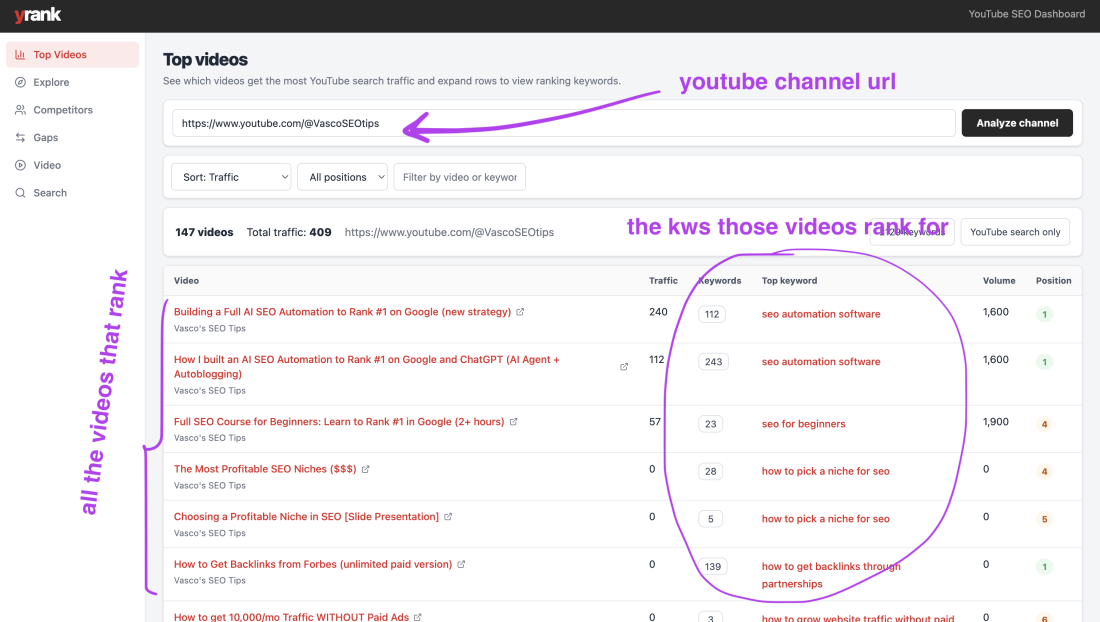
Learn how to discover the keywords your YouTube videos already rank for, identify which videos pull search traffic, and uncover the easiest ranking opportunities on your channel.
Table of contents
If you’ve ever asked, “What keywords does my YouTube video rank for?”, you’ve probably run into the same frustrating problem: most tools want you to type in a keyword first.
That works if you already know exactly which search terms you want to track.
But that’s not what many creators actually need.
A lot of the time, the real question is:
That is a completely different workflow.
Instead of starting with a keyword and checking whether one video ranks for it, you want to start with your video or your channel and discover:
- which videos are ranking in YouTube search
- which keywords those videos rank for
- which videos bring in the most search traffic
- which rankings are close to improving
That is where the real insight is.
Why this matters
Most creators think about YouTube SEO in terms of publishing new videos.
They do keyword research, pick a target term, optimize the title, and hope the video ranks.
That is useful. But it leaves out a much bigger opportunity: understanding what your existing videos already rank for.
When you know the keywords a video is already showing up for, you can make much better decisions.
- You can spot videos that are quietly pulling search traffic.
- You can find videos that rank for dozens of long-tail searches you never intentionally targeted.
- You can see which videos are already close to top positions.
- You can use that information to update, improve, and expand what is already working.
Instead of guessing what YouTube search wants, you can work from signals you already have.
Why it’s hard to find this information
The reason this is harder than it should be is simple: most YouTube SEO tools are built for keyword-first tracking.
They assume you want to choose a keyword, add it to a tracker, and monitor whether your video ranks for that one term over time.
That is useful for campaigns. But it does not answer questions like:
- What keywords is this video already ranking for?
- Which of my channel’s videos are actually showing up in search?
- Which keywords are driving visibility across my whole channel?
- Which rankings are sitting in positions 4 to 15 and could improve with a small update?
Those are the questions that matter if you want to grow search traffic efficiently.
Want to see what your videos already rank for?
Paste your YouTube channel URL into your tool and instantly see which videos rank, what keywords they rank for, and where your best opportunities are.
Try the toolThe better way to do it
The best way to find what keywords your YouTube video ranks for is to use a channel-first workflow.
Instead of starting with one keyword, start with your channel URL.
From there, you want to see:
1. Which videos on your channel rank in YouTube search
Not every video on a channel gets meaningful search visibility. Some rank for a lot of terms, some rank for only a few, and some do not rank at all.
The first useful step is simply identifying which videos are showing up in search.
2. The keywords each video ranks for
Once you know a video ranks, the next step is the important one: what are the actual keywords behind that visibility?
This tells you the true search footprint of the video. Often, one video will rank for far more terms than you expected.
3. The positions for those keywords
Ranking is not binary. A video ranking #2 for one keyword and #14 for another tells you two very different things.
You want to know whether a video is already in the top 3, sitting in the top 10, or stuck just outside the strongest positions.
4. Which videos pull the most search traffic
Some videos rank for many low-demand terms. Others rank for fewer terms but bring in much more traffic.
You need to know which videos are actually driving search performance, not just which ones have the biggest keyword count.
What to look for once you find your rankings
Once you know what keywords a video ranks for, the goal is not just to admire the data. The goal is to act on it.
Videos ranking for more terms than expected
These are often your hidden winners. A video may not have gone viral, but if it ranks for a broad set of related searches, it can become a steady source of traffic over time.
Keywords where you rank between positions 4 and 15
These are usually your best quick wins. You already have traction. You are already relevant. You do not need to force a brand-new topic from zero.
A better title, stronger first 30 seconds, tighter description, or refreshed thumbnail can sometimes make a meaningful difference here.
Patterns across multiple videos
When several videos rank for similar terms, that usually means YouTube already understands your channel in that topic area.
That gives you a signal to go deeper instead of publishing random topics.
Ranking keywords you never intentionally targeted
This is one of the most valuable discoveries. Sometimes YouTube associates a video with related searches you did not optimize for directly.
That can reveal new title angles, new video ideas, and new keyword clusters to build around.
How to use this data to get more YouTube search traffic
Refresh old videos that already rank
If a video already has search visibility, updating it is often easier than starting from scratch.
- improve the title around the strongest keyword theme
- tighten the description around related terms
- make the video opening match the search intent more clearly
- improve packaging if the click-through rate looks weak
Create follow-up videos around adjacent topics
If one video ranks for a cluster of related queries, that topic is already validated.
That makes it easier to create beginner versions, advanced versions, comparison videos, case studies, or “mistakes to avoid” spin-offs.
Find content gaps
Once you know what your videos rank for, the next question is what they do not rank for.
That is where content gap analysis becomes useful.
If competitor channels rank for important terms you are missing, you now have a clear direction for what to publish next.
Study competitor overlap
If other channels keep appearing on the same keyword set, they are likely your most direct search competitors.
That is useful because you can then analyze:
- which topics they are covering
- which formats seem to work
- what search terms overlap with yours
- where they rank and you do not
That turns ranking data into a real content roadmap.
The easiest workflow
If you want the fastest way to find what keywords your YouTube video ranks for, use this process:
- Paste your channel URL into a YouTube ranking discovery tool.
- See which videos on your channel rank in search.
- Expand a video to view the keywords it ranks for.
- Review keyword positions and search demand.
- Prioritize videos sitting just outside the top spots.
- Refresh those videos before publishing brand-new content.
This is a much better workflow than tracking a small handpicked set of keywords and hoping that tells the full story.
What the best tools should show you
If you are evaluating tools for this, do not just look for a generic “YouTube rank tracker.”
Look for a workflow that shows:
- all ranking videos on your channel
- the keywords each video ranks for
- the positions for those keywords
- the videos pulling the most search traffic
- competitor overlap
- content gaps
- quick wins
That gives you a much more complete view of what is happening on your channel.
They are asking, “Which of my videos are working in search, and what should I do next?”
Final takeaway
If you want to find what keywords your YouTube video ranks for, do not stop at basic keyword tracking.
Start with your channel.
Find the videos already ranking. Break down the keywords behind them. See which videos are pulling search traffic. Then use that data to refresh winners, uncover quick wins, and plan smarter content.
That is how you turn YouTube SEO into a real system instead of a guessing game.
See what your channel already ranks for
Want to turn YouTube rankings into an actionable content system? Paste your channel URL into your tool and instantly see which videos rank, what keywords they rank for, and where the easiest gains are.
Analyze your channelFAQ
Can I see what keywords my YouTube video ranks for?
Yes. The right workflow is to analyze the video or channel and see the search terms it already ranks for, rather than only tracking keywords you manually entered.
How do I find what my YouTube channel ranks for?
Use a channel-level tool that shows all ranking videos on your channel and the keywords associated with each one.
Is checking one keyword at a time enough?
Not really. A single video can rank for many related searches, and those long-tail terms often reveal your best opportunities.
What should I do after I find my rankings?
Focus first on videos ranking between positions 4 and 15, refresh existing winners, and use the data to identify content gaps and follow-up topics.

Generate, publish, syndicate and update articles automatically
The AI SEO Writer that Auto-Publishes to your Blog
- No card required
- Articles in 30 secs
- Plagiarism Free