
AI Brand Monitoring: How to Track Your Brand Across ChatGPT, Claude, Gemini & Perplexity

A year ago I made a video calling LLM brand trackers BS. I still stand by why I said it — but I've changed my mind, and this guide is the result.
Back then my objection was simple: a tool that counts how often ChatGPT "mentions your brand" is worthless if you can't tie those mentions to real demand. You could be mentioned a thousand times for prompts nobody actually types, and feel great about a number that means nothing. Vanity.
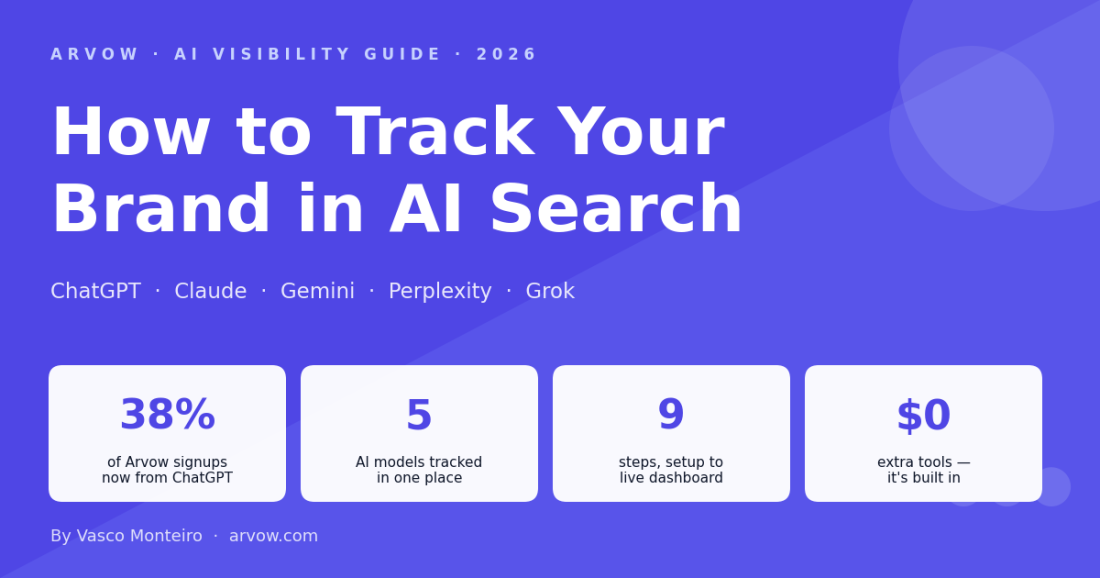
38% of Arvow signups now come from ChatGPT |
5 AI models tracked in one place |
9 steps from setup to live dashboard |
$0 extra tools — it's built into Arvow |
Three things changed my mind:
- You can now anchor every tracked prompt to real search demand. Before you track a prompt, you check the underlying keyword's volume in Google Keyword Planner — so you only monitor prompts you know people search. That kills the vanity problem at the source.
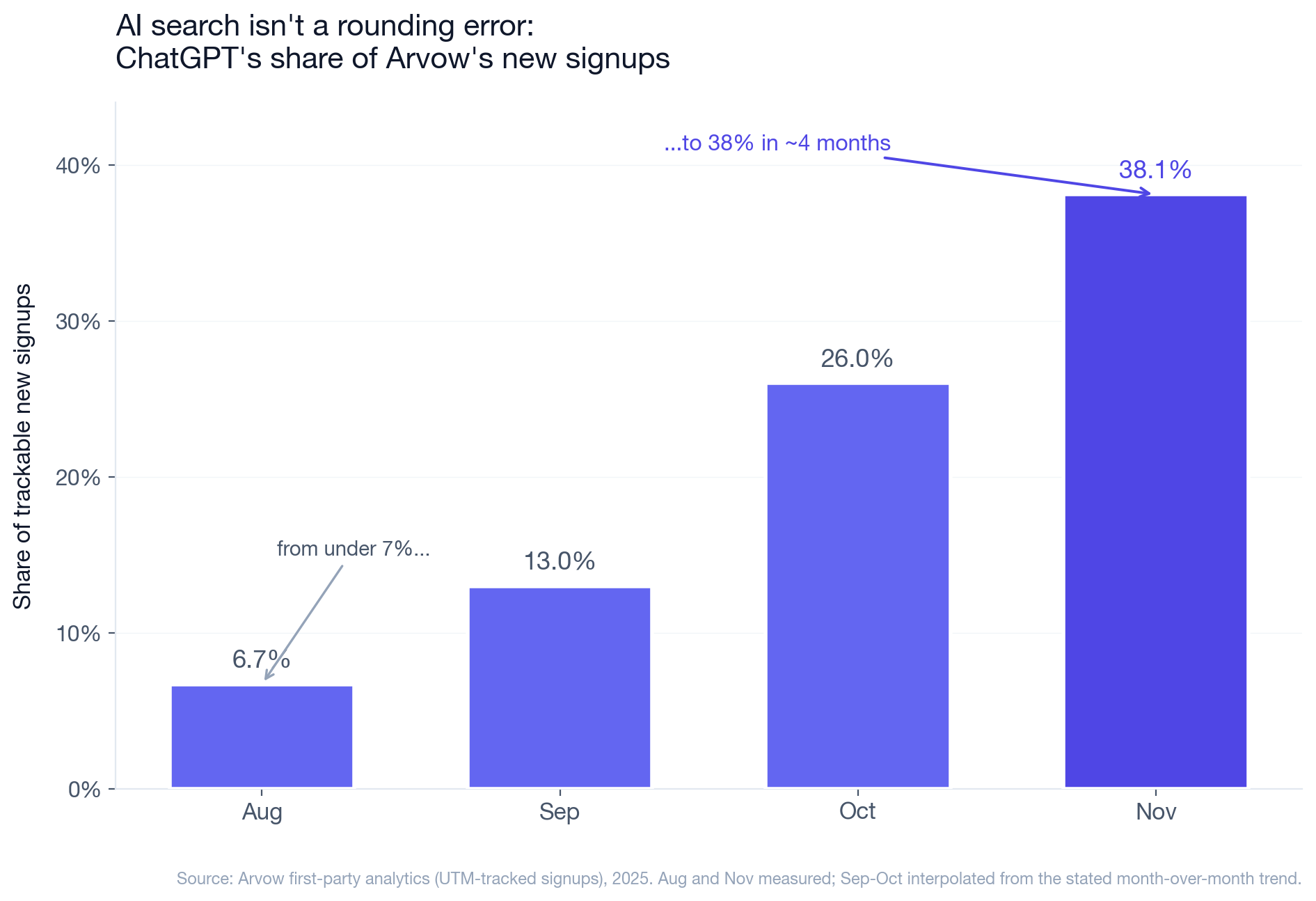
- AI search stopped being a rounding error. In one recent month, 38% of our trackable new signups came from ChatGPT — up from under 7% a few months earlier. When a channel grows that fast, you watch it.
- The job changed. It's no longer "rank tracking" (which needs prompt-volume data nobody has). It's watching sentiment and which sources get cited — both of which are actionable today.
So here's exactly how we track our own brand across ChatGPT, Claude, Gemini, Perplexity and Grok, using Arvow's LLM Brand Monitor — step by step, with screenshots.
Why bother tracking AI search at all
When someone asks ChatGPT "what's the best AI SEO tool for agencies," the model doesn't invent an answer — it pulls from sources across the web and names specific brands. If you're named, you get a pre-qualified visitor who already trusts the recommendation. If a competitor is named and you aren't, you never knew the conversation happened.
Classic rank trackers can't see any of this, because it isn't happening on a Google results page. That's the gap a brand monitor fills: it runs the prompts your buyers actually ask, records whether (and how) you show up, and turns it into something you can act on. Here's the workflow.
Step 1 — Open Brand Monitors and create a new monitor
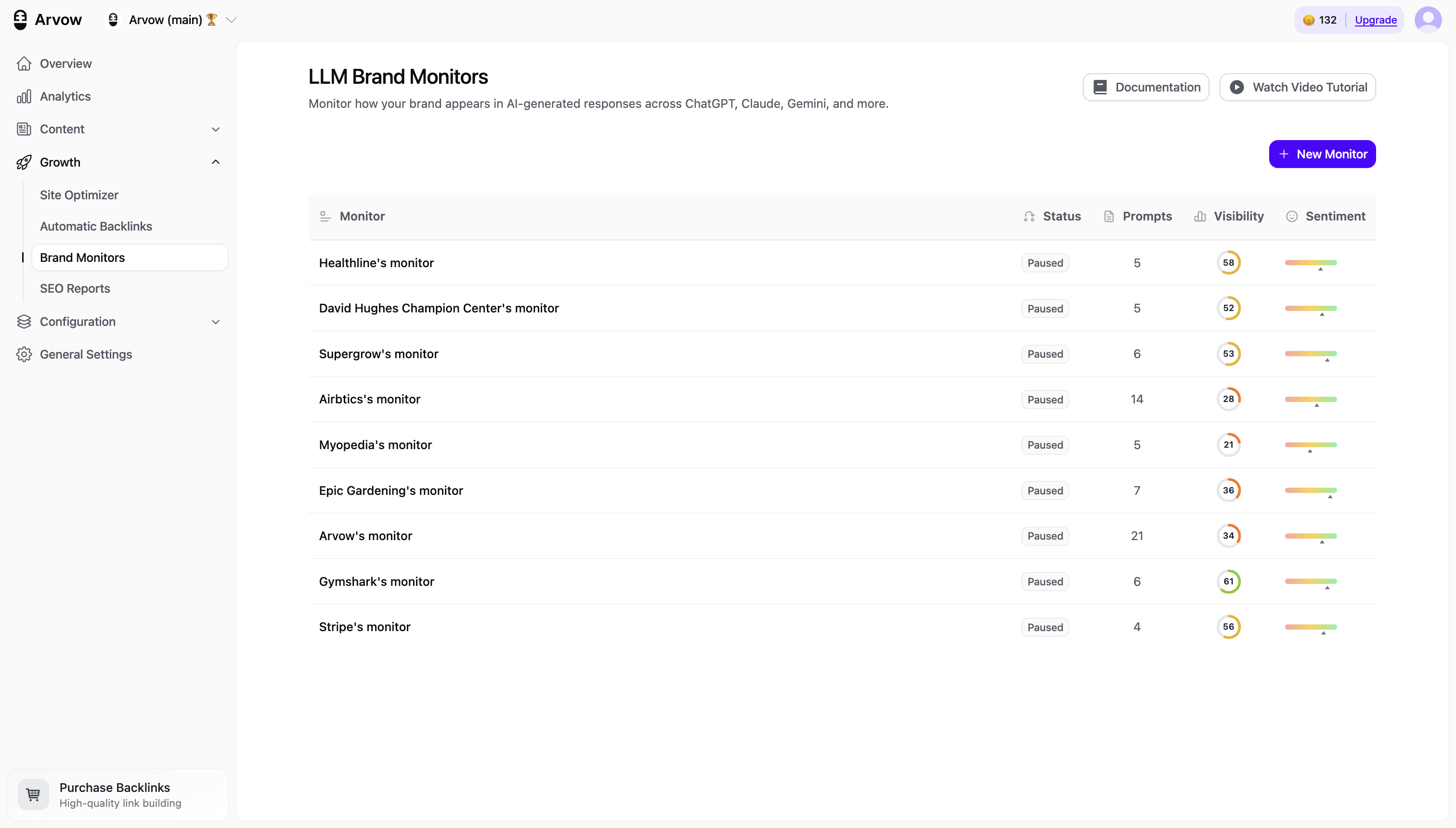
Inside Arvow, go to Growth → Brand Monitors. You'll see every monitor you're running, with visibility, tracked-prompt count, and sentiment at a glance. Click New Monitor to start.
Step 2 — Add your website
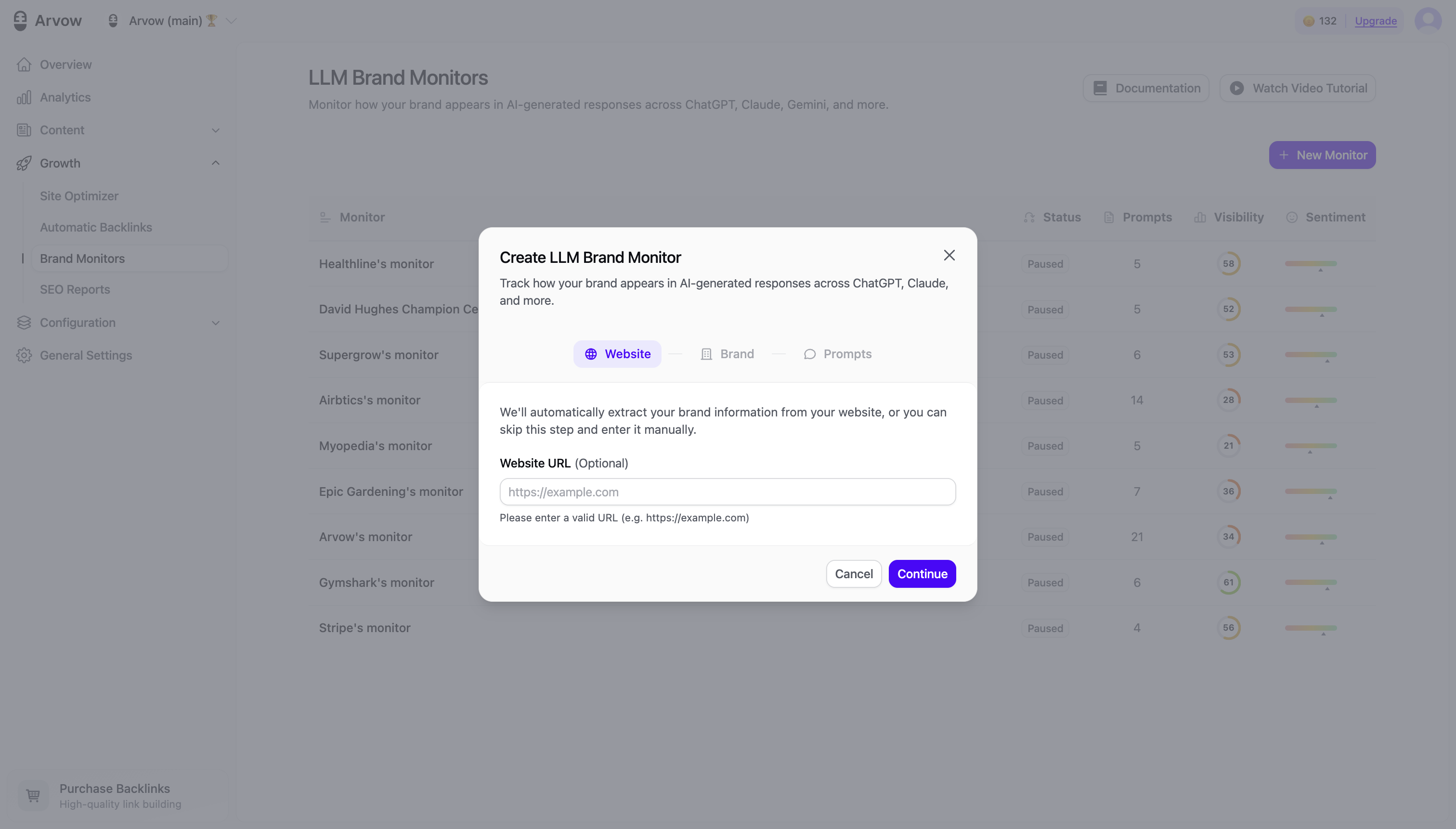
The first step of the setup wizard asks for your website. Arvow reads it to understand what you do, so the prompts it suggests later are relevant rather than generic.
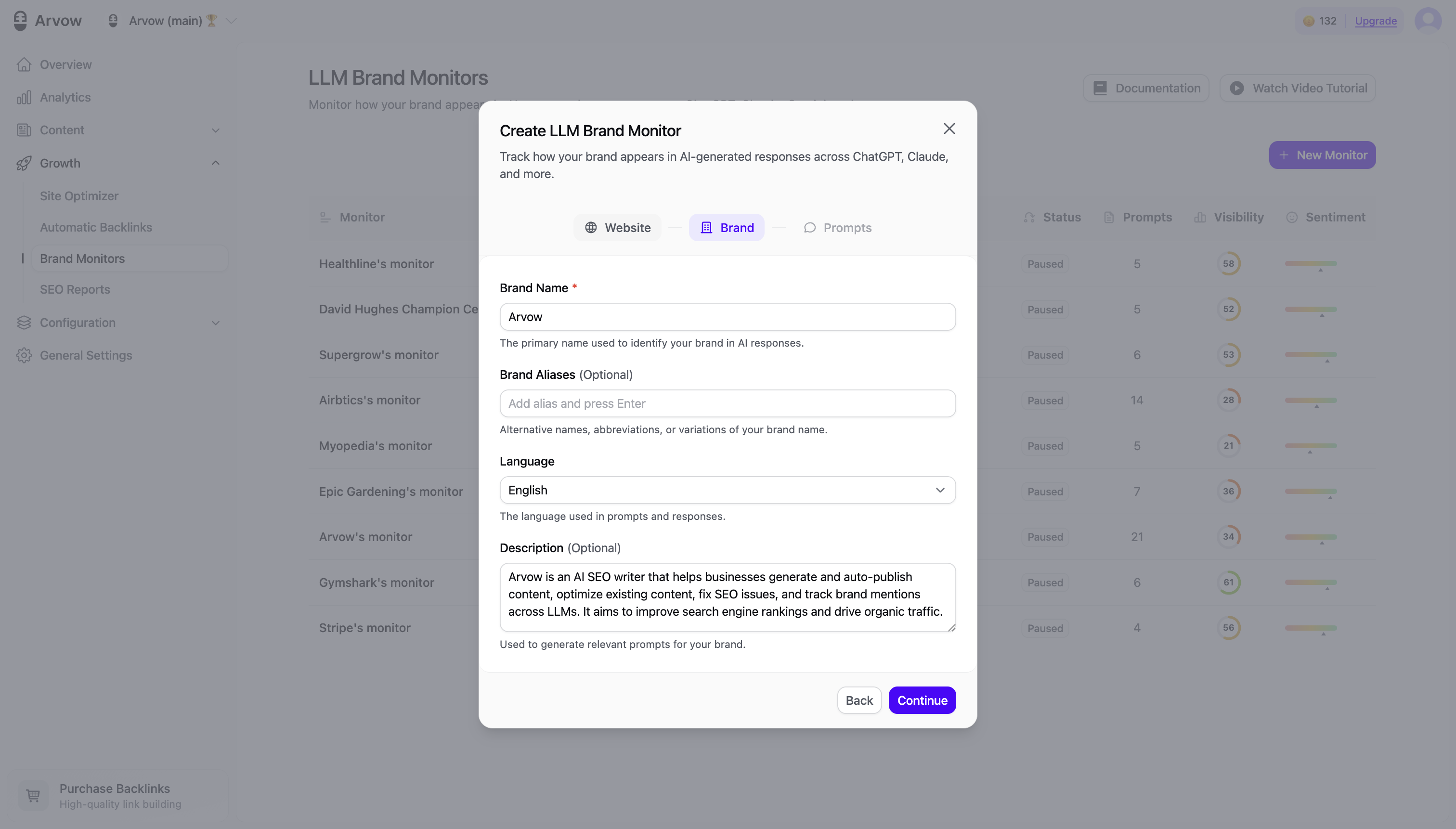
Step 3 — Set your brand name, aliases and language
Next, confirm your brand name and add any aliases — abbreviations, common misspellings, product names. This matters more than it looks: LLMs refer to brands inconsistently, and if you only track the exact name you'll undercount real mentions. Set the language and a short description while you're here.
Step 4 — Review your prompts (this is the part that fixes the vanity problem)
Arvow auto-generates a starting set of prompts from your site — things like "How can [brand] help me rank higher on Google?" You can keep them, edit them, or add your own.
This is the step that earns the whole exercise. Don't track a prompt unless its underlying keyword has real search demand. Take the prompt, reduce it to its core keyword, and sanity-check the volume in Google Keyword Planner first. Tracking "best AI SEO tool for agencies" (a keyword thousands of people search) is worth it. Tracking an oddly specific prompt nobody types is the vanity trap I used to complain about. Curate accordingly.
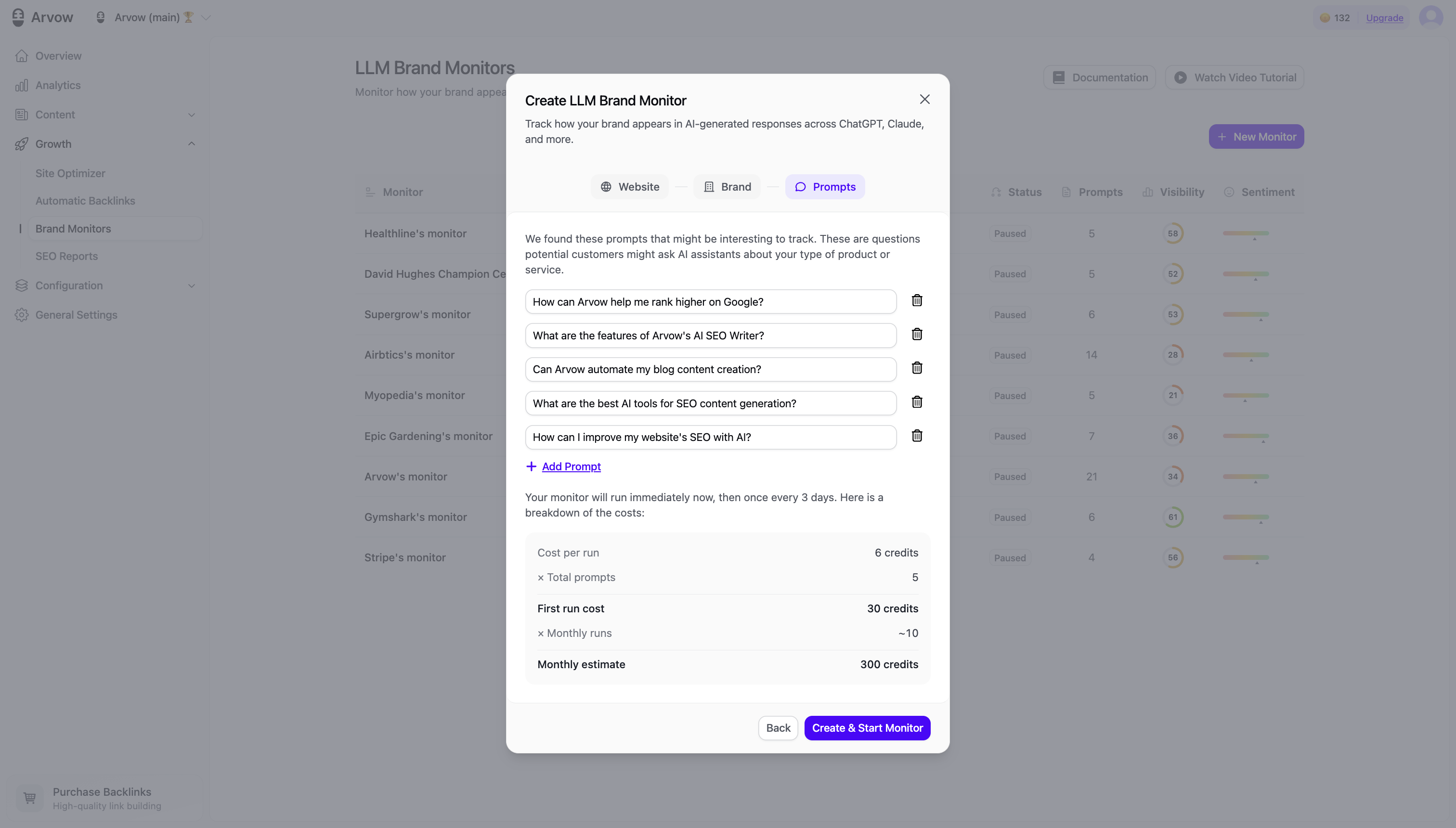
Step 5 — Confirm the cost and start the monitor
Before it runs, Arvow shows the credit cost per run and your monthly estimate, so there are no surprises. Confirm and hit Create & Start Monitor.
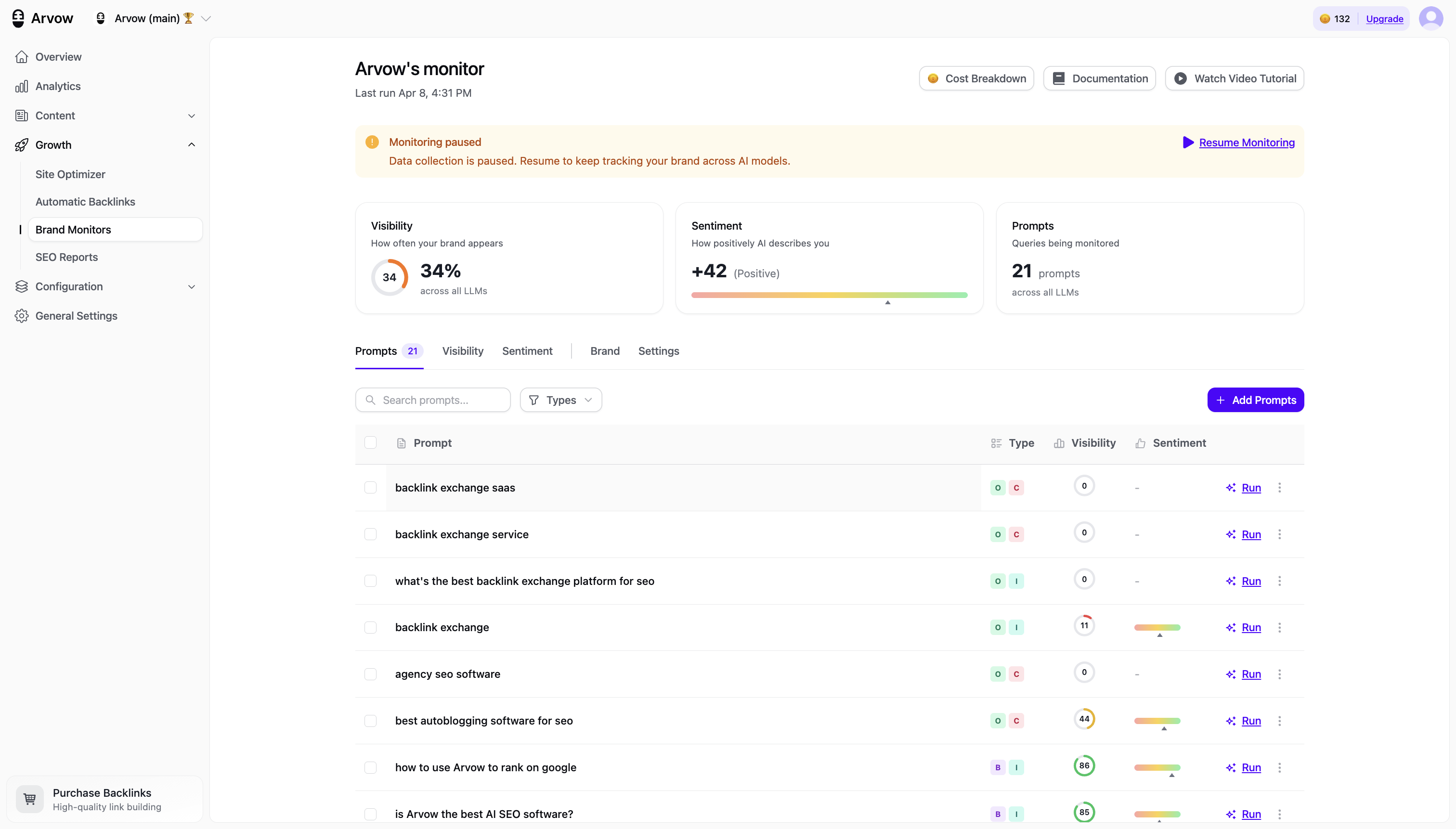
Step 6 — Read your dashboard: visibility, sentiment, prompts
Once it's run, the monitor dashboard gives you three numbers that matter:
- Visibility — how often your brand appears across all the LLMs you track.
- Sentiment — whether the way you're described skews positive or negative.
- Prompts — how many queries you're monitoring.
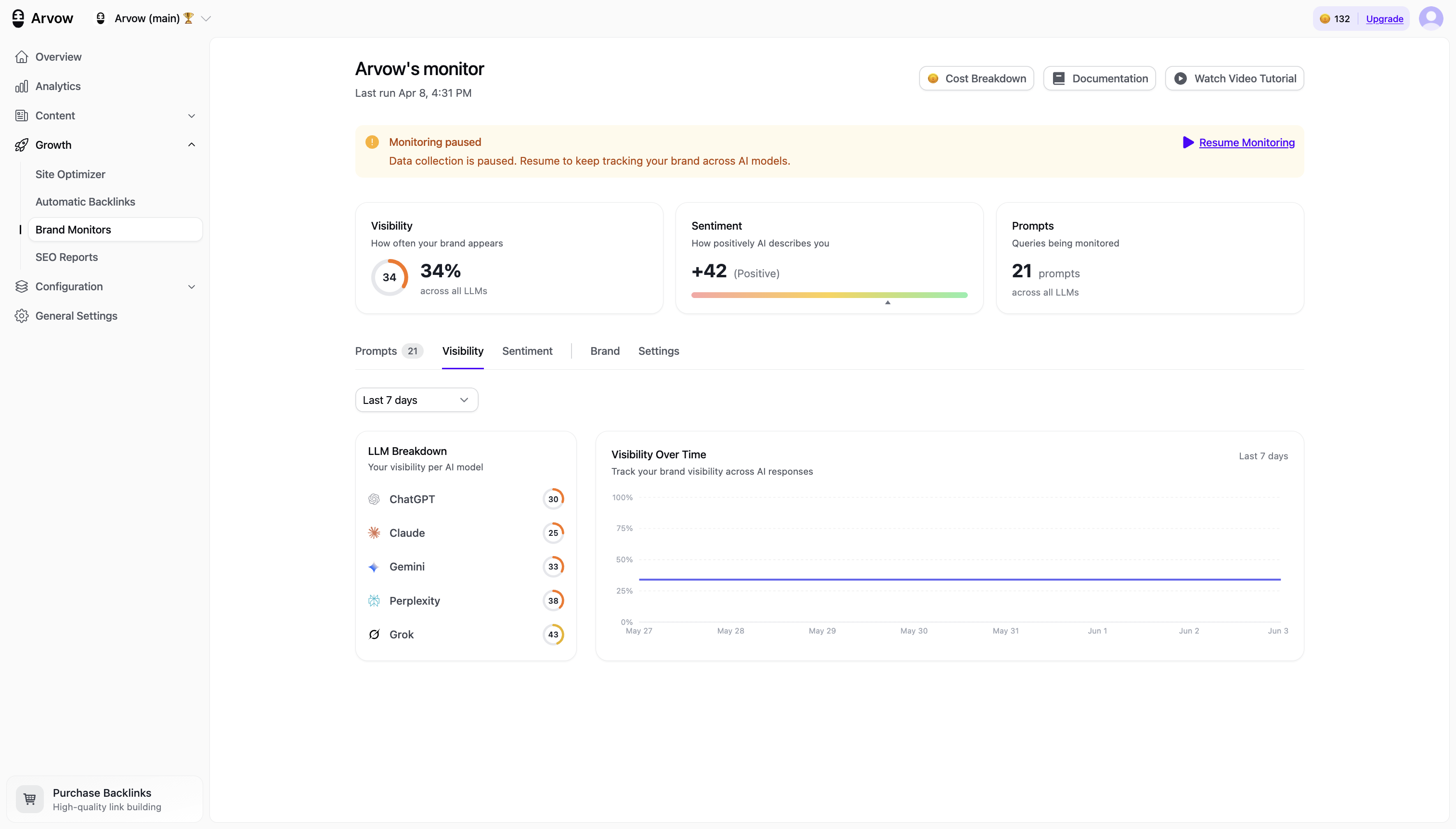
Step 7 — See your visibility per AI model
The Visibility tab breaks the score down by model — ChatGPT, Claude, Gemini, Perplexity and Grok — plus a trend line over time. This is where patterns show up: you might be strong in ChatGPT and invisible in Perplexity, which tells you exactly where to focus. (Grok, for example, leans on X/Twitter data — so syndicating your content to X tends to move that number specifically.)
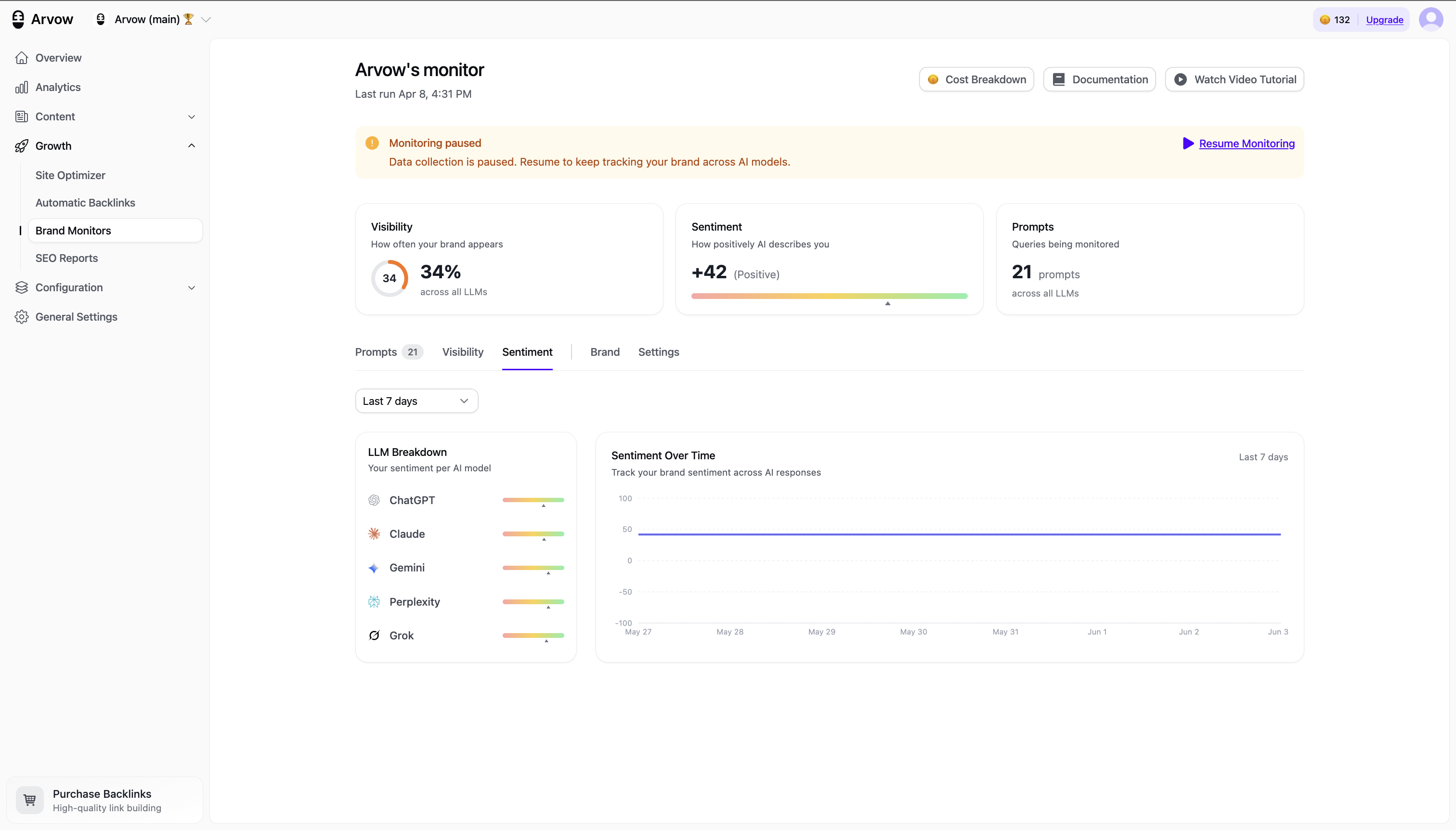
Step 8 — Check sentiment per model
Visibility tells you if you show up; sentiment tells you how. The Sentiment tab shows the same per-model breakdown and trend. A model describing you negatively is worse than not appearing at all — and it's fixable, which we'll get to.
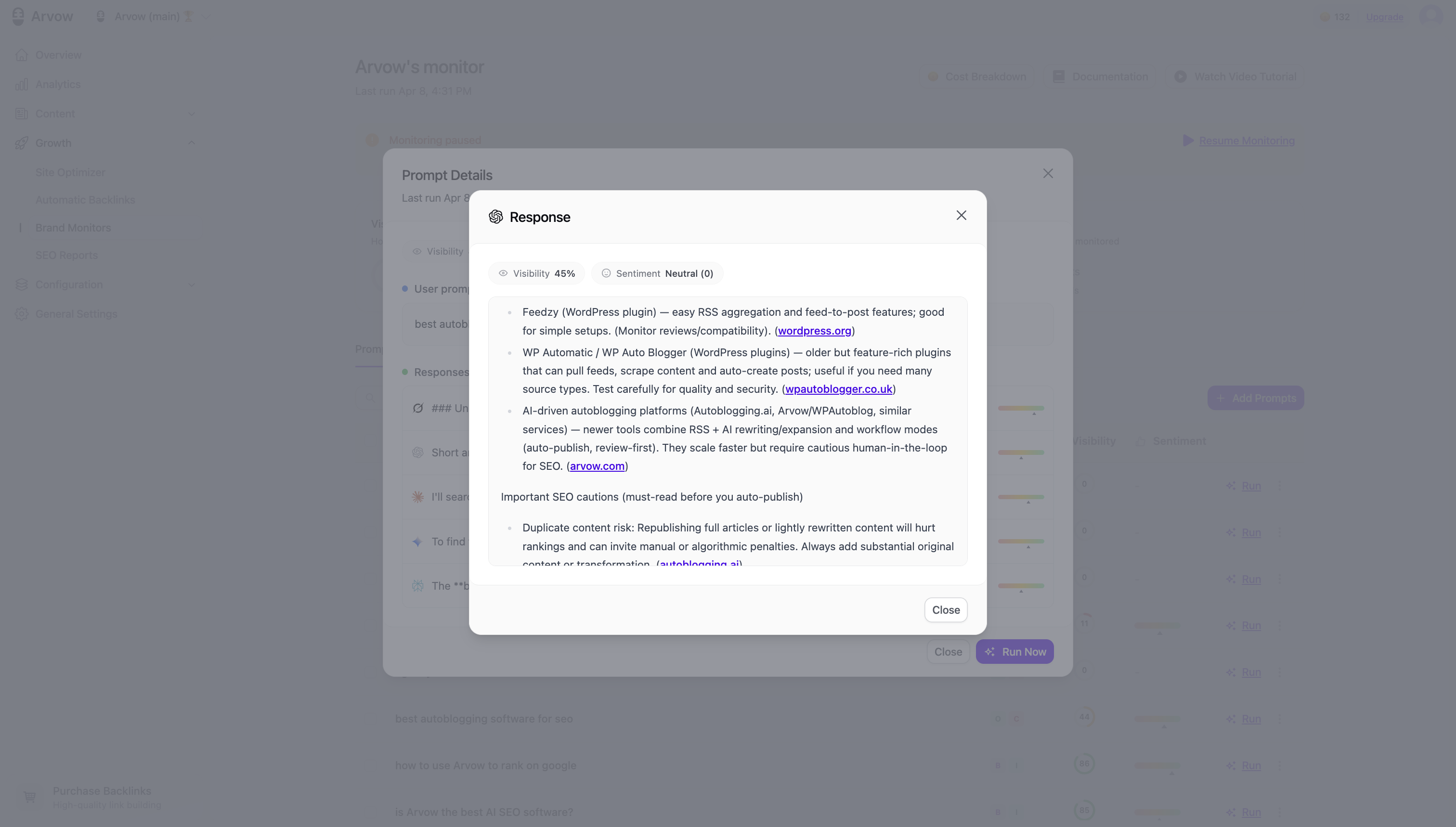
Step 9 — Drill into a prompt to read the actual answers
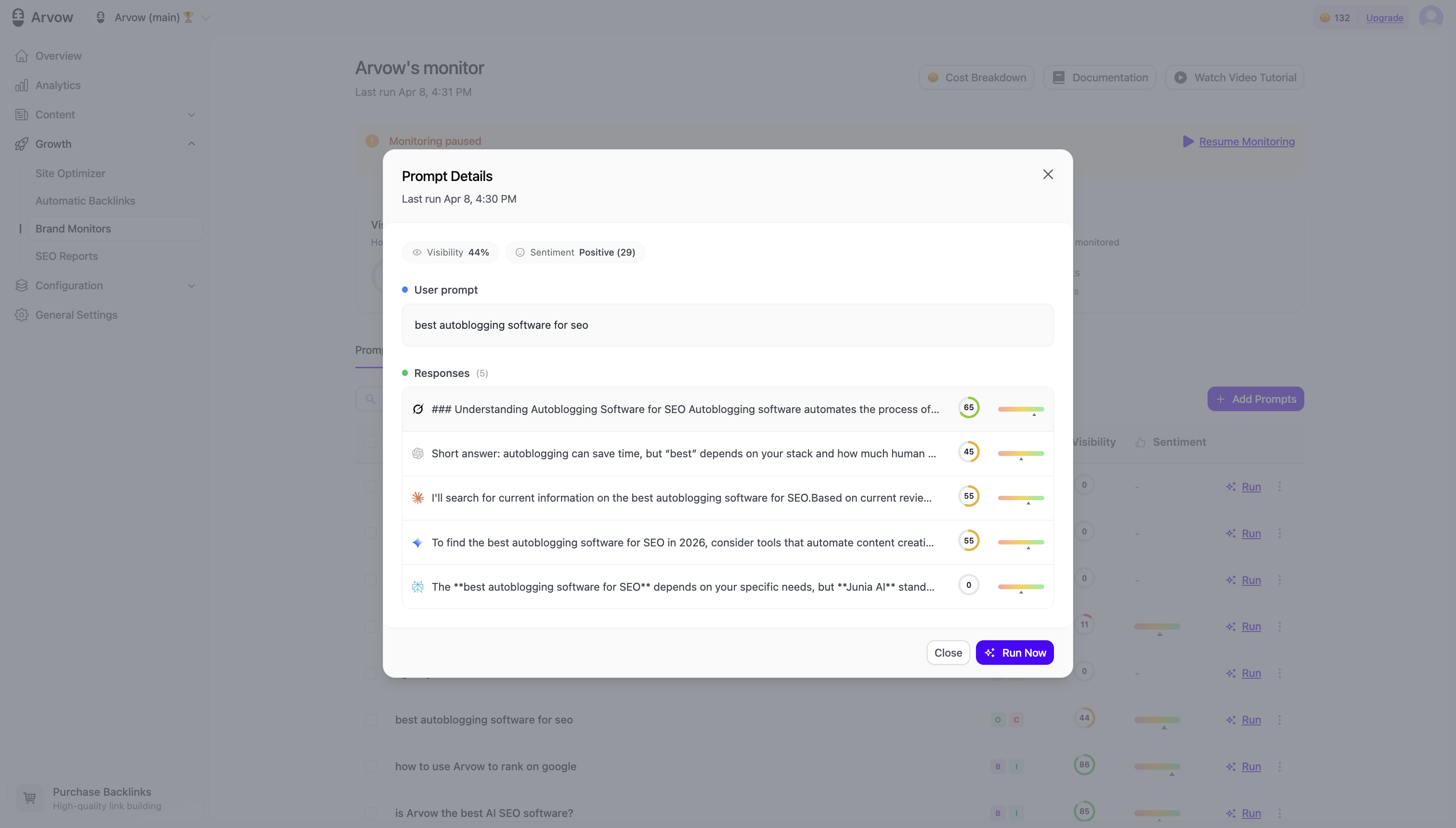
Click any prompt to see the literal response each model gave — the exact text, with its visibility and sentiment score. This is the most useful screen in the tool. You're not reading a dashboard abstraction; you're reading what a buyer reads when they ask about your category, and you can see precisely which source the model cited to build that answer.
How to actually act on the data
Tracking is pointless if you don't do anything with it. The three moves we make, in order:
- Low visibility on a high-demand prompt. Open the prompt, see which sources the model is citing (almost always listicles and comparison pages). Then either earn a place in those sources or publish your own piece that satisfies the same intent — because the model recommends whoever documented the answer best.
- Negative sentiment. Find the citation driving it and address the underlying claim with better, clearer content. You're not gaming the model; you're giving it accurate information to cite.
- A competitor cited where you aren't. That's your content roadmap, handed to you. Match the format that's winning, then go one better.
This is also why AI visibility isn't a separate discipline from SEO. The brands that get cited by LLMs are, overwhelmingly, the ones already producing content that ranks on Google and Bing — the mentions are a byproduct of doing the work. A monitor doesn't replace that work; it tells you whether it's landing.
What not to obsess over
Keep the old warning in mind: a mention count on a prompt nobody searches is still a vanity metric. Don't celebrate "mentioned 40 times" without asking whether those 40 prompts have any real demand behind them. Track a tight set of prompts tied to keywords you've verified, watch sentiment and citations, and ignore the rest. The tool is a compass, not a scoreboard.
Who this is for
If you run content for multiple clients, this is a reporting deliverable on its own — "here's how each client shows up across AI search this month" is the kind of thing few agencies can produce yet. Arvow's LLM Brand Monitor is built for that multi-client reality, and it sits alongside the rest of the agency stack — the AI SEO Agent and AI SEO Editor that produce the content the monitor measures.
Track your first brand in a few minutes. The LLM Brand Monitor is built into Arvow's Business plan and above — start on the AI Visibility Tracker.
The bottom line
I was right that mention-counting alone is a vanity metric — and wrong to dismiss the whole category. Tie prompts to real demand, watch sentiment and citations, and AI brand monitoring becomes a genuine edge, not a gimmick.
The LLM Brand Monitor is included on Arvow's Business plan and above. If you're weighing dedicated tools first, read our honest Profound AI review and the full roundup of AI visibility trackers — then come track your first brand.
Written by Vasco Monteiro, founder of Arvow. I track our own brand across ChatGPT, Claude, Gemini, Perplexity and Grok with the exact workflow above.

Generate, publish, syndicate and update articles automatically
The AI SEO Writer that Auto-Publishes to your Blog
- Cancel anytime
- Articles in 30 secs
- Plagiarism Free